Evaluate Copilot Agent Configuration Compliance Status
Short answer
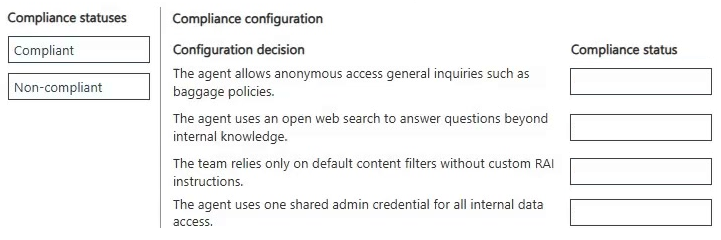
Anonymous access for general inquiries is Compliant. Open web search, default content filters without custom RAI instructions, and shared admin credentials are Non-compliant.
Question
Case Study
This is a case study. Case studies are not timed separately from other exam sections. You can use as much exam time as you would like to complete each case study. However, there might be additional case studies or other exam sections. Manage your time to ensure that you can complete all the exam sections in the time provided. Pay attention to the Exam Progress at the top of the screen so you have sufficient time to complete any exam sections that follow this case study.
To answer the case study questions, you will need to reference information that is provided in the case. Case studies and associated questions might contain exhibits or other resources that provide more information about the scenario described in the case. Information provided in an individual question does not apply to the other questions in the case study.
A Review Screen will appear at the end of this case study. From the Review Screen, you can review and change your answers before you move to the next exam section. After you leave this case study, you will NOT be able to return to it.
To start the case study
To display the first question in this case study, select the "Next" button. To the left of the question, a menu provides links to information such as business requirements, the existing environment, and problem statements. Please read through all this information before answering any questions. When you are ready to answer a question, select the "Question" button to return to the question.
Background
Blue Yonder Airlines is a global carrier headquartered in Los Angeles, California, operating domestic and international flights. The company serves millions of passengers annually through its website, mobile app, and call centers. To improve customer service efficiency and reduce call center volume, Blue Yonder is deploying an AI agent in Microsoft Copilot Studio.
The agent will handle customer inquiries across multiple channels – web chat, mobile app, and Microsoft Teams (for internal support staff). It will answer questions, retrieve data from enterprise systems, and escalate to human agents when needed.
The project is led by a cross-function team:
Product manager: Defines requirements and success metrics.
Lead agent author: Designs topics, intents, and generative behavior.
Flow designers: Build agent flows and integrations.
IT/security and compliance: Oversees identity, data protection, and Responsible AI (RAI) compliance.
Current environment
Channels
Public website: Embedded web chat
Mobile app: In-app chatbot
Microsoft Teams: Internal support agent access
Identity and access
Customers: Anonymous access for general inquiries (e.g., flight status, baggage policy).
Authentication is required for personal data access (e.g., bookings, loyalty points).
Internal staff: Authenticate via Microsoft Entra ID.
Data sources
Reservation and Ticketing System (internal): REST API, no prebuilt connector with custom enterprise database.
Flight Status and Weather APIs (external): REST APIs with API keys.
Customer Support Knowledge Base: SharePoint library with PDFs and policy documents.
Loyalty Program Data: Stored in Dynamics 365 and Dataverse.
Travel Advisory Content: Uses REST API with partner services.
Integration mechanisms
Custom connectors must be used for internal APIs that lack prebuilt connectors.
HTTP request nodes may be used for lightweight external APIs.
Knowledge sources must be used for unstructured content.
Agent flows must be used to encapsulate reusable logic (e.g., rebooking).
Business requirements
Omnichannel support
Deploy the agent across web, mobile, and Teams with a consistent user experience. The Teams deployment must also support internal staff.
Self-service capabilities
The agent must handle common inquiries such as:
Flight status
Booking and rebooking
Loyalty program questions
Travel policies and baggage rules
Human escalation
If the agent cannot resolve an issue or the user requests help, it must:
Escalate to a human agent.
Transfer the conversation transcript and relevant context.
Redact any sensitive personal data before escalation.
Knowledge integration
The agent must use scalable methods for knowledge integration and must not rely on manually authored Q&A topics for each document.
Performance metrics
First-contact resolution: +25%
Tier-1 call deflection: ≥20%
Response time: 90% of queries answered within 30 seconds
Accuracy: ≥95% for known FAQs
CSAT: ≥85% for AI-handled interactions
Technical requirements
Platform constraints
No custom code is permitted; only Copilot Studio's built-in tools may be used.
All backend logic must be implemented using agent flows.
Markdown must be used for formatting (e.g., bold, bullet points); HTML is not supported.
Authentication
Sign-in is required for personal data access.
Anonymous access is allowed for general inquiries.
User identity must be used for data access; shared or builder credentials must not be used.
Compliance and security
Power Platform DLP policies must be enforced to block unauthorized data flows.
Responsible AI content moderation filters must be enabled.
Prompt modifications must be added to enforce tone, disclaimers, and refusal behavior.
Disclaimers must be applied consistently across all generative responses. Manual edits to individual topics must be avoided.
Monitoring and maintenance
All conversations and actions must be logged for auditing.
Weekly reviews of transcripts and metrics must be conducted.
Issues and constraints
API rate limits: External APIs (e.g., flight status) have usage limits. Agent flows must handle retries and caching to avoid exceeding quotas.
Knowledge base limits: Copilot Studio has limits on the number and size of indexed documents. Large files must be split or summarized.
Generative answer risks: Generative responses must be constrained to avoid policy violations. Prompt modifications and filters must be used to enforce tone, safety, and compliance.
User input variability: Users phrase questions in diverse ways. Topics must include varied trigger phrases and fallback handling.
Authentication UX: The agent must clearly explain when sign-in is required and handle transitions smoothly across channels.
Problem statement
Blue Yonder Airlines must deploy a secure, scalable, and policy-compliant AI agent using Microsoft Copilot Studio. The agent must deliver accurate, helpful, and safe responses across multiple channels, integrate with enterprise systems, and support both anonymous and authenticated users. It must adhere to strict data protection and Responsible AI standards while improving customer service efficiency and satisfaction.
You need to evaluate whether the current configuration decisions for the Blue Yonder Copilot agent comply with the company's security and governance policies.
Which compliance status should you assign to each configuration decision? To answer, move the appropriate compliance statuses to the correct configuration decisions. You may use each compliance status once, more than once, or not at all. You may need to move the split bar between panes or scroll to view content.
NOTE: Each correct selection is worth one point.
Key Takeaways
The question tests mapping security and governance requirements to specific configuration decisions, where the common trap is assuming default settings or broad search capabilities meet strict enterprise compliance standards.
This scenario tests evaluating the compliance of Microsoft Copilot Studio agent configurations against security and governance policies. The page establishes that anonymous access for general inquiries is compliant, while open web search, default RAI filters, and shared admin credentials are non-compliant.
Common mistake: Assuming that open web search or default content filters are sufficient for enterprise deployments, ignoring explicit requirements for user-specific identity and custom prompt modifications.
Expert Analysis
Why the Answer Is Correct
The correct compliance statuses directly reflect the case study's explicit technical and security requirements. Anonymous access for general inquiries is explicitly permitted, making it Compliant. Conversely, using an open web search violates the requirement to use specific enterprise knowledge sources and integrations. Relying solely on default filters violates the mandate to add prompt modifications for tone and disclaimers. Using a shared admin credential directly violates the rule that user identity must be used for data access instead of shared or builder credentials.
Why Other Candidate Answers Are Wrong
Marking open web search as compliant ignores the strict enterprise data boundaries defined in the current environment and business requirements. Assuming default RAI filters are compliant overlooks the technical requirement that prompt modifications must enforce tone, disclaimers, and refusal behavior. Classifying shared admin credentials as compliant contradicts the fundamental security principle stated in the case study that user identity must drive data access.
Community Comment Notes
The community consensus strongly aligns with the correct evaluation. Commenters like Sweden2022 correctly identify all four compliance statuses, noting that open web search, default filters, and shared credentials are "Non-compliant." JamesM9 similarly points out that the case explicitly requires "authenticated, user-specific identity" and "additional RAI controls," reinforcing why the latter three configurations fail compliance.
Exam Strategy
When evaluating compliance in case studies, cross-reference every configuration decision against the explicit 'Technical requirements' and 'Compliance and security' sections. If a decision violates a stated rule, it is automatically non-compliant regardless of standard defaults.
Discussion 4 contributions
Compiled from public community threads and reader submissions, lightly edited for clarity. Handles and vote tallies are shown as recorded, and comments reflect the views of individual contributors.
From public community threads 4
-
harshagracy 👍 1The agent allows anonymous access general inquiries such as baggage policies. Compliant (The case study states: "Anonymous access is allowed for general inquiries.") The agent uses an open web search to answer questions beyond internal knowledge. Non-compliant (The case study requires the agent to be grounded in specific enterprise systems and knowledge sources, not open web search, which violates data protection and RAI standards.) The team relies only on default content filters without custom RAI instructions. Non-compliant (The case study states: "Prompt modifications must be added to enforce tone, disclaimers, and refusal behavior.") The agent uses one shared admin credential for all internal data access. Non-compliant (The case study explicitly states: "User identity must be used for data access; shared or builder credentials must not be used.")
-
Sweden2022 👍 1The agent allows anonymous access for general inquiries such as baggage policies — Compliant The agent uses an open web search to answer questions beyond internal knowledge — Non-compliant The team relies only on default content filters without custom RAI instructions — Non-compliant The agent uses one shared admin credential for all internal data access — Non-compliant
-
JamesM9 👍 1Compliant: Anonymous access for general inquiries. Non compliant: Open web search; default filters without custom RAI instructions; shared admin credential. The case explicitly permits anonymous access for general inquiries, while requiring authenticated, user-specific identity for personal/internal data access and additional RAI controls.
-
lucas_0102 👍 1I'm struggling with this—why is this the correct answer?
Reader comments & corrections
No reader corrections yet — spotted an error or have a note? Share it below.