Deploy Order for Copilot Studio Agent in M365 Agents SDK App?
Short answer
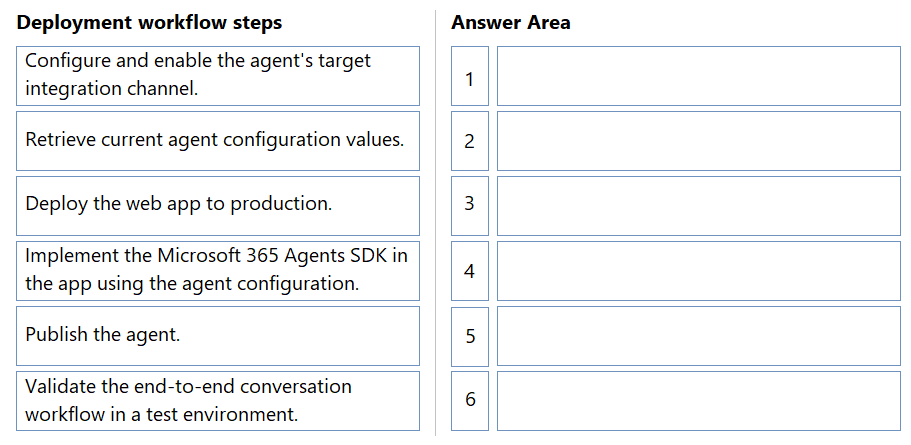
Publish the agent; configure and enable its integration channel; retrieve configuration values; implement the M365 Agents SDK; validate end-to-end in a test environment; then deploy the web app to production.
Question
A company is integrating an agent in Copilot Studio into a custom application by using the Microsoft 365 Agents SDK.
The company has the following requirements for the application:
The deployment workflow must follow a dependency driven sequence.
The agent must be published before configuration values are retrieved.
End-to-end validation must occur before production deployment.
You need to plan the deployment workflow to integrate the agent.
In which order should you perform the actions? To answer, move all actions from the list of actions to the answer area and arrange them in the correct order.
Key Takeaways
The question tests dependency ordering across publish, channel configuration, configuration retrieval, SDK implementation, validation, and production deployment; the trap is assuming configuration values exist before the agent is published and its channel enabled.
When a Copilot Studio agent is integrated into a custom application with the Microsoft 365 Agents SDK, the deployment workflow must be dependency-driven: the agent is published, its target integration channel is configured and enabled, and only then are the agent configuration values (tenant ID, app ID, bot ID) consumed by the SDK code. This page establishes the correct six-step order, ending with test-environment validation before the web app is deployed to production.
Common mistake: The most common wrong approach is to start by retrieving the agent's configuration values and implementing the SDK first, and to publish the agent last. This fails because the app registration and channel endpoints that produce those configuration values are only created once the agent is published and the custom application channel is configured and enabled.
Expert Analysis
Why the Answer Is Correct
Publishing the agent is genuinely the first action, because publishing is what provisions the app registration and channel endpoint that yield the tenant ID, app/client ID, and bot ID the SDK needs. Configuring and enabling the agent's target integration channel (the custom application/web app channel) comes next, since the channel must exist before its configuration can be read out. Only after that do you retrieve the current agent configuration values and implement the Microsoft 365 Agents SDK in the web app using them, which satisfies the stated requirement that the agent be published before configuration values are retrieved. End-to-end conversation validation in a test environment is then performed before the final step, deploying the web app to production, satisfying the requirement that validation precede production deployment. The whole sequence is dependency driven: publish produces configuration, configuration enables SDK coding, and coded plus validated behavior gates the production release.
Why Other Candidate Answers Are Wrong
The alternative ordering that starts with retrieving configuration values, implements the SDK, validates, deploys to production, and only then configures the channel and publishes the agent reverses the true dependencies. In that arrangement, no configuration values exist to retrieve because the agent has not been published and its channel has not been enabled, so the first step cannot actually be completed. It also violates the explicit requirement that publishing happen before configuration retrieval, and it defers publishing and channel configuration until after production deployment, leaving nothing deployed for the validated web app to talk to. There is no legitimate reading of the requirements in which channel configuration or publishing can be sequenced after the SDK implementation and production release.
Community Comment Notes
Faisalronnie and MeshMallow both listed the identical six-step order that matches this verdict, and Wheels supplied the key dependency rationale with the observation that "you first need to publish the agent, so publishing is the first step." Ageansea proposed the reversed sequence, "my prefer order is: (1)Retrieve the agent's current configuration values," placing publishing last, which cannot work because the configuration values are not available until after publish and channel enablement. Lucás/ lucas_0102 asked "I'm not following the reasoning—can someone explain?", and the explanation is the dependency chain: publish creates the app registration, the enabled channel exposes its settings, and those settings feed the SDK implementation before test validation and production deployment.
Official Reference
https://learn.microsoft.com/en-us/microsoft-365/agents-sdk/
This link opens the official vendor documentation in a new tab.
Exam Strategy
On drag-drop deployment-order items, anchor the sequence to any explicit requirement statement — here, "published before configuration values are retrieved" forces Publish as the first action and Retrieve configuration values after channel enablement. Then place validation immediately before the production step, and let the remaining actions fill the middle in dependency order.
Frequently Asked Questions
Why must the Copilot Studio agent be published before retrieving its configuration values?
Where does end-to-end validation fit in a Copilot Studio to M365 Agents SDK deployment?
Discussion 5 contributions
Compiled from public community threads and reader submissions, lightly edited for clarity. Handles and vote tallies are shown as recorded, and comments reflect the views of individual contributors.
From public community threads 5
-
faisalronnie 👍 5Order Action 1 Publish the agent. 2 Configure and enable the agent's target integration channel. 3 Retrieve current agent configuration values. 4 Implement the Microsoft 365 Agents SDK in the app using the agent configuration. 5 Validate the end-to-end conversation workflow in a test environment. 6 Deploy the web app to production.
-
MeshMallow 👍 2Order: 1. Publish the agent. 2. Configure and enable the agent's target integration channel. 3. Retrieve current agent configuration values. 4. Implement the Microsoft 365 Agents SDK in the app using the agent configuration. 5. Validate the end-to-end conversation workflow in a test environment. 6. Deploy the web app to production.
-
ageansea 👍 1my prefer order is: (1)Retrieve the agent's current configuration values. (2)Implement the Microsoft 365 Agents SDK in the app using the agent configuration. (3)Validate the end-to-end conversation workflow in a test environment. (4)Deploy the web app to production. (5)Configure and enable the agent's target integration channel. (6)Publish the agent.
-
Wheels 👍 1In order to obtain the code for the web app channel, you first need to publish the agent, so publishing is the first step
-
lucas_0102 👍 1I'm not following the reasoning—can someone explain?
Reader comments & corrections
No reader corrections yet — spotted an error or have a note? Share it below.