Copilot Studio Environment Variable Handling Behaviors
Short answer
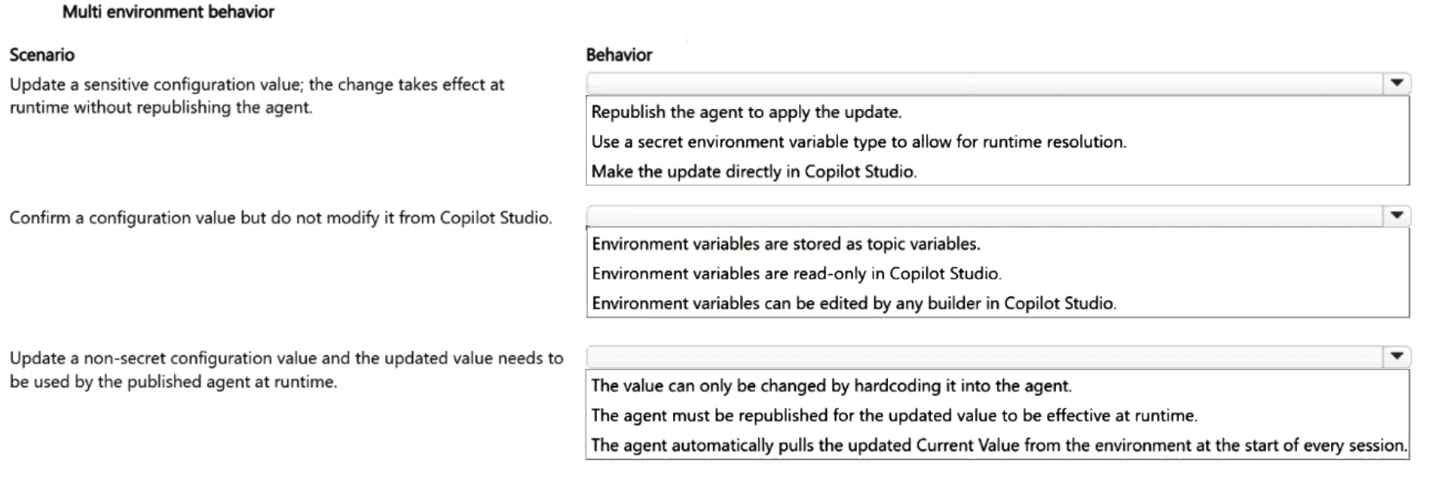
Scenario 1: Use a secret environment variable type to allow runtime resolution. Scenario 2: Environment variables are read-only in Copilot Studio. Scenario 3: The agent must be republished for the updated value to be effective at runtime.
Question
A team uses environment variables to separate configuration from an agent so that the same solution can be moved between environments.
The team requires the following scenarios to be addressed:
• An administrator updates a sensitive configuration value and needs the change to take effect at runtime without republishing the agent.
• A builder needs to confirm a configuration value but must not be able to modify it from Copilot Studio.
• An administrator updates a non-secret configuration value and needs the updated value to be used by the published agent at runtime.
You need to apply the correct handling behavior for different environment-variable scenarios.
Which behavior should you apply for each scenario? To answer, select the appropriate options in the answer area.
NOTE: Each correct selection is worth one point.
Key Takeaways
The main trap is confusing when updates take effect: secrets resolve at runtime (no republish needed), while non-secrets are static after publishing (republish required).
This page explains how to handle sensitive vs. non-sensitive configuration in Microsoft Copilot Studio using secret and non-secret environment variables, detailing runtime resolution versus publish-time embedding.
Common mistake: Learners often assume all environment variables behave like secrets and resolve at runtime, failing to realize that non-secret variables are locked into the agent definition upon publishing.
Expert Analysis
The question requires mapping three specific operational constraints to the correct environment variable handling behaviors in Microsoft Copilot Studio. The core distinction lies between secret and non-secret environment variables, and how they interact with runtime resolution and publish cycles.
- Sensitive configuration value (runtime update without republishing): Secret environment variables are designed specifically for this purpose. They are encrypted at rest and retrieved from a secure store (such as Azure Key Vault or a connector) at runtime. This allows an administrator to update the value in the underlying source, and the agent will immediately reflect the change without requiring a new version of the agent to be published. Therefore, the behavior is Use a secret environment variable type to allow runtime resolution.
- Confirm value but not modify it: In Copilot Studio, once an environment variable is created and associated with the agent, its definition is immutable within the studio interface for security and consistency reasons. However, the specific constraint here is about the builder's ability to modify it. The key insight is that environment variables themselves are generally read-only in the sense that their values are managed outside the standard topic editing flow, often tied to specific environments. More importantly, the prompt implies a restriction on modification. The most accurate description of this state is that Environment variables are read-only in Copilot Studio regarding direct value manipulation by builders during design; changes must happen via the environment management pane or external sources.
- Non-secret configuration value (updated value used at runtime): Non-secret environment variables are embedded into the agent’s definition when it is published. Because they are part of the published package, any update to a non-secret variable requires the agent to be republished for the new value to take effect. They do not resolve at runtime from an external source like secrets do. Thus, the behavior is The agent must be republished for the updated value to be effective at runtime.
The comment provided correctly identifies these distinctions: secrets resolve at runtime allowing updates without republishing, while non-secrets are baked in at publish time.
Exam Strategy
When facing 'HOTSPOT' questions about configuration management, always check if the requirement involves 'sensitive data' or 'runtime updates'. If yes, select 'Secret' options. If the requirement involves 'standard config' and 'updates', remember that non-secrets require republishing. This binary thinking separates the scenarios quickly.
Frequently Asked Questions
Can I update a non-secret environment variable without republishing?
Why use secret environment variables?
Discussion 1 contributions
Compiled from public community threads and reader submissions, lightly edited for clarity. Handles and vote tallies are shown as recorded, and comments reflect the views of individual contributors.
From public community threads 1
-
Arcadiuz 👍 1I think: (2) Use a secret environment variable type to allow runtime resolution (2) Environment variables are read-only in Copilot Studio (2) The agent must be republished for the updated value to be effective at runtime Microsoft Learn explicitly distinguishes between secret and non-secret environment variables. 1. Secret environment variables Secret values are retrieved at runtime. When an administrator changes the secret value, the published agent can use the updated value without republishing. 2. Read-only in Copilot Studio Environment variables are read-only for agent authors in Copilot Studio. Administrators can manage their values through Power Apps. 3. Non-secret environment variables The published version of an agent includes the environment-variable values that were present when it was published. If an administrator changes a non-secret value, the agent must be republished before the updated value takes effect. Why the other options are wrong • Republish a secret value: Not required for secret environment variables. • Store environment variables as topic variables: They are a separate Power Platform configuration mechanism. • Allow builders to edit values in Copilot Studio: Environment variables are read-only in Copilot Studio. • Automatically retrieve every non-secret Current Value at the start of every session: This is not the documented behavior.
Reader comments & corrections
No reader corrections yet — spotted an error or have a note? Share it below.