Configuring Power Platform Pipelines for Agent Deployment
Short answer
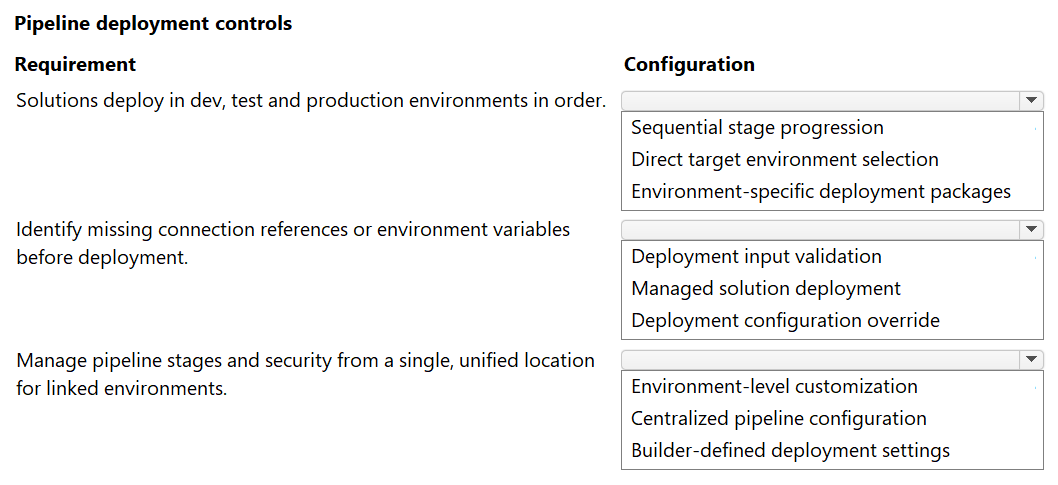
Configure Sequential stage progression for ordered deployment; Deployment input validation to identify missing references; and Centralized pipeline configuration for unified management.
Question
A team deploys Copilot Studio solutions by using Power Platform Pipelines.
You must configure a deployment strategy that meets the following requirements:
Ensure that the solutions deploy in dev, test, and production environments in order.
Identify missing connection references or environment variables before the deployment process begins.
Manage all pipeline stages and security from a single, unified location for all linked environments.
You need to configure the pipeline to meet the requirements.
What should you configure for each requirement? To answer, select the appropriate options in the answer area.
NOTE: Each correct selection is worth one point.
Key Takeaways
Tests the ability to map specific ALM requirements in Power Platform Pipelines to their corresponding configuration settings for secure and orderly agent deployment.
Learn how to configure Power Platform Pipelines for Copilot Studio agents using sequential stage progression, deployment input validation, and centralized pipeline configuration.
Common mistake: Learners often confuse 'Deployment input validation' with post-deployment monitoring tools. It is crucial to remember that this specific setting runs *before* the deployment starts to catch missing connections or variables, ensuring the package is ready for execution.
Expert Analysis
The scenario requires configuring Power Platform Pipelines within the Copilot Studio ecosystem to manage the lifecycle of agent solutions across dev, test, and production environments. The three requirements map directly to specific pipeline features designed for governance and automation.
First, ensuring that solutions deploy sequentially through dev, test, and production is achieved by configuring Sequential stage progression. This feature enforces an ordered workflow where a solution must successfully complete one stage before moving to the next, preventing premature promotion to higher environments.
Second, identifying missing connection references or environment variables before deployment begins is handled by Deployment input validation. This pre-deployment check scans the package for unresolved dependencies, allowing teams to catch configuration errors early rather than failing at runtime in production.
Third, managing all pipeline stages and security from a single, unified location for linked environments is the core function of Centralized pipeline configuration. This setting allows administrators to define the entire pipeline structure, including approvals and security permissions, in one consolidated view rather than managing each environment's deployment settings individually.
These configurations are part of the broader strategy for implementing Application Lifecycle Management (ALM) for agents. Misconfiguring these steps can lead to deployment failures or security gaps, as unvalidated connections may break in production, and lack of sequential control can result in inconsistent testing states.
Official Reference
https://learn.microsoft.com/en-us/power-platform/alm/pipelines-overview
This link opens the official vendor documentation in a new tab.
Exam Strategy
When facing HOTSPOT questions on ALM and pipelines, focus on the timing and scope of the requirement. 'Before deployment' points to validation checks. 'In order' implies sequential workflows. 'Single unified location' indicates centralized governance settings. Match these keywords to the specific pipeline feature names provided in the exam interface.
Frequently Asked Questions
What happens if Deployment input validation fails?
Can I manage security for each environment separately?
Discussion 2 contributions
Compiled from public community threads and reader submissions, lightly edited for clarity. Handles and vote tallies are shown as recorded, and comments reflect the views of individual contributors.
From public community threads 2
-
faisalronnie 👍 2• Solutions deploy in dev, test and production environments in order → Sequential stage progression • Identify missing connection references or environment variables before deployment → Deployment input validation • Manage pipeline stages and security from a single, unified location for linked environments → Centralized pipeline configuration.
-
Snoopy70 👍 1Solutions deploy in dev, test, and production environments in order> ✅ Sequential stage progression Identify missing connection references or environment variables before deployment✅ Deployment input validation Manage all pipeline stages and security from a single, unified location for all linked environments✅ Centralized pipeline configuration
Reader comments & corrections
No reader corrections yet — spotted an error or have a note? Share it below.