Configuring Human-in-the-Loop Behaviors in Copilot Studio Agent Flows
Short answer
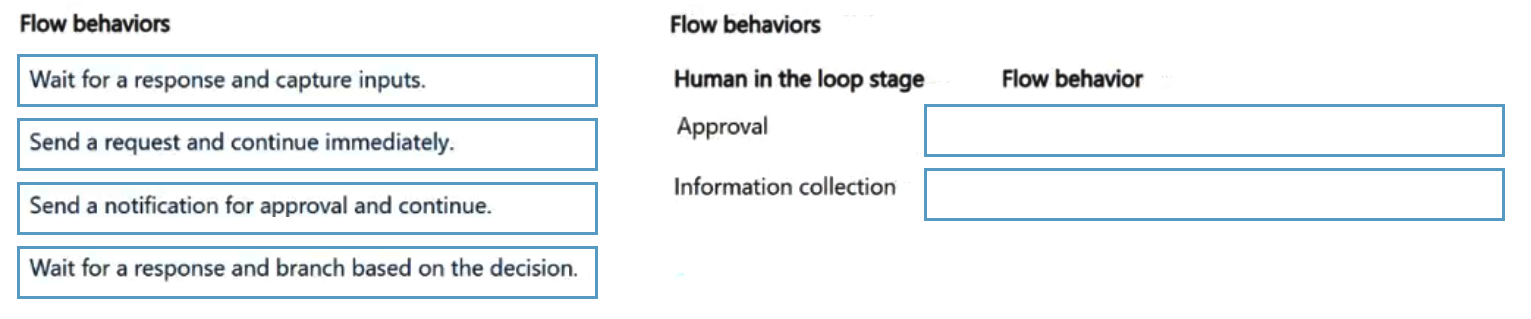
Stage 1: Wait for a response and branch based on the decision. Stage 2: Wait for a response and capture inputs.
Question
A company is designing an agent flow that includes human in the loop stages during execution.
The company requires that the agent flow perform the following actions:
• Must wait for a human decision before it resumes.
• Must collect information and then continue execution.
You need to configure the flow behavior.
Which flow behavior should you configure for each stage? To answer, move the appropriate flow behaviors to the correct stages. You may use each flow behavior once, more than once, or not at all. You may need to move the split bar between panes or scroll to view content.
NOTE: Each correct selection is worth one point.
Key Takeaways
The main trap is confusing 'branch based on decision' with 'capture inputs'; remember that branching controls flow direction based on choices, while capturing stores data for processing.
Learn how to configure human-in-the-loop stages in Microsoft Copilot Studio by selecting the correct flow behaviors for decision branching versus information collection.
Common mistake: Learners often select 'branch based on decision' for all human interactions, failing to recognize that simple data collection tasks do not require conditional routing logic.
Expert Analysis
The question requires configuring human-in-the-loop behaviors within a Copilot Studio agent flow, specifically distinguishing between decision-based branching and data collection. The correct configuration for the first stage, which 'must wait for a human decision before it resumes,' is Wait for a response and branch based on the decision. This behavior pauses the agent until a user provides input, typically via a button or choice card, allowing the flow to route to different paths based on that binary or multi-option selection.
The second stage, which 'must collect information and then continue execution,' corresponds to Wait for a response and capture inputs. Unlike the branching option, this behavior focuses on gathering free-text or structured data from the user without necessarily altering the control flow's direction based on the content of the answer; it simply captures the value for subsequent steps in the same path.
A common trap involves confusing these two because both involve waiting for user interaction. Learners might incorrectly select 'branch' for data collection if they assume any user input changes the flow. However, the key distinction lies in the outcome: if the next step depends on which option was chosen (e.g., Approve vs. Reject), use branching. If the system needs to store or process specific details provided by the user (e.g., a reason for rejection) regardless of the path, use capture inputs. Understanding this nuance is critical for designing efficient, logical agent flows that handle exceptions and data gathering appropriately.
Exam Strategy
When analyzing drag-and-drop questions about flow behaviors, isolate the purpose of each stage. Ask yourself: Does the next step change based on the user's specific choice? If yes, choose the branching option. If the goal is merely to gather data or text for the next action, choose the capture option. This mental check prevents over-engineering simple data collection as complex routing.
Frequently Asked Questions
What is the difference between branching and capturing inputs in Copilot Studio?
Can I use both branching and capturing in the same human-in-the-loop stage?
Discussion 1 contributions
Compiled from public community threads and reader submissions, lightly edited for clarity. Handles and vote tallies are shown as recorded, and comments reflect the views of individual contributors.
From public community threads 1
-
Arcadiuz 👍 11.Wait for a response and branch based on the decision 2.Wait for a response and capture inputs An approval process requires the flow to wait for a decision before continuing. The result can be used to determine which branch of the flow should execute. For information collection, the flow waits for the human response and captures the submitted values. Why the other options are wrong: - Send a request and continue immediately: Does not wait for the human decision. - Send a notification for approval and continue: A notification is not equivalent to waiting for and capturing an approval decision.
Reader comments & corrections
No reader corrections yet — spotted an error or have a note? Share it below.