Configuring Chat Channel Pre-Chat Surveys for Verification and Routing
Short answer
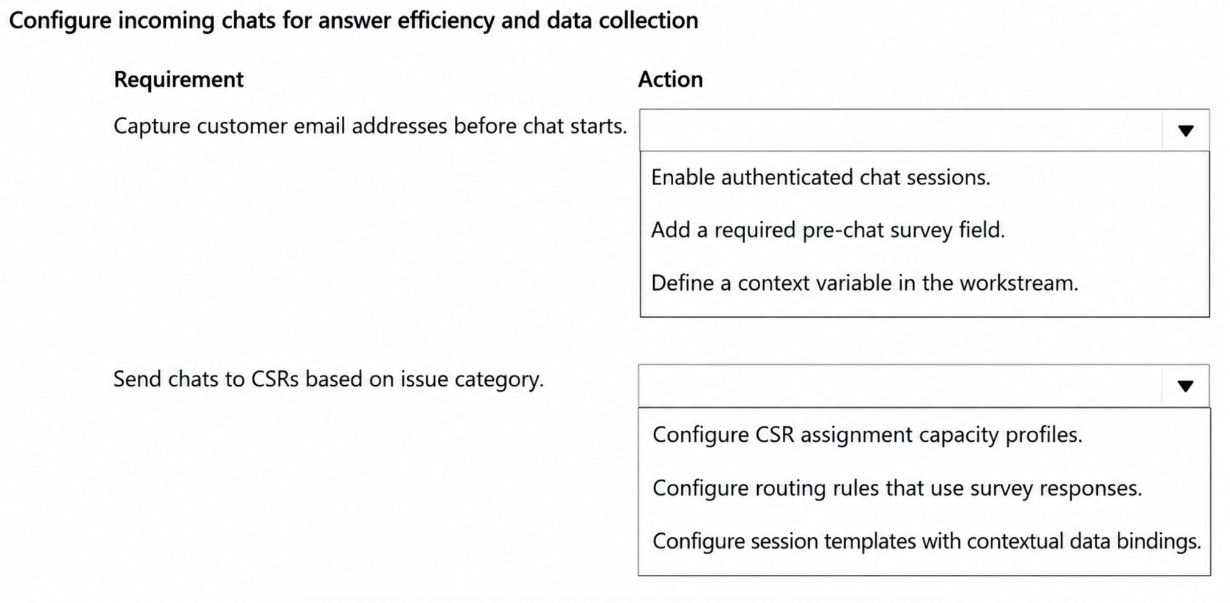
Add a pre-chat survey question for email address, which creates a context variable automatically. Add a pre-chat survey question for contact reason and map the resulting context variable to the routing logic.
Question
Customer service representatives (CSRs) at a company use a chat channel in Dynamics 365 Customer Service.
The company wants to improve how incoming chats are handled as follows:
• Email addresses must be captured for customer verification before engaging the customer.
• The reason for the contact must be captured before the chat starts and must be used for routing.
You need to configure the chat channel to meet the requirements.
Which action should you perform for each requirement? To answer, select the appropriate options in the answer area.
NOTE: Each correct selection is worth one point.
Key Takeaways
The main trap is assuming manual coding or complex integration is needed; instead, pre-chat survey questions automatically generate context variables that handle both data capture and routing mapping.
Learn how to configure Dynamics 365 Contact Center chat channels using pre-chat surveys to capture email and contact reasons. Discover how context variables are automatically created to facilitate verification and routing.
Common mistake: Learners often overlook that context variables are auto-created, leading them to search for manual variable definition steps. Another common error is failing to link the context variable to the routing engine after capturing the reason.
Expert Analysis
To meet the requirement of capturing email addresses for verification before engaging the customer, you must configure a pre-chat survey. Within this survey, adding a specific question field allows the system to capture user input. Crucially, when a question is added to a pre-chat survey in Dynamics 365 Contact Center, a corresponding context variable is automatically created by the system. This variable stores the captured data and makes it available for subsequent processing or display, fulfilling the need to capture and verify the email address without manual custom code.
For the second requirement, capturing the reason for contact and using it for routing, the same mechanism applies but with a different configuration step. You add another question to the pre-chat survey to capture the reason. To enable routing based on this value, you must map the newly created context variable (which holds the reason) to a queue attribute or use it in a routing rule within the unified routing configuration. The key insight here is that pre-chat survey questions generate context variables automatically, which serve as the bridge between user input and routing logic. Therefore, both actions involve adding questions to the pre-chat survey, with the first ensuring the variable exists for verification and the second linking that variable to routing criteria.
Exam Strategy
When configuring digital channels like chat, always look for 'Pre-chat Survey' options first for data collection needs. Remember that any question added there generates a context variable. For routing scenarios, immediately check if you can map that variable to a queue or routing rule rather than building custom workflows, as this is the standard low-code approach.
Frequently Asked Questions
Do I need to manually create context variables for chat pre-chat surveys?
How do I route chats based on pre-chat survey answers?
Discussion 1 contributions
Compiled from public community threads and reader submissions, lightly edited for clarity. Handles and vote tallies are shown as recorded, and comments reflect the views of individual contributors.
From public community threads 1
-
lastcert 👍 1First one should be Add pre-chat survey question, context variable created automatically.
Reader comments & corrections
No reader corrections yet — spotted an error or have a note? Share it below.
Related Analysis
Practice All AB-250 Questions
Access 106 questions with complete answers and detailed explanations.
View Full AB-250 Practice Test →