Configuring Self-Provisioning IVR in Universal Device Template
Refer to the exhibit. An administrator is asked to allow new phones to use self-provisioning Interactive Voice Response. Which change to the Universal Device Template implements this feature? - 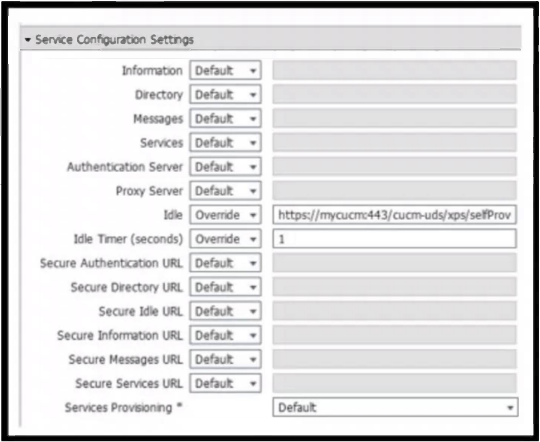
Community Votes
100% of anonymous learners picked answer A. Votes are pick records left by other test-takers — they are not the verified answer.
Community Insight
The exam tests the distinction between IVR-based and URL-based self-provisioning; the trap is assuming all self-provisioning requires a specific URL configuration, whereas IVR relies on dialing rather than idle state URLs.
This question tests the configuration of self-provisioning for IP phones via Interactive Voice Response (IVR). The community consensus confirms that leaving the Idle URL at default is correct because IVR-based provisioning does not rely on URL triggers.
Community Discussion (3 comments)
Comments & Corrections
No comments yet — spotted an error or have a note? Share it below.
Expert Analysis
Why the Answer Is Correct
Option A is correct because when using Interactive Voice Response (IVR) for self-provisioning, the phone does not need to be triggered by an idle state URL. The administrator simply needs to configure the phone to dial the IVR number during the self-provisioning process. Leaving the 'Idle URL' field with its default value ensures that no conflicting URL-based provisioning logic interferes with the IVR method.Why the Other Options Are Wrong
Options B, C, and D configure Authentication Server, Secure Information, and Directory URLs respectively. These fields are used for other functionalities like authentication protocols, displaying help information, or directory lookups, but they do not enable the self-provisioning mechanism itself. Configuring these would not allow new phones to use the IVR self-provisioning feature.Community Comment Notes
Comment [1] cites Cisco documentation confirming that defaults should remain in that section for IVR-based provisioning. Comment [2] provides critical clarification: Idle URL is specifically for 'URL Based' Self-Provisioning, which is distinct from IVR-based provisioning. This distinction is key to answering correctly.Official Reference
- https://www.cisco.com/c/en/us/support/docs/unified-communications/unified-communications-manager-callmanager/214233-configure-self-provisioning-feature-on-c.pdf
- https://www.cisco.com/c/en/us/support/docs/unified-communications/unified-communications-manager-callmanager/214228-configure-self-provisioning-feature-on-c.html
Exam Strategy
Always distinguish between the two types of self-provisioning: IVR-based and URL-based. If the question specifies IVR, avoid selecting options that involve configuring specific URLs for idle states or directory access, as those are relevant only to URL-based methods.