What Causes a VRRP Error Between Two Routers on the Same VLAN?
Short answer
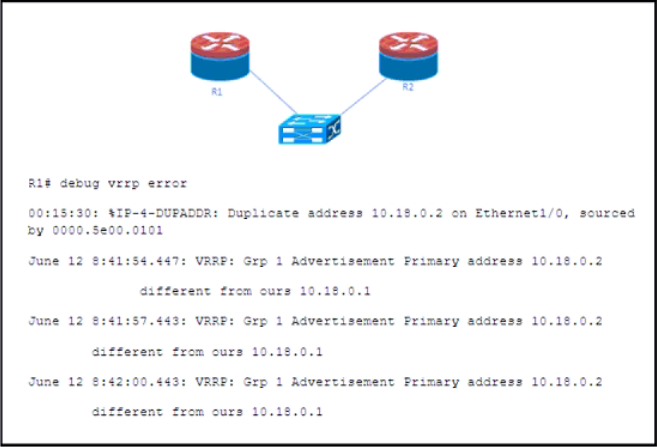
D R1 is configured with VIP 10.18.0.1 on VRRP group 1 and R2 is configured with VIP 10.18.0.2 on VRRP group 1.
Question
Key Takeaways
The exam tests your ability to identify that all routers in the same VRRP group must share the identical Virtual IP address; a VIP mismatch is a common trap that generates a VRRP error.
This question tests troubleshooting of VRRP (Virtual Router Redundancy Protocol) misconfigurations, specifically mismatched Virtual IP addresses (VIP) within the same VRRP group. Community consensus confirms that a VIP mismatch between routers in the same VRRP group triggers a VRRP error.
Common mistake: Many candidates choose option A, assuming that different VIPs on the two routers are acceptable, but in VRRP the entire group must agree on the same VIP to form a valid redundancy group.
Expert Analysis
Why the Answer Is Correct
Option D states that R1 is configured with VIP 10.18.0.1 on VRRP group 1 while R2 is configured with VIP 10.18.0.2 on VRRP group 1. In VRRP, all routers participating in the same group must use the same Virtual IP address. The debug output in the exhibit shows an error message indicating the received VIP (10.18.0.2) is "different from ours 10.18.0.1," which directly points to a VIP mismatch within the same group. Community comment [1] confirms this by quoting the exact debug output. Comment [3] further validates that this scenario is documented in the Cisco IOS Debug Command Reference.
Why the Other Options Are Wrong
Option A incorrectly suggests both routers can have different VIPs (10.18.0.2 and 10.18.0.1) — while this is technically the same mismatch as D, the exhibit shows R1's VIP is 10.18.0.1, not 10.18.0.2, making A factually inconsistent with the debug output. Option B describes both routers using the same VIP (10.18.0.2), which would not produce a VIP mismatch error. Option C describes a group mismatch (group 1 vs. group 0), which would generate a different error message related to group ID mismatch rather than a VIP mismatch.
Community Comment Notes
Comment [1] (4 likes) directly quotes the debug output showing the VIP discrepancy, reinforcing option D. Comment [2] (2 likes) emphasizes that the Virtual IP address is the primary identifier for a VRRP group and must match across all members. Comment [3] (1 like) cites the Cisco IOS Debug Command Reference as the authoritative source for interpreting the debug vrrp error output.
Exam Strategy
When troubleshooting VRRP errors, always verify that the Virtual IP address and group number match exactly on all routers in the redundancy group. Pay close attention to debug output messages — they often quote the exact parameter that is mismatched, guiding you directly to the correct answer.
Community Votes
100% of anonymous learners picked answer D. Votes are pick records left by other test-takers — they are not the verified answer.
Discussion 3 contributions
Compiled from public community threads and reader submissions, lightly edited for clarity. Handles and vote tallies are shown as recorded, and comments reflect the views of individual contributors.
From public community threads 3
-
Mekai2020 👍 4 Answered DR1: "different from ours 10.18.0.1" on VRP group 1
-
slacker_at_work 👍 2 Answered DNote that in VRRP (Virtual Router Redundancy Protocol), the primary address to be considered is the virtual IP address (VIP) assigned to the VRRP group
-
artilling 👍 1 Answered DThis is the correct answer. It is taken directly from Cisco IOS Debug Command Reference (debug vrrp error)
Reader comments & corrections
No reader corrections yet — spotted an error or have a note? Share it below.
Related Analysis
Practice All 350-401 Questions
Access 218 questions with complete answers and detailed explanations.
View Full 350-401 Practice Test →