How to resolve an EtherChannel PAgP misconfiguration issue?
Short answer
A Configure the EtherChannel members in desirable mode.
Question
Key Takeaways
The exam tests your ability to map EtherChannel debug log keywords (PAgP vs. LACP) to the correct negotiation modes, with the common trap being selecting LACP modes (active/passive) when PAgP is in use.
This question tests the ability to identify and resolve an EtherChannel negotiation failure caused by a PAgP mode mismatch. Community consensus confirms that recognizing PAgP keywords in debug output is essential to selecting the correct mode (desirable or auto).
Common mistake: Candidates often choose 'active' or 'passive' mode, which are LACP modes, not realizing the debug output explicitly references PAgP, which only supports 'desirable' and 'auto' modes.
Expert Analysis
Why the Answer Is Correct
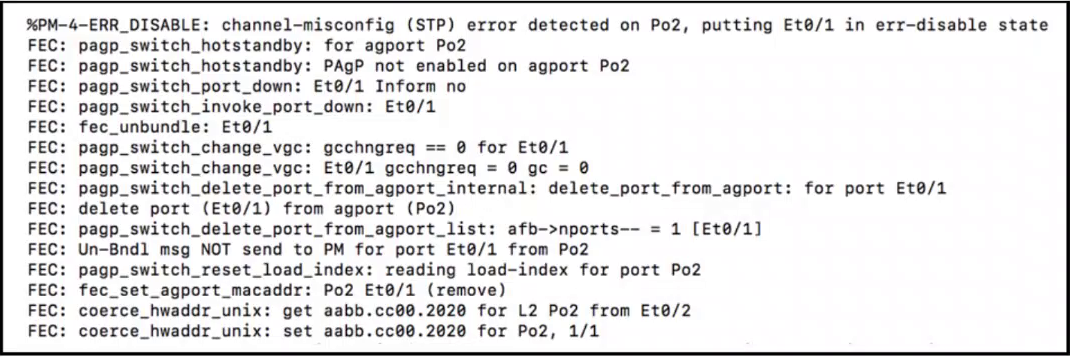
The debug output in the exhibit references PAgP (Port Aggregation Protocol), which is Cisco's proprietary EtherChannel negotiation protocol. PAgP only supports two negotiation modes: desirable and auto. Since the channel is failing to form, the member ports are likely set to 'auto' on both sides, preventing negotiation. Changing one side to 'desirable' will initiate PAgP negotiation and resolve the issue. Option A is the only valid PAgP mode listed.
Why the Other Options Are Wrong
Option B ('on') is a static EtherChannel mode that disables negotiation entirely and would not resolve a PAgP mismatch—it would simply force the channel without protocol checks. Options C ('active') and D ('passive') are LACP (IEEE 802.3ad) modes, not PAgP modes; configuring them would switch the protocol entirely and is inconsistent with the debug output indicating PAgP is in use.
Community Comment Notes
Comment [1] correctly identifies that the PAgP keyword in the log eliminates LACP and static options, narrowing the choice to 'desirable'. Comment [2] reinforces that PAgP only operates in 'auto' and 'desirable' modes. Comment [3] provides a helpful cheat sheet: PAgP → desirable/auto, LACP → active/passive, Static → on.
Exam Strategy
When you see EtherChannel debug output, immediately identify the protocol keyword (PAgP, LACP, or none). Map the protocol to its valid modes—PAgP uses desirable/auto, LACP uses active/passive, and static uses on—before evaluating the answer options.
Community Votes
100% of anonymous learners picked answer A. Votes are pick records left by other test-takers — they are not the verified answer.
Discussion 6 contributions
Compiled from public community threads and reader submissions, lightly edited for clarity. Handles and vote tallies are shown as recorded, and comments reflect the views of individual contributors.
From public community threads 6
-
shefo1 👍 11 Answered Aim sure A is right because if you look this log message , you see the PAgP , means the misconfigurations in PAgP configuration , in result you ignore the options that is talking about LAcP + static B - on (static) C - active (LAcP) D - passive (LAcp)
-
incognitoborg 👍 5 Answered AThis is 100% A, PAgP operates in auto and desirable
-
chiacche 👍 1PAgP -> Desirable, Auto LAcP -> Active, Passive Static -> On
-
99a6054 👍 1A seems to be the right answer.
-
supershysherlock 👍 2 Answered AA is correct.
Show 1 more comment
-
Mohaned990_go 👍 1 Answered APAgp disable
Reader comments & corrections
No reader corrections yet — spotted an error or have a note? Share it below.
Related Analysis
Practice All 350-401 Questions
Access 218 questions with complete answers and detailed explanations.
View Full 350-401 Practice Test →