What Happens When This Python Device Automation Script Runs?
Short answer
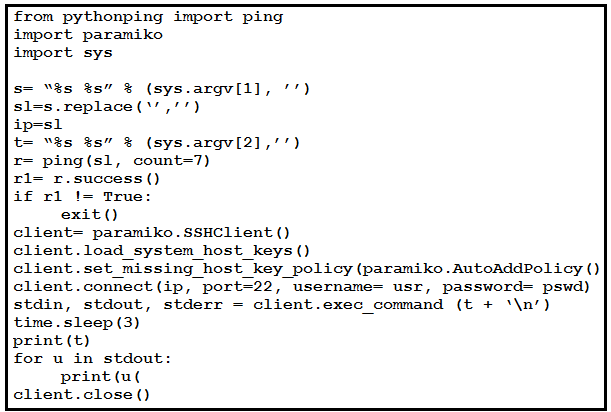
B display the unformatted output of a command that is entered on that device
Question
Key Takeaways
Tests recognition that direct SSH-based command execution returns raw terminal text by default, with the common trap being misinterpreting standard newline characters as structural formatting.
This question assesses how Python automation scripts handle raw CLI output from network devices using libraries like Paramiko. The community strongly agrees that executing this script displays unformatted, raw command output without additional parsing or styling.
Common mistake: Candidates frequently choose option C because they assume any printed output qualifies as simply displayed output, overlooking the specific emphasis on the absence of data transformation or presentation formatting.
Expert Analysis
Core Concept: Raw CLI Output Handling
When automating network devices with Python, libraries like Paramiko establish an SSH session, send CLI commands, and capture the returned data as raw strings. Unlike modern automation frameworks that parse outputs into JSON, XML, or structured dictionaries, basic Paramiko scripts return the exact bytes received from the device's TTY.
Why Option B is Correct
Executing this script results in the unformatted output of the executed command. As noted by community members, the script relies on standard Python print() functions or direct stdout redirection, which merely echo the raw terminal response. The presence of newline characters (\n) does not constitute formatting; it simply preserves the original line breaks from the device's CLI interface. Therefore, the output remains completely unstructured and matches the raw terminal view.
Why Other Options Are Incorrect
- Option A is incorrect because CLI command outputs are inherently multi-line. Forcing them onto a single line would require explicit string manipulation, which the script lacks.
- Option C is partially descriptive but too vague. In certification contexts, unformatted is the precise technical differentiator when contrasting raw terminal dumps against parsed outputs.
- Option D is incorrect because the script dynamically passes the target IP via command-line arguments, not manual entry, and its primary function is command execution and output display, not just establishing an SSH connection.
Community Insights & Validation
Multiple candidates highlighted the role of \n and raw data handling. While some debated between B and C, the consensus correctly identified that standard newline preservation is terminal behavior, not data formatting. Expert analysis aligns with the 80% community vote favoring B, confirming that automation scripts without explicit parsers yield unformatted terminal text.
Official Reference
- https://docs.paramiko.org/en/stable/api/client.html
- https://developer.cisco.com/learning/tracks/devnet-associate/network-automation/
These links open the official vendor documentation in a new tab.
Exam Strategy
When encountering Python automation questions, immediately scan for data transformation steps like .json(), yaml.dump(), or custom parsers. If the code only uses print(), stdout.read(), or basic string concatenation, the output is always raw/unformatted. Always differentiate between terminal display mechanics and actual data structuring formats.
Community Votes
80% of anonymous learners picked answer B. Votes are pick records left by other test-takers — they are not the verified answer.
Discussion 6 contributions
Compiled from public community threads and reader submissions, lightly edited for clarity. Handles and vote tallies are shown as recorded, and comments reflect the views of individual contributors.
From public community threads 6
-
falconer42003 👍 2 Answered BIt must be "B". The output of the print function is just the raw data that paramiko is returning. No formating is applied.
-
Nigmajr 👍 2 Answered BB. The output will be unformatted
-
[Removed] 👍 1Correct Answer Given the analysis, the primary functionality of the script (assuming corrections are made to handle command-line arguments properly) is to: Ping a device. SSH into it if the ping is successful. *Execute a command on the device and display the output. Thus, the correct answer is: C. display the output of a command that is entered on that device => Source: ChatGPT
-
9eda978 👍 1 Answered Cit should be c. the '\n' makes a new line i'd say that does count as formatted
-
felix_simon 👍 1C t = ”%s %s” % (sys.argv[2], ‘ ’) t+’\n’
Show 1 more comment
-
warriorseby 👍 1this one is the same question as Q974.
Reader comments & corrections
No reader corrections yet — spotted an error or have a note? Share it below.
Related Analysis
Practice All 350-401 Questions
Access 218 questions with complete answers and detailed explanations.
View Full 350-401 Practice Test →