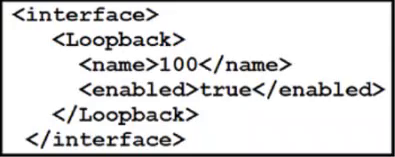
What does the <enabled>true</enabled> tag achieve for a loopback interface?
Short answer
A It unshuts the loopback interface.
Question
Key Takeaways
The question tests your understanding of how modern network automation frameworks represent administrative states, while the common trap involves misreading XML as display output or relying on legacy knowledge that loopbacks cannot be administratively shut down.
This question evaluates your ability to translate declarative XML/YANG configuration payloads into traditional Cisco IOS CLI commands. The community consensus confirms that setting <enabled>true</enabled> directly maps to the no shutdown command, effectively unshutting the interface.
Common mistake: Option B is frequently selected when candidates mistake the XML snippet for show command output rather than a configuration payload. Some also hesitate because classic IOS treats loopbacks as always-up, but IOS XE YANG models explicitly support interface enable/disable states, making A the technically correct translation.
Expert Analysis
Mapping Declarative Syntax to CLI Verbs
Modern network automation relies on data models like YANG, which serialize configurations into structured formats such as XML via NETCONF or RESTCONF. In these models, the <enabled>true</enabled> tag explicitly sets the administrative state of an object to active. When mapped to Cisco IOS XE, this directly corresponds to the imperative CLI command no shutdown. As highlighted by community members chiacche and supershysherlock, interpreting <enabled>true</enabled> as no shut is the standard automation-to-CLI translation.
Loopback Interface State Management
While traditional IOS versions treat loopback interfaces as virtual, always-up logical constructs, Cisco IOS XE's YANG interface model treats them uniformly with physical ports. This means they possess both an administrative state (enabled) and an operational state (oper-status). Setting <enabled>true</enabled> ensures the interface is administratively brought up, aligning perfectly with option A. NetworkJanitor and zbeugene7 correctly pointed out that loopbacks can indeed have an admin state in modern IOS XE environments, dispelling older misconceptions.
Eliminating Incorrect Options
Option B incorrectly assumes the snippet is read-only output, ignoring that the structure targets a configuration container rather than a data node. Option C is invalid because renaming requires modifying the <name> or id attribute, not the enabled flag. Option D would require a delete operation or setting the state to false, not enabling it. Mastering this translation between declarative tags and CLI verbs is essential for successfully navigating the programmability sections of the 350-401 exam.
Official Reference
https://datatracker.ietf.org/doc/html/rfc7950
This link opens the official vendor documentation in a new tab.
Exam Strategy
When encountering XML, JSON, or YAML snippets on the 350-401 exam, immediately look for state-changing keywords like <enabled>, <state>, or <config> and mentally translate them to their CLI equivalents (no shutdown, ip address, etc.). Always verify whether the snippet is structured as a configuration payload or read-only output by checking for container elements versus list/data nodes.
Community Votes
85% of anonymous learners picked answer A. Votes are pick records left by other test-takers — they are not the verified answer.
Discussion 7 contributions
Compiled from public community threads and reader submissions, lightly edited for clarity. Handles and vote tallies are shown as recorded, and comments reflect the views of individual contributors.
From public community threads 7
-
slacker_at_work 👍 4 Answered AI was mistaken: A. It unshuts the loopback interface. The <interface> element specifies the configuration of an interface. The <Loopback> element represents the loopback interface configuration. <name>100</name> specifies the name of the loopback interface, which is "100". <enabled>true</enabled> indicates that the loopback interface is enabled. The value "true" signifies that the interface is enabled. The provided XML code configures and enables a loopback interface with the name "100". This means that it unshuts (enables) the loopback interface.
-
supershysherlock 👍 4 Answered AA. It unshuts the loopback interface. The configuration indicates that the loopback interface is being enabled with <enabled>true</enabled>. In networking terms, particularly Cisco, "no shutdown" is the command used to enable an interface, which is equivalent to setting the enabled state to true. So, this would be the equivalent of "unshutting" the loopback interface. The snippet doesn't display, rename, or delete an interface; it configures it to be enable
-
NetworkJanitor 👍 2Actually, a Loopback CAN be admin shut: Loopback0 unassigned YES unset administratively down down Tunnel0 10.100.100.2 YES NVRAM up up R20(config-if)# R20#sh ver | s Version Cisco IOS Software [Dublin], Linux Software (X86_64BI_LINUX-ADVENTERPRISEK9-M), Version 17.12.1, RELEASE SOFTWARE (fc5) Low quality Q in my opinion. <enable> would have to be <no shutdown>
-
zbeugene7 👍 2Bad language.... One can't unshut something that can not be shutdown ever. loopback interface can't be shutdown , there is no need to unshut it, unless in CISCO vrsion of english being shut is the same as being disabled.....
-
ferdomravec87 👍 2This is not a piece of code, this is a static XML, we see nothing about how/what is being executed here. weid question, I would answer B as a programmer.
Show 2 more comments
-
slacker_at_work 👍 2 Answered BIn my humble view it is B, but I can be mistaken.
-
chiacche 👍 1 Answered A<enabled>true</enabled> -> no shut
Reader comments & corrections
No reader corrections yet — spotted an error or have a note? Share it below.
Related Analysis
Practice All 350-401 Questions
Access 218 questions with complete answers and detailed explanations.
View Full 350-401 Practice Test →