Configuring Cisco SD-WAN Cloud Interconnect with Equinix
DRAG DROP
Refer to the exhibit.
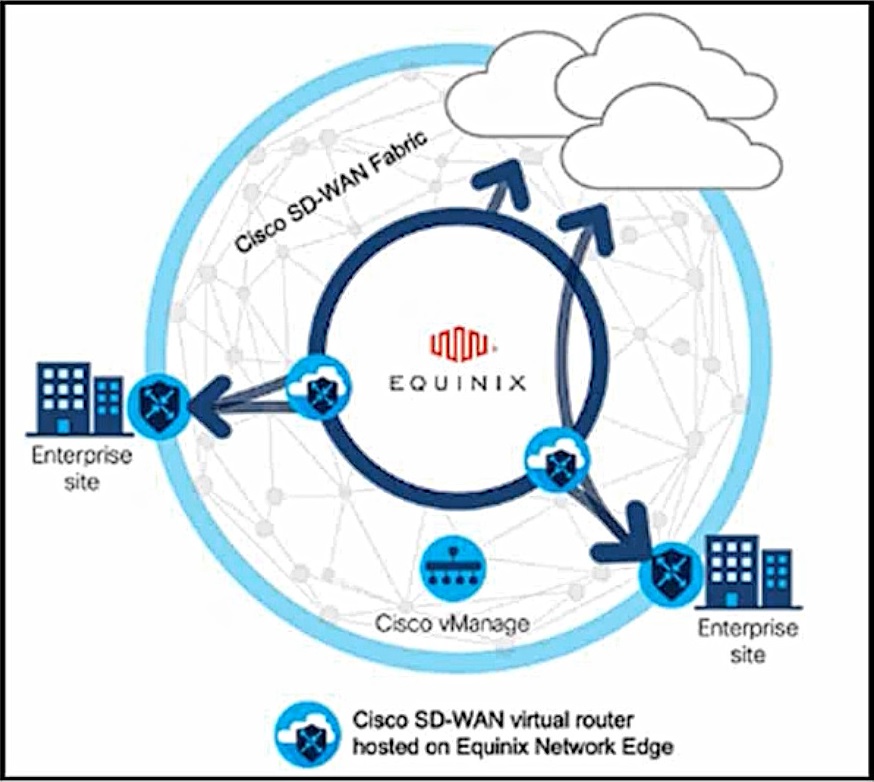 These configurations are complete:
Create an account in the Equinix portal.
Associate the Equinix account with Cisco vManage.
Configure the global settings for Interconnect Gateways.
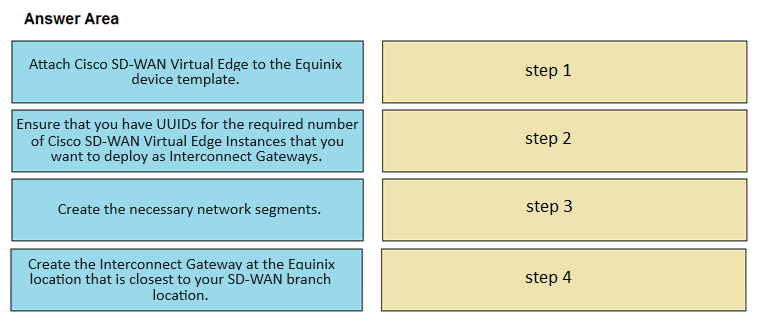
Drag the prerequisite steps from the left onto the order on the right to configure a Cisco SD-WAN Cloud Interconnect with Equinix.
These configurations are complete:
Create an account in the Equinix portal.
Associate the Equinix account with Cisco vManage.
Configure the global settings for Interconnect Gateways.
Drag the prerequisite steps from the left onto the order on the right to configure a Cisco SD-WAN Cloud Interconnect with Equinix.
Community Insight
The process requires establishing identity (UUIDs) before infrastructure (network segments), followed by device attachment, and finally gateway creation.
This guide details the correct sequential order for configuring a Cisco SD-WAN Cloud Interconnect with Equinix, specifically focusing on the prerequisite steps involving vManage and device templates.
Learners often attempt to create the Interconnect Gateway or network segments before ensuring the necessary UUIDs and token configurations are in place, leading to configuration failures.
Community Discussion (1 comments)
Comments & Corrections
No comments yet — spotted an error or have a note? Share it below.
Expert Analysis
Why the Answer Is Correct
The correct sequence for configuring Cisco SD-WAN Cloud Interconnect with Equinix begins with ensuring that the necessary UUIDs and tokens are generated and available, as these are required for authentication and identification in subsequent steps. Next, you must create the necessary network segments within the Equinix environment to define the logical boundaries for the interconnect. Following this, the Virtual Edge (vEdge) device is attached to the Equinix device template in vManage to bind the software definition to the physical or virtual hardware. Finally, the Interconnect Gateway is created at the designated Equinix location to establish the actual connectivity link between the SD-WAN fabric and the cloud provider.Why Other Candidate Answers Are Wrong
Attempting to create the Interconnect Gateway before setting up network segments or attaching the Virtual Edge is logically flawed because the gateway depends on existing segments and device associations. Creating network segments without prior UUID/token verification may result in permission errors or unidentifiable resources. Attaching the Virtual Edge before defining the network segments leaves the device without a proper context for its connection points.Community Comment Notes
Community consensus supports the order: UUIDs/Tokens first, then Network Segments, then Virtual Edge attachment, and finally Interconnect Gateway creation. As Helloory noted, these are the correct order based on practical implementation experience. The comments highlight that skipping the initial identity setup leads to immediate failure in later stages.Exam Strategy
When dealing with drag-and-drop questions involving multi-vendor integrations like Cisco and Equinix, always look for dependency chains: identity/authentication usually comes first, followed by resource creation, then binding/attachment, and finally activation/linking.
Frequently Asked Questions
Why must UUIDs be ensured before creating network segments?
UUIDs provide the unique identifiers required for authentication and resource tracking in the Equinix portal and vManage, which are prerequisites for creating any network segment.
What happens if I attach the Virtual Edge before creating network segments?
Attaching the Virtual Edge prematurely can lead to configuration errors because the device template may not have valid network segment references to associate with the edge device.