NetFlow Export on Management Interface IOS-XE
Short answer
A Configure a different interface to send the records.
Question
Key Takeaways
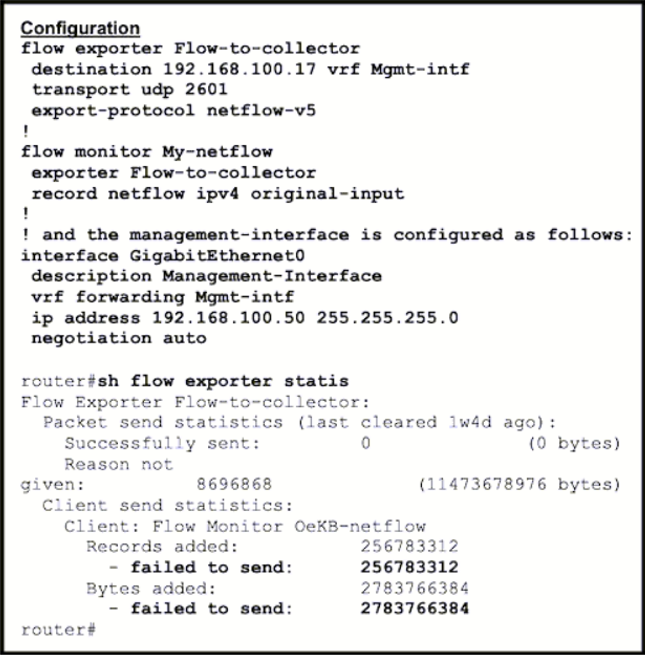
The question tests knowledge of platform-specific limitations where the management interface cannot be used as a source for NetFlow exports, requiring a different interface.
This question tests the limitation of exporting NetFlow data from a management interface in IOS-XE. The correct configuration requires using a non-management interface because the management port does not support NetFlow export.
Common mistake: Many candidates choose B, assuming that configuring the management interface in the global routing table would allow it to send records, ignoring the hardware/firmware restriction.
Expert Analysis
Why the Answer Is Correct
In Cisco IOS-XE, the dedicated management interface (such as GigabitEthernet0/0/0 or MgmtEth) is designed for out-of-band management and typically does not support the generation and export of NetFlow records. This is a common platform limitation found in ISR and ASR series routers. Therefore, to successfully send NetFlow data to a collector, you must configure NetFlow on a different, regular data interface. As noted by user bk989, "its not supported under any MGMT port in ios-xe releases".
Why the Other Options Are Wrong
Option B is incorrect because placing the management interface in the global routing table does not enable NetFlow export capabilities on that specific hardware port; the limitation is at the agent level, not just routing. Option C is irrelevant because the protocol version (v5 vs v9) does not change the fact that the source interface cannot export. Option D assumes reachability is the issue, but even with perfect reachability, the router will not generate/export flows from the mgmt interface.
Community Comment Notes
The community consensus strongly supports A. User NZhang confirmed A is correct and linked to a Cisco community thread stating no NetFlow export on management interfaces. User dapardo also leaned towards A, noting that while VRF configuration might seem relevant, the fundamental issue is the interface type.
Official Reference
This link opens the official vendor documentation in a new tab.
Exam Strategy
When troubleshooting NetFlow issues, always verify if the source interface is a dedicated management port. If it is, switch your focus to other data interfaces immediately, as this is a known limitation in many IOS-XE platforms.
Frequently Asked Questions
Can I export NetFlow from the MgmtEth interface?
Is this true for all Cisco routers?
Community Votes
100% of anonymous learners picked answer A. Votes are pick records left by other test-takers — they are not the verified answer.
Discussion 3 contributions
Compiled from public community threads and reader submissions, lightly edited for clarity. Handles and vote tallies are shown as recorded, and comments reflect the views of individual contributors.
From public community threads 3
-
bk989 👍 2Hi had this issue before , its not supported under any MGMT port in ios-xe releases, to source netflow from you will need to use a different interface https://community.cisco.com/t5/network-management/no-netflow-export-on-management-interface-gig0-of-isr-4431/td-p/2992691
-
NZhang 👍 2 Answered AA is correct. https://community.cisco.com/t5/network-management/no-netflow-export-on-management-interface-gig0-of-isr-4431/td-p/2992691
-
dapardo 👍 1 Answered AWell, Considering that VRF is configured on the interface A will be a good option but B should it be good, isnt?
Reader comments & corrections
No reader corrections yet — spotted an error or have a note? Share it below.
Related Analysis
Practice All 300-410 Questions
Access 159 questions with complete answers and detailed explanations.
View Full 300-410 Practice Test →