Configuring IP SLA UDP Echo Responder for Voice Traffic
Short answer
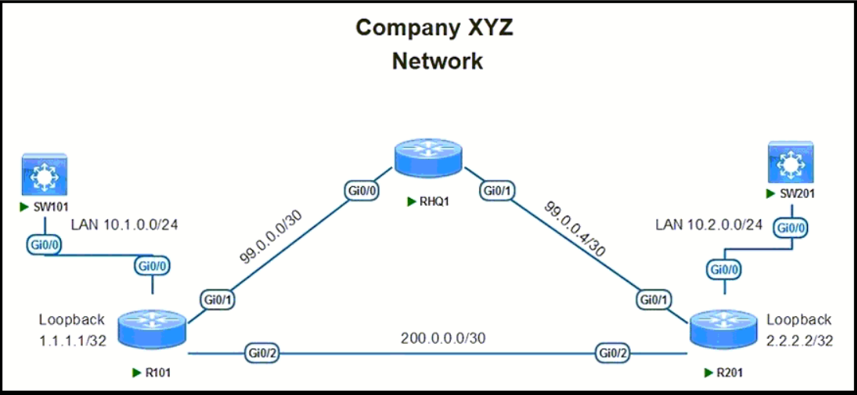
B Configure ip sla responder udp-echo with the destination IP 2.2.2.2 and port 16384 on R201.
Question
 -
- 
Key Takeaways
The exam tests whether you know that the 'ip sla responder udp-echo' command requires the IP address of the local interface acting as the responder, not the source IP or an auto-registration method.
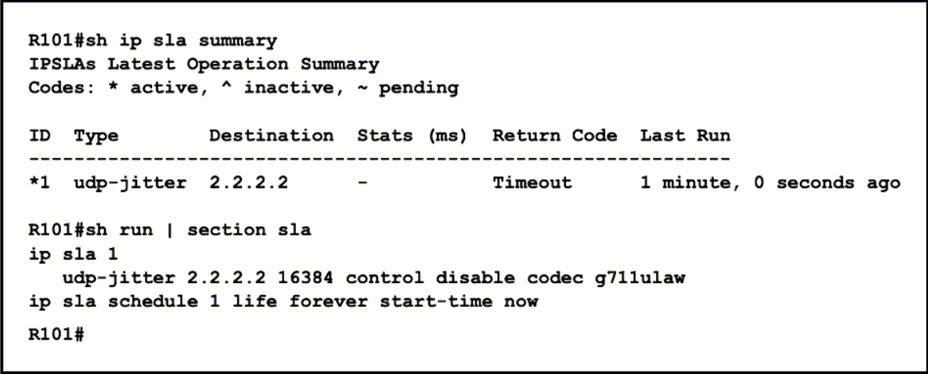
This question tests the configuration of Cisco IP SLA responders to measure Round-Trip Time (RTT) for specific UDP voice traffic ports. The correct command must specify the destination router's interface IP and the exact port used by the probe.
Common mistake: Many candidates choose Option C because they mistakenly use the source IP address (1.1.1.1) instead of the destination/responder IP address (2.2.2.2). Others may select D, assuming auto-registration handles all cases without explicit definition.
Expert Analysis
Why the Answer Is Correct
Option B is the correct configuration for R201. Since R101 sends a UDP echo probe to port 16384, R201 must be configured with ip sla responder udp-echo. Crucially, this command must include the IP address of the interface on R201 that will receive the packet (2.2.2.2) and the port number (16384). This ensures the router explicitly listens on that specific socket for the SLA probe.
Why the Other Options Are Wrong
Option A uses tcp-connect, but the scenario specifies UDP traffic (voice over UDP), so TCP is incorrect. Option C specifies the source IP (1.1.1.1) instead of the responder's own IP (2.2.2.2); the responder command must bind to its own interface. Option D relies on auto-register, which allows any IP SLA operation to register dynamically, but it does not explicitly define the UDP echo parameters required for this specific voice traffic test, making it less precise than the explicit configuration in B.
Community Comment Notes
Community consensus heavily favors Option B. As scarface35 noted, "it should be the IP address of the interface on the destination router-R201 (2.2.2.2)." Another commenter confirmed, "B is correct This command has to be given on the responder," highlighting that the responder side must match the target IP and port. One dissenting comment suggested C, likely confusing the source and destination addresses.
Official Reference
This link opens the official vendor documentation in a new tab.
Exam Strategy
When configuring IP SLA responders, always remember that the udp-echo command binds to the local interface IP. Check the topology carefully to distinguish between the source IP (where the probe originates) and the destination IP (where the responder sits). For voice/jitter tests, ensure the protocol (UDP) matches the service type.
Frequently Asked Questions
Why can't I use auto-register (Option D)?
What is the difference between tcp-connect and udp-echo?
Community Votes
100% of anonymous learners picked answer B. Votes are pick records left by other test-takers — they are not the verified answer.
Discussion 4 contributions
Compiled from public community threads and reader submissions, lightly edited for clarity. Handles and vote tallies are shown as recorded, and comments reflect the views of individual contributors.
From public community threads 4
-
scarface35 👍 5 Answered Bit should be the IP address of the interface on the destination router-R201 (2.2.2.2) ip sla responder udp-echo ipaddress 2.2.2.2 port 16384
-
[Removed] 👍 3 Answered BB is correct This command has to be given on the responder: ip sla responder or ip sla responder udp-echo ipaddress (ip-address of the responder) port (port) vrf (vrf) https://www.practicalnetworking.net/stand-alone/cisco-ip-sla-using-a-cisco-router-to-generate-traffic/#ip-sla-responder:~:text=We%20could%20manually,7.7.7.7%20port%2080
-
bb90403 👍 3 Answered BIt's B.
-
d740f62 👍 1 Answered CCorrect
Reader comments & corrections
No reader corrections yet — spotted an error or have a note? Share it below.
Related Analysis
Practice All 300-410 Questions
Access 159 questions with complete answers and detailed explanations.
View Full 300-410 Practice Test →