How to Make OSPF Area 1 Totally Stubby on R2
Short answer
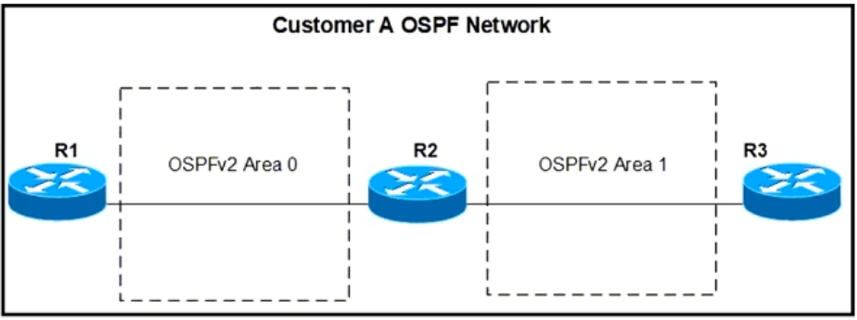
D Configure area 1 stub no-summary on R2 to make area 1 totally stubby, so R3 sees only Type 1 and Type 2 LSAs.
Question
Key Takeaways
Tests the OSPF LSA filtering difference between stub, totally stubby, and NSSA areas; the trap is selecting area 1 stub because it blocks Type 4 and 5 LSAs but still floods Type 3 summaries into R3.
OSPF area 1 on R3 must see only Type 1 and Type 2 LSAs, which requires making it a totally stubby area from the ABR R2. This page confirms that the command area 1 stub no-summary (D) is correct, and explains why plain stub and NSSA options fail.
Common mistake: The most common wrong choice is B, area 1 stub, because many engineers assume stub already eliminates Type 3 LSAs; in reality only the no-summary keyword suppresses Type 3, Type 4, and Type 5 summaries.
Expert Analysis
Why the Answer Is Correct
The requirement is for R3 to receive only Type 1 (router) and Type 2 (network) LSAs in area 1, which means the ABR R2 must stop flooding Type 3 summary, Type 4 ASBR-summary, and Type 5 external LSAs into that area. The Cisco command area 1 stub no-summary configures area 1 as a totally stubby area on R2. A plain stub area only blocks Type 4 and Type 5 LSAs, so R3 would still see Type 3 summaries; adding no-summary suppresses them. Although the ABR injects a default inter-area route, the only non-default LSAs R3 sees are Type 1 and 2. Thus D is the command to apply on R2.Why the Other Options Are Wrong
A (area 1 nssa no-summary) creates a totally NSSA, which allows Type 7 LSAs and is intended for areas that inject external routes, so it does not meet the requirement of only Type 1 and 2 LSAs. B (area 1 stub) is a normal stub area and still permits Type 3 summary LSAs from R2. C (area 1 stub nssa) is an invalid combination because an area cannot be both stub and NSSA. D is the only option that makes area 1 totally stubby and filters out Type 3, 4, and 5 LSAs.Community Comment Notes
The community strongly favors D, with dapardo noting "stub No-Summary = totally stubby area." bk989 correctly explains that plain stub allows Type 1, 2, and 3 LSAs, while no-summary removes the Type 3 summaries. Sammy3637 adds that no-summary prevents Type 3, Type 4, and Type 5 LSAs, leaving only Type 1 and 2. A few voters chose B, likely because they forgot that a normal stub area still receives Type 3 summary LSAs. acg888 simply marked D as correct.Official Reference
https://www.cisco.com/c/en/us/support/docs/ip/open-shortest-path-first-ospf/7039-1.html
This link opens the official vendor documentation in a new tab.
Exam Strategy
Remember that no-summary is configured on the ABR, while internal routers use plain area 1 stub; the question asks for R2, so choose the ABR command. Also map each area type to the LSA types it blocks: stub blocks 4 and 5, totally stubby blocks 3, 4, and 5, and NSSA blocks 4 and 5 but allows 7.
Frequently Asked Questions
Why does area 1 stub no-summary still allow a default route into R3?
Why is area 1 nssa no-summary wrong for this requirement?
Community Votes
76% of anonymous learners picked answer D. Votes are pick records left by other test-takers — they are not the verified answer.
Discussion 8 contributions
Compiled from public community threads and reader submissions, lightly edited for clarity. Handles and vote tallies are shown as recorded, and comments reflect the views of individual contributors.
From public community threads 8
-
dapardo 👍 4 Answered Bstub No-Summary = totally stubby area
-
bk989 👍 3 Answered DStub: type 1 2 3 LSA stub no summary --> allows Type 1 2 originated inside the stub area itself. default route (a single type 3 default route, that prevents type 3 inter-area routes) that points to type 1 2 3 LSA's on the outside of the stub area NSSA Type 1 2 3 7 LSA NSSA no-summary blocks inter-area routes. Gives 1 default route to outside of the NSSA. NSSA no-summary --> type 1 2 7 inside the area itself, one default route to inter-area and Type 5 external routes
-
[Removed] 👍 3 Answered DD is correct Stub Area without no-summary: "area 1 stub" alone will send LSA type 1, 2, 3 Stub Area with no-summary: "area 1 stub no-summary" explicitly prevents type 3 (summary) LSAs from being sent into the area. It´s essentially a more explicit configuration that confirms type 1 and type 2 LSAs are the only types allowed and also ensures that type 3 LSAs are not present.
-
[Removed] 👍 2 Answered DD is correct Stub Area without no-summary: "area 1 stub" alone prevents type 3 and type 5 LSAs from being received in the stub area. Stub Area with no-summary: "area 1 stub no-summary" explicitly prevents type 3 (summary) LSAs from being sent into the area. It´s essentially a more explicit configuration that confirms type 1 and type 2 LSAs are the only types allowed and also ensures that type 3 LSAs are not present.
-
Sammy3637 👍 1 Answered Darea 1 stub: Configures the area as a stub area, which only allows Type 1 (Router) and Type 2 (Network) LSAs, but it may still receive Type 3 (Summary) LSAs from other areas. no-summary: This command, when added to the configuration, prevents Type 3 (Summary), Type 4, and Type 5 (External) LSAs from being generated in a stub area. It ensures that only Type 1 and Type 2 LSAs are allowed into the area.
Show 3 more comments
-
ANEE167 👍 1To get best certification join bmcert.org . This company is providing the best certifications.
-
MANEEE557 👍 1I heared about BMC is that was better than other companys?
-
acg888 👍 4 Answered Dcoorecta
Reader comments & corrections
No reader corrections yet — spotted an error or have a note? Share it below.
Related Analysis
Practice All 300-410 Questions
Access 159 questions with complete answers and detailed explanations.
View Full 300-410 Practice Test →