Why Is the eBGP Neighbor Not Coming Up?
Short answer
A Configure ebgp-multihop 2 on R1 toward the neighbor so the eBGP session can form to a peer that is not directly connected.
Question
Key Takeaways
This item tests the reachability prerequisite for an eBGP session — the peer must be one hop away unless multihop is configured — and the trap is chasing the '0.0.0.0' router ID column, which is only a symptom of a session that never established.
When an eBGP peer's address is not on a directly connected subnet, the session never forms because eBGP sends its TCP packets with a TTL of 1. Raising the hop limit with neighbor ebgp-multihop 2 on R1 is what brings this 300-410 neighbor up, making option A the correct fix.
Common mistake: Many candidates choose B and try to repair the neighbor router ID, but 0.0.0.0 in show ip bgp summary simply means no session exists yet; assigning a valid RID on the remote router would not make a peer two hops away reachable for eBGP.
Expert Analysis
Why the Answer Is Correct
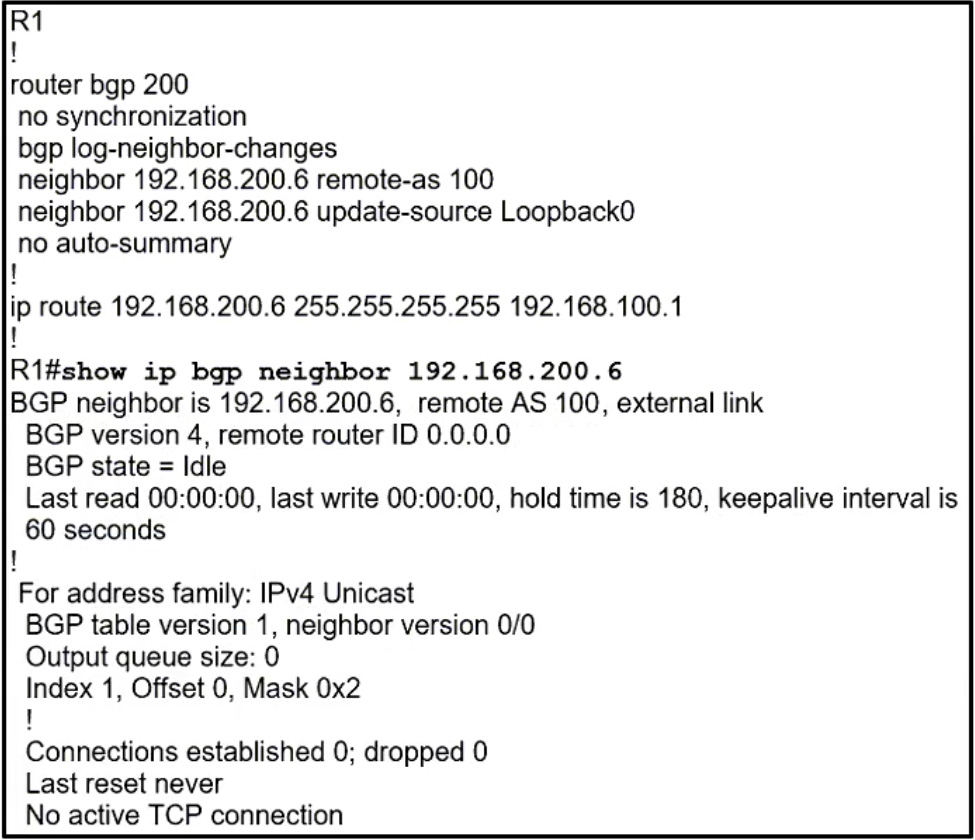
The exhibit shows R1 with a BGP neighbor (192.168.200.6) stuck in a down state, its router ID column reading 0.0.0.0, while the routing table reaches that address through 192.168.100.1 — meaning the peer is not on a directly connected subnet. eBGP by default transmits its TCP/179 packets with a TTL of 1, so packets destined two hops away are dropped before the OPEN message can be exchanged. The neighbor ebgp-multihop 2 command on R1 raises that TTL to 2, allowing the TCP session to complete and the OPEN/KEEPALIVE exchange to follow. Once the session is up, the RID column populates with the peer's real router ID, confirming that the 0.0.0.0 entry was a symptom rather than the fault.
Why the Other Options Are Wrong
Option B misreads the exhibit: 0.0.0.0 in show ip bgp summary is the placeholder shown for a peer with no established session, not a misconfigured router ID on the remote device — the peer's RID is only learned after the OPEN is received, so 'fixing' it changes nothing about reachability. Option C is wrong because a neighbor route map filters or modifies prefixes within a specific AFI/SAFI after the session exists; it cannot stop TCP port 179 from connecting, and no route map is visible in this scenario anyway. Option D is wrong because BGP synchronization is a legacy rule about iBGP-learned routes waiting for IGP confirmation, it is off by default in modern IOS, and enabling it can only suppress routes — never bring an eBGP session up.
Community Comment Notes
As d740f62 explained, "192.168.200.6 can be reached via 192.168.100.1, so at least 2 hops needed", which is exactly the condition that makes ebgp-multihop the fix; the same commenter dismissed the 0.0.0.0 RID as merely indicating there is no TCP connection and confirmed no route map appears in the exhibit. dapardo simply confirmed the published answer as correct, reinforcing the vote consensus around A. cloud29 asked "Why its A? Anyone?", which is the natural question for anyone who has only seen the output and not reasoned through default eBGP TTL behavior.
Exam Strategy
On any 'BGP neighbor not up' exhibit in 300-410, first compare the neighbor address against the connected and routing tables: if it is reached via another router rather than an interface subnet, answer ebgp-multihop (or disable-connected-check for loopback peering). Only after that rule out real session blockers such as wrong AS numbers, no route to the peer, or an ACL on port 179.
Frequently Asked Questions
Why does the neighbor show a router ID of 0.0.0.0 in show ip bgp summary?
Would a neighbor route map prevent the eBGP session from forming?
Community Votes
100% of anonymous learners picked answer A. Votes are pick records left by other test-takers — they are not the verified answer.
Discussion 3 contributions
Compiled from public community threads and reader submissions, lightly edited for clarity. Handles and vote tallies are shown as recorded, and comments reflect the views of individual contributors.
From public community threads 3
-
d740f62 👍 6A - 192.168.200.6 can be reached via 192.168.100.1, so at least 2 hops needed B - remote RID 0.0.0.0 just tells that there's no TCP connection, and it's given on the pic C - I don't see any route map here D - this has nothing to do w/ the no sync command
-
dapardo 👍 1 Answered AProvide answer is correct
-
cloud29 👍 1Why its A? Anyone?
Reader comments & corrections
No reader corrections yet — spotted an error or have a note? Share it below.
Related Analysis
Practice All 300-410 Questions
Access 159 questions with complete answers and detailed explanations.
View Full 300-410 Practice Test →