LLDP Configuration on Single Interface in Multivendor Network
Short answer
B Disable CDP globally with 'no cdp run' and enable LLDP only on Gi1/0/1 using 'lldp transmit' and 'lldp receive', keeping it off on all other interfaces in the multivendor VoIP deployment.
Question
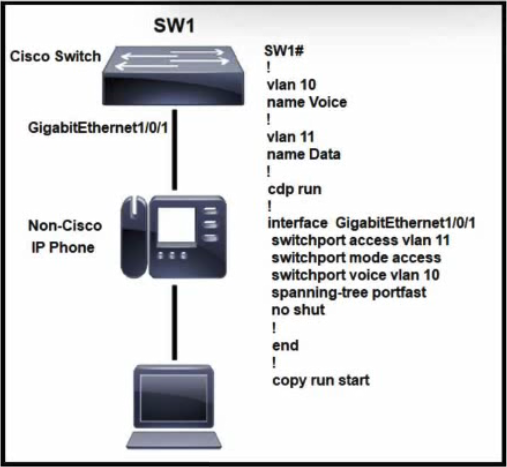
Refer to the exhibit. A multivendor network exists and the company is implementing VoIP over the network for the first time. Which configuration is needed to implement the neighbor discovery protocol on the interface and allow it to remain off for the remaining interfaces?
Key Takeaways
The question tests whether you know LLDP must be enabled per-interface using 'lldp transmit' and 'lldp receive' commands, not with the nonexistent 'lldp enable' command, and that 'no cdp run' removes the Cisco-proprietary CDP from a multivendor environment.
This CCNA 200-301 question tests configuring an industry-standard neighbor discovery protocol (LLDP) on just one interface of a multivendor network carrying new VoIP traffic, while leaving the protocol off everywhere else. The correct answer enables LLDP only at the interface level using the valid commands 'lldp transmit' and 'lldp receive' under interface Gi1/0/1, after disabling the Cisco-proprietary CDP globally.
Common mistake: Most learners pick Option A because it looks reasonable (global 'lldp run' then 'lldp enable' on the interface), but 'lldp enable' is not a valid Cisco IOS command — LLDP on an interface is turned on with 'lldp transmit' and 'lldp receive'.
Expert Analysis
Why the Answer Is Correct
Option B is the only choice that uses valid, real Cisco IOS commands to activate LLDP on a single interface. Under interface GigabitEthernet1/0/1, the commands lldp transmit and lldp receive are exactly how LLDP advertisement and reception are turned on for a specific port, which satisfies the requirement that the protocol stay off on all remaining interfaces. The leading no cdp run command is also appropriate here: because CDP is Cisco-proprietary and the network is explicitly multivendor, disabling CDP globally is the correct move before relying on the open-standard LLDP. Even though a complete production deployment would also include a global lldp run to enable LLDP at the global level on Cisco IOS, Option B is the only answer whose interface-level syntax is fully valid and matches the question's stated goal.
Why the Other Options Are Wrong
Option A uses lldp enable under the interface, and no such command exists in Cisco IOS — the only interface-level LLDP toggles are lldp transmit and lldp receive, so this configuration would be rejected. Option C is doubly broken: it misspells the prompt as SW1(contig)#, places lldp enable (again nonexistent) in global config mode, and puts lldp run — a global command — under the interface, which is invalid. Option D is wrong on two counts: it uses cdp enable (not a valid command; CDP uses cdp run), and more importantly CDP is Cisco-proprietary, so enabling it would not solve the multivendor neighbor-discovery requirement that LLDP (an open IETF/IEEE standard) addresses.
Community Comment Notes
Several commenters correctly flagged that "lldp enable" is not a real command, with dropspablo flatly stating "Command \"lldp enable\" does not exist!" and no_blink404 agreeing that this rules out Option A. picho707 argued that B is "the best of all the crappy answers provided" because global lldp run would enable LLDP on all ports, contradicting the question's requirement. pikos1 and 3040636 both pointed out that Option B omits the global lldp run command needed for LLDP to actually function, while AbdullahMohammad251 acknowledged this caveat yet still concluded "B is correct" because the interface-level commands are valid and the other options contain outright invalid syntax. henrygonzlab preferred Option A, reasoning that without global lldp run LLDP will not work — but that argument rests on the nonexistent lldp enable command, so it cannot be the intended answer.
Exam Strategy
On neighbor-discovery questions, first identify whether the scenario is multivendor (use LLDP) or Cisco-only (CDP). Remember that LLDP is off by default on Cisco IOS and is enabled per-interface with lldp transmit/lldp receive — there is no lldp enable command, and cdp run is a global command, not an interface-level one.
Frequently Asked Questions
Why is 'lldp enable' not a valid command for enabling LLDP on an interface?
Why does the configuration start with 'no cdp run' before enabling LLDP?
Discussion 16 contributions
Compiled from public community threads and reader submissions, lightly edited for clarity. Handles and vote tallies are shown as recorded, and comments reflect the views of individual contributors.
From public community threads 16
-
picho707 👍 4 Answered BUnfortunately, it is the best of all the crappy answers provided. if lldp run or lldp enabled is run at the config level. it will enable lldp on all the ports. B is the best answers from all of them.
-
dropspablo 👍 3 Answered BB is correct because the commands "SW1(config-if)#lldp transmit - SW1(config-if)#lldp receive" enable LLDP directly on the specific interface, without needing the command "SW1(config)#lldp run" which would also work, as it enables LLDP on all interfaces. CDP is enabled on all interfaces with the command "(config)#cdp run" and we disable or enable it only on a specific interface with "(config-if)#cdp enable" or "(config-if)#no cdp enable" , but in LLDP the "lldp enable" command does not exist, because we have more options like defining "transmit" and "receive" on the interface, while CDP can only enable or disable a CDP interface with "cdp enable", that's why LLDP has more options. Correct me if I'm wrong on any point!
-
pikos1 👍 3In "B" answer is missing "lldp run" command.... without that command lldp will not work
-
AbdullahMohammad251 👍 2 Answered BA is incorrect (there is no "lldp enable" command. To enable LLDP on an interface we use the two commands: "lldp transmit" & "LLDP receive") B is correct but it is missing "lldp run command." On cisco devices, LLDP is globally disabled by default and we need to enable it globally, before configuring its settings under a certain interface. Option B is the most Correct of the 4 Choices. C is incorrect (lldp run is a global config command; it is not configured under the interface settings) D is incorrect (CDP run is a global config command; it is not configured under the interface settings).
-
AbdullahMohammad251 👍 2 Answered BFrom my research, I couldn't find one source that uses "lldp enable" command and even if it's used it will be used per interface level. A & C are incorrect. D is wrong because cdp run command is a gloabal configuration command not per interface level and we need to use lldp since it's a multivendor scenario. B is correct
Show 11 more comments
-
no_blink404 👍 2 Answered BAnswer is B. Can't be answer A since 'lldp enable' isn't a legitimate command.
-
dropspablo 👍 2Command "lldp enable" does not exist!
-
henrygonzlab 👍 1 Answered AA is the correct option: It enables LLDP globally (
lldp run) and then activates the protocol specifically on the indicated interface (lldp enable). B:no cdp rundisables CDP, butlldp transmitandlldp receiveonly configure individual transmission/reception; without the globallldp runcommand, LLDP will not work. C: It uses incorrect syntax (lldp enablein global configuration mode andlldp rununder the interface). D: CDP is a Cisco proprietary protocol and does not operate in a standard way with equipment from other vendors (multivendor environments). -
JuanluRea 👍 1 Answered Ahttps://www.comparitech.com/net-admin/cisco-discovery-protocol/#:~:text=Can%20CDP%20and%20LLDP%20coexist,to%20interoperate%20with%20other%20vendors. Can CDP and LLDP coexist? Yes. CDP and LLDP can coexist, or be used at the same time, especially if your network environment is made up of devices from different vendors. The majority of Cisco devices will also support LLDP, as this allows them to interoperate with other vendors. However, in those devices, LLDP is off by default. I think A is correct because LLDP will not work without "lldp run" command.
-
MassNastty1 👍 1B should be correct. CDP is a Cisco’s Proprietary Layer 2 Neighbor Discovery Protocol; it should be disabled in the global configuration mode and would not work in a multivendor environment. LLDP is the vendor neutral, IEEE 802.1AB standard protocol for Layer 2 Neighbor Discovery that Cisco switches generally support. CDP is enabled by default on Cisco Switches and must be disabled globally. Answer B is correct.
-
AbdullahMohammad251 👍 1https://www.cisco.com/c/en/us/support/docs/smb/switches/cisco-small-business-300-series-managed-switches/smb5578-configure-link-layer-discovery-protocol-lldp-port-settings-o.html#:~:text=Enabled%20to%20send%20and%20receive%20all%20TLVs.&text=Important%3A%20Since%20LLDP%20is%20globally,settings%20on%20a%20specific%20interface.
-
3040636 👍 1but in answer B , lldp is not enabled globally.For lldp to function, 'lldp run' command must be issued in the global configuration mode and 'lldp transmit' and 'lldp receive' must be issued in the interface configuration mode.
-
AbdullahMohammad251 👍 1Correction no lldp run will disable lldp on all interfaces and we can not enable lldp on interface level without lldp run command. I tried it on PT
-
MinSun600 👍 1 Answered Bthey are intentionally spinning you with speech then give you the question nothing straight
-
AbdullahMohammad251 👍 1I also think we should have used no LLDP run in option B instead of no cpd run.
-
ac89l 👍 1can anyone confirm this?
Reader comments & corrections
No reader corrections yet — spotted an error or have a note? Share it below.
Related Analysis
Practice All 200-301 Questions
Access 220 questions with complete answers and detailed explanations.
View Full 200-301 Practice Test →