Configuring Static Host Routes on Cisco Routers
Short answer
B Establishes a host route using the /32 subnet mask (255.255.255.255) directed at PC 10's IP address.
Question
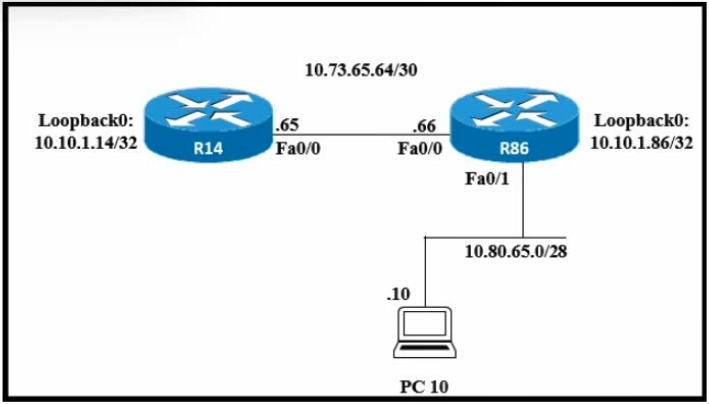
Refer to the exhibit. Router R14 is in the process of being configured. Which configuration must be used to establish a host route to a PC 10?
Key Takeaways
A host route always requires a /32 subnet mask (255.255.255.255) to distinguish it from network routes.
Learn how to configure a static host route to a specific device like PC 10 using the 255.255.255.255 subnet mask.
Common mistake: Selecting Option A because users confuse a /31 point-to-point link mask with a host route mask.
Expert Analysis
The question asks for the configuration to establish a host route to PC 10. In IP routing, a host route is defined by a subnet mask of all ones (255.255.255.255 or /32), which specifies that the destination address refers to a single, specific host rather than a network segment.
Let's analyze the syntax ip route <destination> <mask> <next-hop>:
- Option A: Uses mask 255.255.255.254 (/31). This creates a point-to-point link route, not a host route.
- Option B: Uses mask 255.255.255.255 (/32) with destination 10.80.65.10. This correctly targets the specific IP of PC 10. The next hop is 10.73.65.66, which is a valid adjacent router interface in typical topology contexts (e.g., R14 connecting to another router via a different subnet). This matches the definition of a host static route.
- Option C: Uses mask 0.0.0.255 (/24) and incorrectly swaps the destination and next-hop roles relative to standard static route syntax.
- Option D: Uses mask 255.0.0.0 (/8), which defines a Class A network route, not a host route.
Therefore, Option B is the only configuration that establishes a route to a single host address.
Exam Strategy
When asked about 'host' routes, immediately look for the 255.255.255.255 (or /32) mask. If the question asks for a default gateway or network route, look for 0.0.0.0 or a smaller mask like /24. Always verify the next-hop IP is reachable and distinct from the destination.
Frequently Asked Questions
What is a host route?
Why is a /31 mask incorrect for a host route?
Community Votes
100% of anonymous learners picked answer B. Votes are pick records left by other test-takers — they are not the verified answer.
Discussion 20 contributions
Compiled from public community threads and reader submissions, lightly edited for clarity. Handles and vote tallies are shown as recorded, and comments reflect the views of individual contributors.
From public community threads 20
-
VChatzi 👍 14I want my money back
-
learntstuff 👍 11stop complaining and research the answer. we all know some of the answers are wrong
-
Vikramaditya_J 👍 6 Answered BA host route always uses /32 (=255.255.255.255) subnet mask and it's syntax is: ip route <destination-ip-address> 255.255.255.255 <next-hop-ip-address> For example, to create a host route for the host with IP address 192.168.1.100 with a next-hop router IP address of 10.1.1.1, the following command can be used: ip route 192.168.1.100 255.255.255.255 10.1.1.1
-
gewe 👍 4B is correct
-
RidzV 👍 3 Answered BNo brainier. Route for specific Destination address should have mask of 255.255.255.255
Show 15 more comments
-
kennie0 👍 3i cant believe I pay for these answers picked by the owner of this site
-
ahmt 👍 3 Answered BB is correct ip route 10.80.65.10 255.255.255.255 10.73.65.66
-
oatmealturkey 👍 3 Answered BHow on Earth did you get D
-
drewsped 👍 2Bbbbbb Answers for recent batch of questions are dub
-
Tdawg1968 👍 2B - Route to host/Mask through first hop IP
-
Da_Costa 👍 2I fear for this answer, I don't know
-
j1mlawton 👍 2 Answered BBBBBBB
-
maximus_007 👍 1 Answered BThis answer took less than 5 seconds to answer. Why? It touches on your understanding of static routing which is one of the core fundamentals of the CCNA exam.
-
Yeeeeeeee 👍 1 Answered BAnswer is B. ip route <remote ip address> <subnetmask><next hop ip/exit interface>
-
WerWeissDasScho 👍 1i can't believe that i paid for this
-
lucantonelli93 👍 1 Answered BIt's B ! Please correct this answer
-
Rynurr 👍 1 Answered B"B" is the correct answer
-
tal10 👍 1 Answered Bb is the correct answer
-
papinski 👍 1 Answered BFirst hop is .66
-
bisiyemo1 👍 1 Answered BIt is B please.
Reader comments & corrections
No reader corrections yet — spotted an error or have a note? Share it below.
Related Analysis
Practice All 200-301 Questions
Access 220 questions with complete answers and detailed explanations.
View Full 200-301 Practice Test →