FileReader buffer read behavior in Java
Short answer
D The output file contains the full string '0123456789' because the code correctly writes only the number of characters actually read in each iteration.
Question
Key Takeaways
The core concept tested is how java.io.FileReader handles partial reads and what FileWriter writes; the common trap is assuming the entire buffer content (including stale data) is written instead of just the count returned by read().
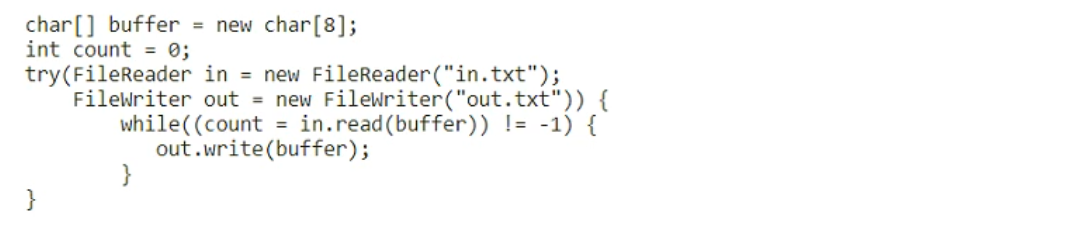
This question tests the behavior of FileReader when reading into a fixed-size char array buffer. It establishes that only the characters actually read are written to the output file, ignoring any leftover data from previous buffer fills.
Common mistake: Many learners choose option F (which is not listed in the provided A-E options but appears in comments) or assume all 8 chars are always written, failing to realize that `out.write(buffer, 0, count)` restricts output to the actual number of characters read.
Expert Analysis
Why the Answer Is Correct
The code uses a char[] buffer of size 8. The input file contains '0123456789' (10 characters). In the first iteration, in.read(buffer) reads the first 8 characters ('01234567') and returns 8. The code then executes out.write(buffer, 0, count), which writes exactly those 8 characters to out.txt. In the second iteration, in.read(buffer) reads the remaining 2 characters ('89') into the first two positions of the buffer and returns 2. The code then executes out.write(buffer, 0, 2), appending '89' to out.txt. The total content of out.txt becomes '0123456789'. Therefore, Option D is correct.
Why the Other Options Are Wrong
Option A (012345678) implies only 9 characters were written, which is incorrect as all 10 are read. Option B (01234567801234) suggests double writing or incorrect buffering logic. Option C (01234567) implies only the first chunk was written and the rest ignored. Option E (012345678901234) suggests garbage data or repeated writing. None of these match the precise byte/char count logic of read returning specific counts.
Community Comment Notes
Several commenters incorrectly claim the answer is 'F' (often citing '0123456789234567'), likely confusing this with a different version of the question where out.write(buffer) is used without the offset/count parameters, or misinterpreting the buffer reuse. One commenter correctly notes that running the program yields '0123456789', confirming that only the read characters are written. Another points out that if count is used correctly, the output length matches the input length.
Official Reference
https://docs.oracle.com/en/java/javase/17/docs/api/java.base/java/io/FileReader.html#read(char%5B%5D)
This link opens the official vendor documentation in a new tab.
Exam Strategy
Always check the arguments passed to write(). If it is write(buffer, 0, count), only count characters are written. If it is just write(buffer), the entire buffer is written, potentially including stale data from previous iterations.
Frequently Asked Questions
Why doesn't the second read overwrite the first output?
What happens if I use out.write(buffer) instead of out.write(buffer, 0, count)?
Discussion 8 contributions
Compiled from public community threads and reader submissions, lightly edited for clarity. Handles and vote tallies are shown as recorded, and comments reflect the views of individual contributors.
From public community threads 8
-
james2033 👍 3package q17; import java.io.FileNotFoundException; import java.io.FileReader; import java.io.FileWriter; import java.io.IOException; public class Q17 { public static void main(String[] args) throws Exception { char[] buffer = new char[8]; int count = 0; try (FileReader in = new FileReader("D:\\in.txt"); FileWriter out = new FileWriter("D:\\out.txt")) { while ((count = in.read(buffer)) != -1) { out.write(buffer); } } // catch (FileNotFoundException e) { // throw new RuntimeException(e); // } catch (IOException e) { // throw new RuntimeException(e); // } } } // Result: // 0123456789234567
-
j_jain 👍 2Correct answer is F Buffer already contains 01234567 and we have 89 left so next time it will replace 0 with 8 and 1 with 9. As there is no data left so it will write 89234567.
-
supersquax 👍 1Correct option is F, because the buffer is of size 8. Therefore, it can only read 8 characters at a time. First 8 digits in F are correct and the entire thing is of length 16. Although the first 8 digits in B and E are correct, the entire length doesn't add it. Doesn't make sense that the buffer first reads 8 chars, then 6 more in B or 7 more in E.
-
xplorerpj 👍 1Buffer only contains [0, 1, 2, 3, 4, 5, 6, 7] In second iteration, in.read(buffer) becomes "-1" . How is the answer F "0123456789234567" ? I ran the program & see only 01234567 in output file.
-
Tojose 👍 1the right option is F. 0123456789234567
Show 3 more comments
-
omegavalou 👍 2why is the right option F?
-
xplorerpj 👍 1Correct answer is F
-
meltedolive 👍 1right option is F
Reader comments & corrections
No reader corrections yet — spotted an error or have a note? Share it below.