Java Instant truncatedTo ChronoUnit MINUTES Result
Short answer
A The truncated login time is still before the logout time, so the else block prints "Can't logout".
Question
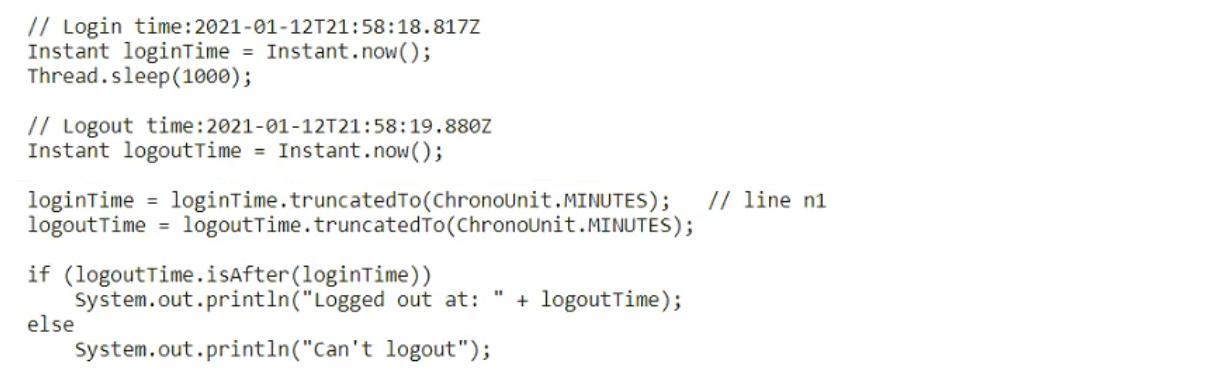
Key Takeaways
The key trap is confusing 'truncation' with 'rounding'; truncation always rounds down, making the login time earlier than logout time.
This question tests the behavior of Instant.truncatedTo() in Java 8+ datetime API. The correct result is determined by how truncating to minutes affects comparison logic.
Common mistake: Learners often choose D, assuming truncation rounds to the nearest minute or that seconds/nanoseconds are preserved, leading them to believe the times remain distinct enough for a successful logout message.
Expert Analysis
Why the Answer Is Correct
The code uses loginTime.truncatedTo(ChronoUnit.MINUTES). This method sets all fields smaller than minutes (seconds and nanoseconds) to zero. Since both loginTime and logoutTime occur within the same minute (21:58), truncating loginTime results in 2021-01-12T21:58:00Z. The logoutTime remains 2021-01-12T21:58:19.880Z. The condition if (!loginTime.isBefore(logoutTime)) checks if login is NOT before logout. Since 21:58:00 IS before 21:58:19, the condition is false, and the else block executes, printing "Can't logout".
Why the Other Options Are Wrong
Option B and D represent the actual timestamp values but ignore the program flow logic; they would only print if the condition were true. Option C suggests a compilation error, but truncatedTo is a valid method on Instant accepting ChronoUnit. The syntax is correct.
Community Comment Notes
Most users correctly identified A as the answer. As minhdev noted, "truncatedTo coverts the logoutTime=LoginTime => else is reached," highlighting the logical outcome. James2033 provided a full trace showing the timestamps confirm the 'isBefore' relationship holds true.
Official Reference
This link opens the official vendor documentation in a new tab.
Exam Strategy
Always trace the value changes step-by-step. When truncatedTo is used, remember it chops off lower units, potentially making two distinct times equal or altering their order relative to expectations.
Frequently Asked Questions
Does truncatedTo round or truncate?
Why doesn't it print the logged out message?
Community Votes
100% of anonymous learners picked answer A. Votes are pick records left by other test-takers — they are not the verified answer.
Discussion 5 contributions
Compiled from public community threads and reader submissions, lightly edited for clarity. Handles and vote tallies are shown as recorded, and comments reflect the views of individual contributors.
From public community threads 5
-
minhdev 👍 3A is correct: truncatedTo() coverts the logoutTime=LoginTime => else is reached.
-
james2033 👍 2 Answered Apackage q04; import java.time.Instant; import java.time.temporal.ChronoUnit; public class Q04 { public static void main(String[] args) throws InterruptedException { // Login time: 2021-01-12T21:58:18.817Z Instant loginTime = Instant.now(); Thread.sleep(1000); // Logout time: 2021-01-12T21:58:19.880Z Instant logoutTime = Instant.now(); loginTime = loginTime.truncatedTo(ChronoUnit.MINUTES); // line n1 logoutTime = logoutTime.truncatedTo(ChronoUnit.MINUTES); if (logoutTime.isAfter(loginTime)) { System.out.println("Logged out at: " + logoutTime); } else { System.out.println("Can't logout"); } } } // Result: // Can't logout
-
nickpati92 👍 1 Answered AtruncatedTo: Returns a copy of this Instant truncated to the specified unit. Truncating the instant returns a copy of the original with fields smaller than the specified unit set to zero. The fields are calculated on the basis of using a UTC offset as seen in toString. For example, truncating with the MINUTES unit will round down to the nearest minute, setting the seconds and nanoseconds to zero.
-
Uteman 👍 2Outputs Can't logout
-
xplorerpj 👍 1A is correct
Reader comments & corrections
No reader corrections yet — spotted an error or have a note? Share it below.