Java Text Blocks and String Equality
Short answer
D True:false:false:false
Question
Key Takeaways
The common trap is assuming text blocks are trimmed like standard strings; they actually include a newline at the end if content follows the closing quotes on a new line.
This question tests the behavior of Java text blocks regarding implicit newlines and string equality. The correct answer is D because text blocks preserve trailing newlines unless explicitly removed, causing mismatches with standard strings.
Common mistake: Many learners choose C, incorrectly assuming that text blocks are automatically trimmed or that interning affects the structural comparison of the block's content.
Expert Analysis
Why the Answer Is Correct
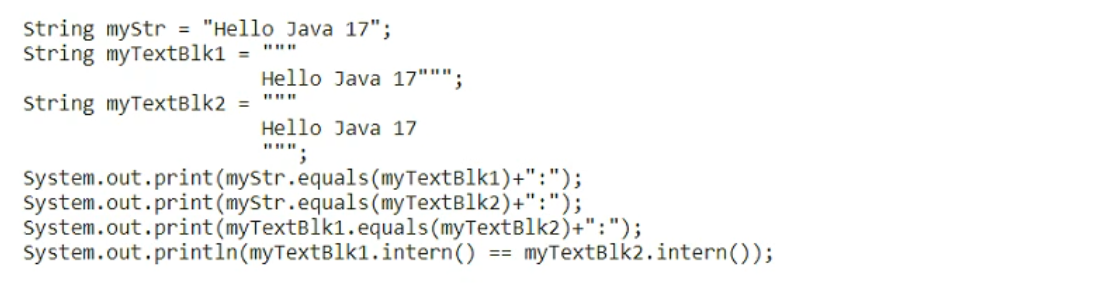
The code compares a standard string myStr with two text blocks. myTextBlk1 has its closing delimiter on the same line as the content, so it does not add an implicit newline, making it equal to myStr. myTextBlk2 has the closing delimiter on a new line, which adds an implicit newline character to the content, making it unequal to myStr. The final comparison involves String.intern, but since the objects are already distinct in value, interning does not make them equal if their values differ. Thus, the output is true:false:false:false.
Why the Other Options Are Wrong
Option A assumes all comparisons are true, ignoring the newline difference. Option B assumes the second comparison is false but the third is true, failing to recognize that myTextBlk2's value differs from myTextBlk1. Option C incorrectly assumes that intern forces equality or that text blocks are always trimmed.
Community Comment Notes
Most users correctly identified D by testing the code. As one user noted, "The first comparison is true because myStr and myTextBlk1 are equal... The second and third comparisons are false because myTextBlk2 includes a newline character." Another user confirmed, "D tested correct" after running the snippet.
Exam Strategy
When working with text blocks, always check the position of the closing triple quotes. If they are on a new line, a newline character is included in the string value.
Frequently Asked Questions
Why does myTextBlk1 equal myStr but myTextBlk2 does not?
Does String.intern() make different text blocks equal?
Community Votes
100% of anonymous learners picked answer D. Votes are pick records left by other test-takers — they are not the verified answer.
Discussion 7 contributions
Compiled from public community threads and reader submissions, lightly edited for clarity. Handles and vote tallies are shown as recorded, and comments reflect the views of individual contributors.
From public community threads 7
-
supersquax 👍 2right option is D. copy paste into https://editor.javadevjournal.com/java-17-compiler.html and see for yourself: public class Main{ public static void main(String[] args){ String myStr = "Hello Java 17"; String myTextBlk1 =""" Hello Java 17"""; String myTextBlk2 =""" Hello Java 17 """; System.out.print(myStr.equals(myTextBlk1)+":"); System.out.print(myStr.equals(myTextBlk2)+":"); System.out.print(myTextBlk1.equals(myTextBlk2)+":"); System.out.println(myTextBlk1.intern() == myTextBlk2.intern()); } }
-
testostaws 👍 1Prints true:false:false:false The first comparison is true because myStr and myTextBlk1 are equal (text block doesn't include trailing new lines if there is no content after the last quote). The second and third comparisons are false because myTextBlk2 includes a newline character at the end, making it different from myStr and myTextBlk1. The last comparison is false because, despite interning, myTextBlk1 and myTextBlk2 are not equal due to the newline character in myTextBlk2.
-
Tojose 👍 1I think the right option is C. true:false:true:true
-
Bharadwaj240796 👍 1Option D. true:false:false:false is correct!!
-
meltedolive 👍 2right option is D.
Show 2 more comments
-
c6437d5 👍 2 Answered DD tested correct
-
xplorerpj 👍 1 Answered DD is correct answer
Reader comments & corrections
No reader corrections yet — spotted an error or have a note? Share it below.