Why Does Linux Report 'No Space Left on Device' When Disk Space Is Available?
A Linux engineer receives the following notification from a system: cp: cannot create regular file '/app/appdata.tar': No space left on device The engineer obtains the following output: Which of the following describes the state of the filesystem based on this output? - 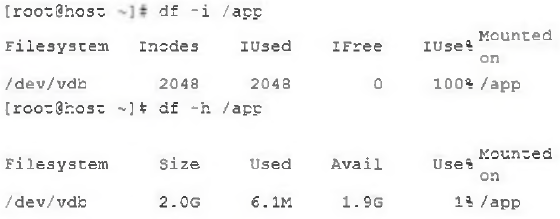
Community Votes
100% of anonymous learners picked answer B. Votes are pick records left by other test-takers — they are not the verified answer.
Community Insight
This question tests the difference between block-space exhaustion and inode exhaustion, with the trap being that engineers often check disk space but forget to check inode usage.
The correct answer is B: the filesystem has run out of inodes, not disk space. Community consensus confirms that comparing df -h with df -i is the key diagnostic when Linux reports ENOSPC despite available storage.
The most likely wrong choice is D, because 'no space left on device' is naturally associated with disk space; however, df -h shows 1.9G free, so the real cause is depleted inodes, which limits file creation.
Community Discussion (3 comments)
Comments & Corrections
No comments yet — spotted an error or have a note? Share it below.
Expert Analysis
Why the Answer Is Correct
B is correct because the df -i /app output shows the filesystem has exhausted all available inodes. Every file or directory consumes an inode, so once inodes are used up, Linux returns the ENOSPC error—even when free disk blocks remain. Commenter [1] skillfully points out that comparing df -h (displaying 1.9G free) with df -i (showing no inodes left) proves the issue is inode exhaustion. This matches the error message exactly: the kernel cannot create a regular file because no inode is available, not because there is no space in the data blocks.
Why the Other Options Are Wrong
A is incorrect because a read-only mount would produce a different error such as 'Read-only file system' and would not be related to inode counts. C is incorrect because the image shows /app is mounted and both df commands display output for it; an incorrect mount location would not show the same filesystem statistics. D is incorrect because df -h explicitly shows available space, so the filesystem has not consumed all data blocks; the issue is metadata exhaustion, not block space exhaustion. Commenter [2] also notes that the original option contains a typo—'modes' should be 'inodes'—which reinforces that inode depletion is the concept being tested.
Community Comment Notes
Commenter [1] provides the clearest explanation: df -i /app outputs indicate all available inodes are used, while df -h /app shows plenty of space. Commenter [2] agrees and points out the typo in the option text. Commenter [3] simply confirms the answer is B. The community is unified on this answer, and the reasoning focuses on verifying filesystem health with both space and inode usage commands before troubleshooting.
Official Reference
Exam Strategy
When you see ENOSPC in a Linux performance question, always check both disk usage and inode usage. In the exam, look for the df -h and df -i outputs and compare the 'IUse%' and 'Use%' columns to determine whether the issue is block space or inode exhaustion.