How to enforce MFA for AWS CLI EC2 commands?
An AWS account administrator created an IAM group and applied the following managed policy to require that each individual user authenticate using multi-factor authentication:
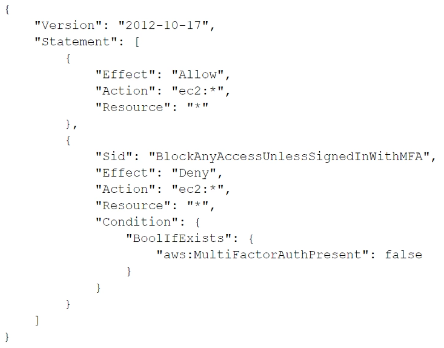 After implementing the policy, the administrator receives reports that users are unable to perform Amazon EC2 commands using the AWS CLI.
What should the administrator do to resolve this problem while still enforcing multi-factor authentication?
After implementing the policy, the administrator receives reports that users are unable to perform Amazon EC2 commands using the AWS CLI.
What should the administrator do to resolve this problem while still enforcing multi-factor authentication?
Community Insight
This item tests how aws:MultiFactorAuthPresent is populated for CLI sessions and the trap of treating it as an editable policy value rather than an AWS-generated request context key.
The IAM policy blocks EC2 CLI actions when aws:MultiFactorAuthPresent is false, so long-term access keys cannot satisfy it. The page establishes that users must obtain MFA-authenticated temporary STS credentials with aws sts get-session-token before making CLI calls.
Most candidates pick A and try to set aws:MultiFactorAuthPresent to true, but that condition key is supplied by AWS after MFA authentication and cannot be forced by editing the policy.
Community Discussion (5 comments)
Comments & Corrections
No comments yet — spotted an error or have a note? Share it below.
Expert Analysis
Why the Answer Is Correct
The policy denies EC2 commands when aws:MultiFactorAuthPresent is false or absent. Long-term AWS CLI access keys are not MFA-authenticated, so every EC2 call made directly with those keys still carries a false or absent MFA context. Running aws sts get-session-token with the user's MFA serial number and current token code returns temporary credentials that include MFA context. Any later CLI call using those temporary credentials satisfies the condition, so permitted EC2 actions proceed while the original deny remains in place.Why the Other Options Are Wrong
A is invalid because aws:MultiFactorAuthPresent is a request context key populated by AWS after MFA authentication, not a value an administrator can set to true in a policy. C could enforce MFA through a SAML identity provider, but it requires federated API/CLI access and does not directly fix the existing IAM-user CLI workflow described here. D is unnecessarily complex and risky: adding sts:AssumeRole to NotAction weakens the original deny statement and shifts enforcement to a new role trust policy instead of directly obtaining MFA-authenticated session credentials for CLI calls.Community Comment Notes
All visible commenters settle on B, and bigdata2ml points directly to the AWS STS GetSessionToken API reference. giancesarini2023 explains that the command "generates temporary MFA-authenticated credentials", which is exactly the behavior needed for the aws:MultiFactorAuthPresent condition. gonzales captures the operational rule: "MFA for CLI = temporary credentials (STS), not long-term access keys." Liongeek also paraphrases the required aws sts get-session-token invocation with --serial-number and --token-code.Official Reference
Exam Strategy
When a CLI/API user is blocked by an MFA condition key, look for the STS operation that returns MFA-authenticated temporary credentials instead of modifying the condition. In SCS-C03, distinguish long-term IAM user keys from session credentials and check whether the deny policy already allows sts:GetSessionToken.
Frequently Asked Questions
Why do long-term AWS CLI access keys fail when the IAM policy requires MFA?
Long-term access keys are not MFA-authenticated, so aws:MultiFactorAuthPresent stays false and the deny applies. STS GetSessionToken returns temporary MFA-backed credentials.
Can adding sts:AssumeRole to NotAction in the MFA deny policy solve CLI access?
It can shift enforcement to a role trust policy, but it changes the architecture and can weaken the original deny. Option B's GetSessionToken flow directly supplies MFA-authenticated CLI credentials.
Related Analysis
Practice All SCS-C03 Questions
Access 86 questions with complete answers and detailed explanations.
View Full SCS-C03 Practice Test →