How Many Alerts for SharePoint File Uploads in Purview?
Short answer
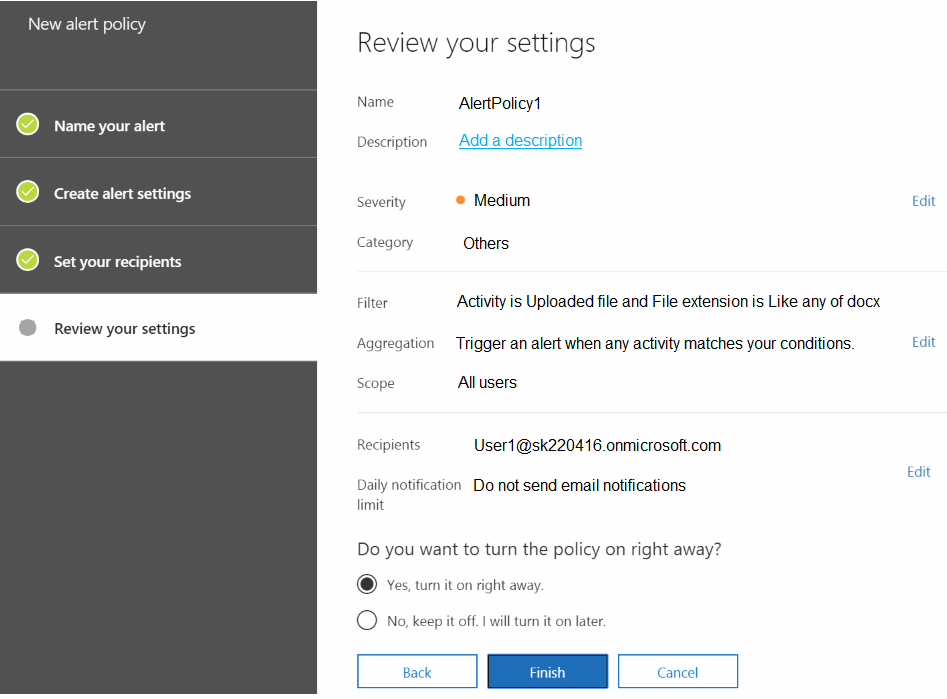
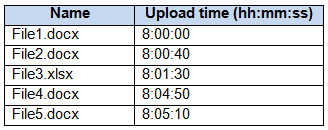
B The policy creates two alerts: .xlsx is filtered out, .docx uploads within one minute aggregate into one alert, and the later .docx upload creates a second.
Question
 -
- 
Key Takeaways
The exam tests two conditions at once: the .docx file-name filter and Purview's one-minute alert aggregation; the trap is counting every .docx upload as a separate alert or including the .xlsx file.
This SC-400 question tests how a Microsoft Purview alert policy, a .docx file-name filter, and one-minute alert aggregation determine the number of alerts after User1 uploads files to SharePoint Site1. The page establishes that the correct count is two: the .xlsx file is ignored, and the matching .docx uploads form one aggregated alert plus a later separate alert.
Common mistake: The most common wrong choice is D (4), which counts each .docx upload as its own alert and ignores the one-minute aggregation rule that combines matching events.
Expert Analysis
Why the Answer Is Correct
The alert policy in the exhibit is scoped to SharePoint upload activity and filters on.docx files, so File3.xlsx cannot trigger an alert. Microsoft Purview alert policies use alert aggregation: matching events that occur within one minute are added to the same alert instead of creating separate alerts. The.docx uploads that fall inside the same one-minute window therefore produce one alert, while the later.docx upload at 08:05:10 falls outside that window and creates a second alert. That gives two alerts total, matching option B. This is also why community users such as Dools and 46a982f land on two after applying the one-minute rule and excluding the.xlsx file.
Why the Other Options Are Wrong
Option A (1) would require the later.docx upload to be part of the same aggregation window, but it occurs after the one-minute window and is not merely a duplicate event. Option D (4), favored by thetootall, Ruslan23, and SDiwan, counts every.docx file as a separate alert and ignores alert aggregation entirely. Option C (3) typically comes from either including the.xlsx upload or splitting the aggregated.docx events incorrectly. Option E (5) counts all five uploads, including the filtered.xlsx file, so it overcounts both the filter and the aggregation behavior. The exhibit's file-name condition and Purview's aggregation rule are the two facts that eliminate these choices.
Community Comment Notes
JimboJones99 gives the clearest explanation of aggregation, noting that another matching event "within one minute" adds details to the existing alert rather than creating a new one. thetootall, Ruslan23, and SDiwan argue for four alerts, but their counts treat each.docx upload as independent and skip the aggregation behavior. Lukas2100 reaches two, although the reasoning mentions a five-minute range; the underlying one-minute aggregation and the excluded.xlsx file still support two. Dools and 46a982f directly cite the one-minute rule and the.xlsx filter, and 46a982f links to Microsoft's alert aggregation documentation. predator8149 suggests one alert based on five-minute consolidation, but that would incorrectly fold the later.docx event into the first alert.
Official Reference
This link opens the official vendor documentation in a new tab.
Exam Strategy
Treat the file-name filter and the aggregation interval as two separate gates: first remove non-matching files like .xlsx, then group the remaining matching events by the one-minute aggregation window before counting alerts. This prevents the common D=4 trap of counting each .docx upload individually.
Frequently Asked Questions
Why doesn't File3.xlsx generate an alert?
Why do multiple .docx uploads produce only one alert?
Community Votes
61% of anonymous learners picked answer B. Votes are pick records left by other test-takers — they are not the verified answer.
Discussion 9 contributions
Compiled from public community threads and reader submissions, lightly edited for clarity. Handles and vote tallies are shown as recorded, and comments reflect the views of individual contributors.
From public community threads 9
-
JimboJones99 👍 8 Answered BWhen one event occurs which matches a policy, an alert is generated and displayed on the Alerts page and a notification is sent. If another event matching the same policy occurs within one minute of the first event, then Compliance Manager adds details about the additional event on the Events log tab of the existing alert instead of triggering a new alert. The goal of alert aggregation is to help reduce alert "fatigue" and let you focus and take action on fewer alerts. Taken from: https://learn.microsoft.com/en-us/purview/compliance-manager-alert-policies#alert-aggregation-for-multiple-events-within-one-minute By this logic, 2 alerts generated. The .xlsx will not generate an alert as it is not in scope of the policy.
-
Lukas2100 👍 3 Answered BWhen triggered alerts are within 5 mins then I think the answer should be 2. Because: File1.docx, File2.docx and File4.docx are in a range of 5 mins = 1 File3.xlsx ist not triggered File5.docx ist triggered at 08:05:10 and this is out of the initial triggered alert at 08:00:00 = +1 So I think the answer is B = 2
-
thetootall 👍 3 Answered D4 alerts, 1 for each file Filter is for .docx files. Dont be confused by the time, the trigger is Upload activity
-
Dools 👍 2 Answered BAnswer is 2 (no alert for xlsx file) When multiple events that match the conditions of an alert policy occur with one minute, they're added to an existing alert by a process called alert aggregation.
-
e5ba977 👍 2Subscription Aggregation interval
Show 4 more comments
-
46a982f 👍 1 Answered BThere is interval of 1 minute for alert aggregation. https://learn.microsoft.com/en-us/purview/compliance-manager-alert-policies#alert-aggregation-for-multiple-events-within-one-minute Additionally, the XLSX file is filtered out.
-
predator8149 👍 1Answer is 1. As the alert triggered within 5 mins will be consolidated in a single alert.
-
SDiwan 👍 3 Answered D4 alerts, 1 for each file
-
Ruslan23 👍 3 Answered DD is the correct answer.
Reader comments & corrections
No reader corrections yet — spotted an error or have a note? Share it below.