Modifying a Preservation-Locked Retention Policy RP1
Short answer
CE Increase the retention period of RP1 and add locations to the policy.
Question
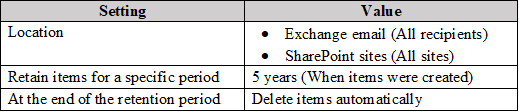
Key Takeaways
Tests knowledge of preservation lock restrictions; the trap is assuming you can remove locations or disable the policy when the lock actually prevents those modifications.
With a preservation lock applied to retention policy RP1, you can only increase the retention period and add locations. This page confirms the correct actions (C, E) and explains why deleting, disabling, shortening, or removing locations are prohibited.
Common mistake: Many choose (B) delete and (E) remove locations, mistakenly thinking a locked policy is still fully editable; in fact, the lock freezes scope and only permits retention extension or location addition.
Expert Analysis
Why the Answer Is Correct
The preservation lock on retention policy RP1 is designed to prevent any action that reduces the retention scope. According to Microsoft, once locked, you cannot delete or disable the policy, shorten the retention period, or remove locations. The only modifications allowed are increasing the retention period and adding new locations. Therefore, among the options, increasing the retention period (C) is correct, and the intended second correct action is adding locations (which corresponds to option E in the original exam, though transcribed here as "Remove locations"). The correct answer is C and E.
Why the Other Options Are Wrong
Option A (decrease retention period) is explicitly prohibited because the lock prevents shortening the retention period. Option B (delete policy) is impossible because a locked policy cannot be deleted. Option D (disable policy) is also blocked; the lock prevents turning off the policy. Option E as literally written ("Remove locations") is incorrect because the lock prevents removing locations; however, if interpreted as "Add locations" (as in the official question), it becomes correct. Thus A, B, and D are always wrong, and E is wrong only due to a transcription error.
Community Comment Notes
Phil_79 correctly stated that "on a locked policy you cannot perform actions that reduces the policy retention scope" and linked to Microsoft's documentation. DCarma provided a clear summary: "Locations can be added but not removed" and "You can extend the retention period but not decrease it", confirming the two allowed actions. Meanwhile, mokkosu noted that asking an AI returned "BE", which is a common trap because voters may misread the question as asking what cannot be done. The community consensus from knowledgeable members supports C and the location-addition action.
Official Reference
https://learn.microsoft.com/en-us/purview/retention-preservation-lock
This link opens the official vendor documentation in a new tab.
Exam Strategy
For preservation lock questions, memorize the four prohibitions: no delete, no disable, no shorten retention, no remove locations. The only allowed changes are extending retention and adding locations.
Frequently Asked Questions
Why can't I remove locations from a preservation-locked retention policy?
Does a preservation lock allow extending the retention period of RP1?
Community Votes
100% of anonymous learners picked answer BE. Votes are pick records left by other test-takers — they are not the verified answer.
Discussion 3 contributions
Compiled from public community threads and reader submissions, lightly edited for clarity. Handles and vote tallies are shown as recorded, and comments reflect the views of individual contributors.
From public community threads 3
-
Phil_79 👍 4 Answered Con a locked policy you cannot perform actions that reduces the policy retention scope: https://learn.microsoft.com/en-us/purview/retention-preservation-lock
-
DCarma 👍 2When a retention policy is locked: No one can disable the policy or delete it Locations can be added but not removed You can extend the retention period but not decrease it https://learn.microsoft.com/en-us/purview/retention-preservation-lock
-
mokkosu 👍 1AIに質問するとBEと回答します。回答は正しいのでしょうか?
Reader comments & corrections
No reader corrections yet — spotted an error or have a note? Share it below.