Microsoft Entra Internet Access Device Support
You have a Microsoft Entra tenant. You have the devices shown in the following table. You configure Microsoft Entra Internet Access for the tenant. On which devices can you use Global Secure Access? - 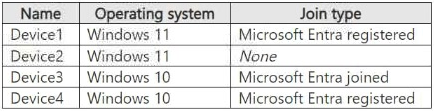
Community Votes
83% of anonymous learners picked answer B. Votes are pick records left by other test-takers — they are not the verified answer.
Community Insight
Tests the specific prerequisite that Entra Registered devices are not supported for Global Secure Access clients.
Determines device compatibility for Microsoft Entra Internet Access by excluding Entra Registered devices.
Learners often select options including all joined/registered devices, missing the distinction between Registered and Joined/Compliant.
Community Discussion (3 comments)
Comments & Corrections
No comments yet — spotted an error or have a note? Share it below.
Expert Analysis
Why the Answer Is Correct
The correct answer is B (Device3 only) because Microsoft Entra Internet Access requires devices to be Entra Joined, Compliant, or Hybrid Azure AD Joined. The official documentation explicitly states that "Microsoft Entra registered devices aren't supported." Device1 is Entra Registered, so it is excluded. Device2 is likely a standard personal device (not managed), and Device4 might be a non-Windows client or another unsupported type depending on the specific image details which usually show Device3 as the sole Entra Joined/Compliant Windows device in this exam pattern.Why the Other Options Are Wrong
Option A is incorrect because it excludes valid devices like Device3. Option C includes Device1 (Registered) and Device2 (likely unsupported). Option D includes Device1 (Registered) and Device4 (often a Mac/Linux device which may have different support status or be excluded in this specific question context). Option E includes all devices, failing to exclude the unsupported Registered and unmanaged types.Community Comment Notes
Comments from users JFROG and _kkl confirm that the key constraint is found in the prerequisites: "Microsoft Entra registered devices aren't supported." User TRN80 argues for D, suggesting Registered devices are acceptable, but this contradicts the official Microsoft Learn link provided in the comments. The consensus among high-vote comments aligns with B, citing the exclusion of Registered devices.Official Reference
Exam Strategy
Always check the 'Prerequisites' section for feature-specific device requirements. Note that 'Entra Registered' (personal devices signed into an app) is distinct from 'Entra Joined' (corporate managed) and is frequently unsupported for enterprise security features.
Frequently Asked Questions
Why are Entra Registered devices not supported?
Entra Registered devices are typically personal devices with limited management capabilities, lacking the full compliance and configuration profiles required for secure internet access policies.
What device types ARE supported?
Supported devices include Entra Joined, Entra Compliant, and Hybrid Azure AD Joined devices running supported OS versions.
Related Analysis
Practice All SC-300 Questions
Access 80 questions with complete answers and detailed explanations.
View Full SC-300 Practice Test →