Conditional Access Template Exclusions for Policy Creator
Short answer
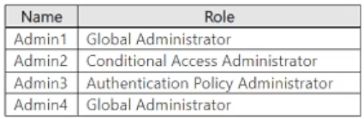
C Admin1, Admin2, and Admin3 are required to use MFA because Admin4, the policy creator, is automatically excluded when using a predefined template.
Question
Key Takeaways
The core concept tested is the automatic exclusion of the policy creator when using predefined CA templates, a common trap where candidates assume all matching roles are affected.
This question tests the behavior of Microsoft Entra ID Conditional Access policies created from predefined templates. It establishes that the user creating the policy is automatically excluded to prevent lockout.
Common mistake: Candidates often select D (All admins) because they miss the implicit exclusion rule or assume MFA is enforced on everyone with admin privileges regardless of creation context.
Expert Analysis
Why the Answer Is Correct
When a Conditional Access policy is created from a predefined template (such as 'Require multifactor authentication for Azure management'), Microsoft Entra ID automatically adds an exclusion for the user who created the policy. This safety mechanism prevents the administrator from being locked out of their own account if the new policy introduces a blocking condition. In this scenario, Admin4 created Policy1; therefore, Admin4 is excluded from the enforcement of Policy1. The policy applies to the other users in the specified roles (Admin1, Admin2, Admin3), requiring them to use MFA.
Why the Other Options Are Wrong
Option A is incorrect because it excludes Admin1, who is a Global Administrator and not the creator, so they must comply. Option B is incorrect because it includes Admin4 (the creator, who is excluded) and excludes Admin2 and Admin3, who are also subject to the policy. Option D is incorrect because it fails to account for the automatic exclusion of the policy creator (Admin4).
Community Comment Notes
The community consensus heavily favors C, with comments explaining the exclusion logic. As one commenter noted, "when you create CA policies from template the current user who is creating them is always excluded." Another user clarified that "Admin4 (Global Administrator, but POLICY CREATOR) → ❌ Not affected." Some users argued for D, stating the question lacks explicit context, but the standard behavior for template-based policies supports the exclusion.
Exam Strategy
Always check if a Conditional Access policy is based on a template. If it is, remember that the creator is implicitly excluded. Do not assume that all users matching the role criteria are included without verifying exclusion conditions.
Frequently Asked Questions
Why is Admin4 excluded from MFA in this scenario?
Does this exclusion apply to manually created policies?
Community Votes
72% of anonymous learners picked answer C. Votes are pick records left by other test-takers — they are not the verified answer.
Discussion 7 contributions
Compiled from public community threads and reader submissions, lightly edited for clarity. Handles and vote tallies are shown as recorded, and comments reflect the views of individual contributors.
From public community threads 7
-
armid 👍 2 Answered Cwhen you create CA policies from template the current user who is creating them is always excluded. Hopefully this is what the question is going for
-
rvln7 👍 1 Answered CWhen a Conditional Access policy is created from a template, the user creating the policy is automatically excluded to prevent them from being inadvertently locked out. This exclusion applies specifically when using predefined TEMPLATES. In your scenario, since Admin4 created Policy1 using the "Require multifactor authentication for Azure management" TEMPLATE, Admin4 would be excluded from the policy. Therefore, the revised answer would indeed be: C. Admin1, Admin2, and Admin3 only If the Conditional Access policy is not created from a template, the user who creates the policy is not automatically excluded.
-
rvln7 👍 1 Answered CAdmin1 (Global Administrator) → ✅ Affected (requires MFA) Admin2 (Conditional Access Administrator) → ✅ Affected (requires MFA) Admin3 (Authentication Policy Administrator) → ✅ Affected (requires MFA) Admin4 (Global Administrator, but POLICY CREATOR) → ❌ Not affected - Conditional Access policies do not apply to the user who creates them (Admin4), until the next sign-in session after policy creation.
-
YesPlease 👍 1 Answered BAnswer B) Admin1 and Admin4 only If DEFAULT SECURITY was still in place, then ALL administrators will have MFA set to ENABLED. However, since a Conditional Access Policy is being used, then you can only go by the one conditional access policy and the roles listed here that will actually have access to the Template Management. In this case, only the Global Admins will have guaranteed access to it.
-
59e8fdb 👍 1 Answered DD is correct in case the admin is not excluded from this policy which does not states anywhere that Admin 4 is excluded. Again Microsoft lacking of context to the question asked
Show 2 more comments
-
d1e85d9 👍 1 Answered CC. Admin1, Admin2, and Admin3 only
-
PrismaConsultores 👍 1 Answered BAdmin2 and Admin3 not have access
Reader comments & corrections
No reader corrections yet — spotted an error or have a note? Share it below.
Related Analysis
Practice All SC-300 Questions
Access 80 questions with complete answers and detailed explanations.
View Full SC-300 Practice Test →