Microsoft Entra PIM for Groups Eligibility
Short answer
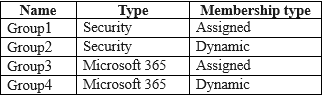
C Group1 and Group3 are eligible for PIM because they are static cloud-created groups, whereas dynamic and synchronized groups are unsupported.
Question
Key Takeaways
Tests the distinction between eligible and ineligible group types in PIM; the trap is assuming all group categories, including synced or dynamic ones, support privileged access management.
Determines which Microsoft Entra groups qualify for Privileged Identity Management (PIM) activation. The correct answer identifies that only static Security and Microsoft 365 groups are supported, excluding dynamic and synchronized types.
Common mistake: Learners often select options including Group4 (synchronized) or Group2 (dynamic), failing to recall that PIM for Groups does not support these specific provisioning methods.
Expert Analysis
Why the Answer Is Correct
Privileged Identity Management (PIM) for Groups supports Microsoft Entra security groups and Microsoft 365 groups, provided they are created directly within the cloud environment. Static groups allow for the assignment of roles and the activation of privileges over time, which is the core function of PIM. Therefore, Group1 (Security) and Group3 (Microsoft 365) are the only eligible candidates.
Why the Other Options Are Wrong
Group2 is a Dynamic Group, and Group4 is Synchronized from on-premises. Microsoft documentation explicitly states that dynamic groups and groups synchronized via Azure AD Connect cannot be enabled for use with PIM for Groups because their membership is managed automatically by rules or source systems, preventing manual role assignment workflows required by PIM.
Community Comment Notes
Community consensus strongly supports option C. Users cite official Microsoft Learn documentation confirming that 'Any Microsoft Entra security group and any Microsoft 365 group (except dynamic groups and groups synchronized from on-premises environment) can be enabled in PIM for Groups.' One user noted this as a key exclusion criterion.
Official Reference
This link opens the official vendor documentation in a new tab.
Exam Strategy
Memorize the exclusions for PIM features: Dynamic Groups and On-Premises Synchronized Groups are almost always incorrect when asked about eligibility for cloud-native governance tools like PIM or Access Reviews.
Frequently Asked Questions
Why can't dynamic groups be used with PIM?
Can synchronized groups be enabled in PIM?
Community Votes
100% of anonymous learners picked answer C. Votes are pick records left by other test-takers — they are not the verified answer.
Discussion 4 contributions
Compiled from public community threads and reader submissions, lightly edited for clarity. Handles and vote tallies are shown as recorded, and comments reflect the views of individual contributors.
From public community threads 4
-
a6792d4 👍 7Any Microsoft Entra security group and any Microsoft 365 group (except dynamic groups and groups synchronized from on-premises environment) can be enabled in PIM for Groups. So C.
-
JanioHSilva 👍 3 Answered Chttps://learn.microsoft.com/en-us/entra/id-governance/privileged-identity-management/concept-pim-for-groups
-
Blakkaboy69 👍 2source https://learn.microsoft.com/en-us/entra/id-governance/privileged-identity-management/concept-pim-for-groups Groups in Microsoft Entra ID can be classified as either role-assignable or non-role-assignable. Additionally, any group can be enabled or not enabled for use with Microsoft Entra Privileged Identity Management (PIM) for Groups. These are independent properties of the group. Any Microsoft Entra security group and any Microsoft 365 group (except dynamic groups and groups synchronized from on-premises environment) can be enabled in PIM for Groups. The group doesn't have to be role-assignable group to be enabled in PIM for Groups.
-
spatrick 👍 1Groups in Microsoft Entra ID can be classified as either role-assignable or non-role-assignable. Additionally, any group can be enabled or not enabled for use with Microsoft Entra Privileged Identity Management (PIM) for Groups. These are independent properties of the group. Any Microsoft Entra security group and any Microsoft 365 group (except dynamic groups and groups synchronized from on-premises environment) can be enabled in PIM for Groups. The group doesn't have to be role-assignable group to be enabled in PIM for Groups.
Reader comments & corrections
No reader corrections yet — spotted an error or have a note? Share it below.
Related Analysis
Practice All SC-300 Questions
Access 80 questions with complete answers and detailed explanations.
View Full SC-300 Practice Test →