Which Devices Support Global Secure Access Client?
You have a Microsoft Entra tenant.
You have the devices shown in the following table.
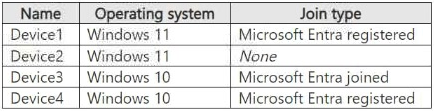 You configure Microsoft Entra Internet Access for the tenant.
On which devices can you use Global Secure Access?
You configure Microsoft Entra Internet Access for the tenant.
On which devices can you use Global Secure Access?
Community Insight
The tested concept is the Global Secure Access client prerequisite list; the trap is assuming that any Windows device with any kind of Entra association (including Microsoft Entra registered) qualifies.
Microsoft Entra Internet Access is delivered through the Global Secure Access client, which has strict device prerequisites. This question establishes that only devices meeting the Entra join-state and supported Windows OS requirements can run the client.
The most common wrong answer is D (Device1, Device3, Device4), chosen because learners believe Microsoft Entra registered devices are supported. Microsoft's Windows client prerequisites explicitly exclude Entra registered devices, which are supported only in preview and are not valid for the exam's intended answer.
Community Discussion (10 comments)
Comments & Corrections
No comments yet — spotted an error or have a note? Share it below.
Expert Analysis
Why the Answer Is Correct
Option B, Device3 only, is correct because the Global Secure Access (Windows) client prerequisites state that the device must be Microsoft Entra joined or Microsoft Entra hybrid joined in the onboarded tenant and must run a supported 64-bit Windows 10 or Windows 11 edition. Devices that are only Microsoft Entra registered do not satisfy the requirement documented in the how-to-install-windows-client article, so any device in the table that is registered or otherwise not joined/hybrid joined is disqualified. This leaves only the single device that is Entra joined (or hybrid joined) on a supported Windows build — Device3.Why the Other Options Are Wrong
Options A, C, and D all include devices that fail at least one prerequisite, most commonly because they are Microsoft Entra registered rather than joined or hybrid joined, or because the OS/build is not on the supported list. Option E is doubly wrong because it implies every listed device qualifies regardless of join state or operating system. The distractor design deliberately exploits the confusion between "associated with Entra in some way" and the specific join-state requirement for the client.Community Comment Notes
Several commenters converged on B, with JFROG stating "I'm going for option B. Look at the Prerequisites where it says Microsoft Entra registered devices aren't supported" and krzkrzkra answering "B. Device3 only". One commenter, mamadou00225, argued for C by quoting a broader prerequisite listing "Microsoft Entra joined, Microsoft Entra hybrid joined, or Microsoft Entra registered," and hitten_za made a similar point, but the registered option is marked preview and is not the supported baseline the exam expects. Gattardi correctly noted the question is ambiguous because "Global Secure access can be used in 2 different ways. Client-Based Access and Clientless Access," yet the client-based install path is what the exam is testing.Official Reference
Exam Strategy
Always check the Global Secure Access client prerequisite matrix: supported OS + Entra join state (joined or hybrid joined). Treat "Microsoft Entra registered" as unsupported unless the question explicitly states the preview feature is enabled.
Frequently Asked Questions
Are Microsoft Entra registered devices supported by the Global Secure Access client?
No for exam purposes. The Windows client prerequisites require Microsoft Entra joined or hybrid joined; Entra registered support is preview only and is excluded from the intended answer.
Which operating systems can run the Global Secure Access client?
Supported clients are 64-bit Windows 10 (supported versions) and Windows 11. Devices on other operating systems cannot install the Windows client for Microsoft Entra Internet Access.
Related Analysis
Practice All SC-300 Questions
Access 80 questions with complete answers and detailed explanations.
View Full SC-300 Practice Test →