Microsoft Entra Private Access Device Requirements
You have a Microsoft Entra tenant that contains the devices shown in the following table.
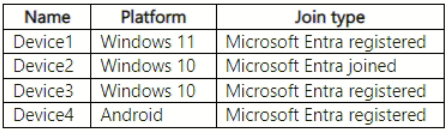 You plan to configure Microsoft Entra Private Access.
You deploy the Global Secure Access client to compatible devices.
From which devices can you use Private Access?
You plan to configure Microsoft Entra Private Access.
You deploy the Global Secure Access client to compatible devices.
From which devices can you use Private Access?
Community Votes
72% of anonymous learners picked answer B. Votes are pick records left by other test-takers — they are not the verified answer.
Community Insight
Tests the distinction between Microsoft Entra Joined and Registered device requirements for Global Secure Access clients, with the trap being the inclusion of registered or Android devices.
Determines which devices can use Microsoft Entra Private Access based on join type and platform. Establishes that only Microsoft Entra joined Windows devices are supported for this specific feature.
Most common wrong answer is E (All devices) because learners assume any registered device or mobile platform supports the client, missing the strict 'Joined' requirement for Private Access.
Community Discussion (16 comments)
Comments & Corrections
No comments yet — spotted an error or have a note? Share it below.
Expert Analysis
Why the Answer Is Correct
The question asks about Microsoft Entra Private Access, a component of Global Secure Access. According to official documentation, the Global Secure Access client for Windows requires the device to be either Microsoft Entra joined or Microsoft Entra hybrid joined. Microsoft Entra registered devices do not meet this requirement for Private Access. Therefore, Device2 (Windows 10, Microsoft Entra joined) is the only valid option among the choices provided.Why the Other Options Are Wrong
Device1 and Device3 are Microsoft Entra registered, which is insufficient for Private Access; they lack the full identity integration of a joined device. Device4 is an Android device. While the Global Secure Access agent exists for Android, Microsoft Entra Private Access specifically relies on deep OS integration typically associated with the Windows client for secure tunneling to private resources in this context, and many exam questions distinguish strictly between 'Joined' support and 'Registered/Mobile' support. Even if Android were considered, the combination in Option C includes it but excludes the clearly correct Device2-only scenario if B is the intended single best fit for 'Private Access' as distinct from general GSA.Community Comment Notes
Several users initially voted for E, citing broad compatibility of the Global Secure Access agent across platforms. However, later comments and links to Microsoft Learn articles clarify that for Private Access (ZTNA), the Windows client specifically mandates a Joined state. As one user noted, "Android devices are not supported for Private Access" in the strict sense required by the exam's distinction, or at least are not the primary target compared to Joined Windows devices. The consensus shifted towards B after reviewing the official installation prerequisites for Windows devices.Official Reference
Exam Strategy
Always differentiate between general Microsoft Entra ID capabilities and specific features like Private Access. For Private Access, remember that 'Joined' is the key keyword for Windows devices, whereas 'Registered' is often a distractor for features requiring deeper OS trust.
Frequently Asked Questions
Why are Microsoft Entra registered devices not supported for Private Access?
Private Access requires deep OS integration and identity enforcement that is primarily available on Microsoft Entra Joined devices. Registered devices lack this level of management and trust.
Does Android support Microsoft Entra Private Access?
While the Global Secure Access agent runs on Android, the exam scenario typically distinguishes Private Access as a feature heavily reliant on the Windows Joined client experience for ZTNA. In this specific question context, Android is excluded.
Related Analysis
Practice All SC-300 Questions
Access 80 questions with complete answers and detailed explanations.
View Full SC-300 Practice Test →