SC-300: Configure Hybrid Join with Entra Connect and Intune MDM Scope
HOTSPOT
Your on-premises network contains an Active Directory Domain Services (AD DS) domain. The domain contains computers that run Windows 11.
You have a Microsoft 365 E5 subscription.
You plan to enable hybrid join and enroll the computers in Microsoft Intune.
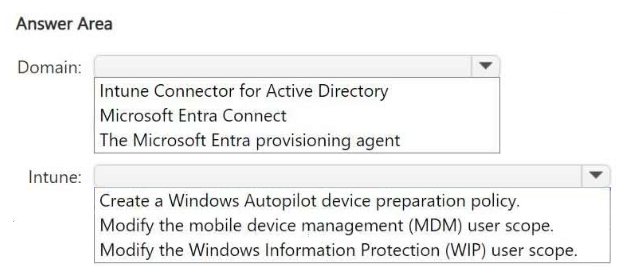
You need to recommend the software that should be deployed to the domain, and the actions that should be performed in Intune.
What should you include in the recommendation? To answer, select the appropriate options in the answer area.
NOTE: Each correct selection is worth one point.
Community Insight
The question tests the distinction between identity synchronization tools (Entra Connect) and device management enrollment scopes, avoiding the trap of selecting 'Intune Connector' which is only for Autopilot scenarios.
This SC-300 hotspot question tests the configuration of Microsoft Entra hybrid join for on-premises Windows 11 devices. The correct solution requires deploying Microsoft Entra Connect to the domain and modifying the MDM user scope in Intune.
Candidates often select 'Intune Connector' instead of 'Microsoft Entra Connect'. This mistake arises from confusing the requirements for Hybrid Azure AD Join (which uses Entra Connect) with Windows Autopilot Hybrid scenarios (which use the Intune Connector).
Community Discussion (12 comments)
Comments & Corrections
No comments yet — spotted an error or have a note? Share it below.
Expert Analysis
Why the Answer Is Correct
To enable Hybrid Azure AD Join for existing on-premises computers, you must deploy Microsoft Entra Connect to the Active Directory Domain Services environment. This tool synchronizes identities and configures the hybrid join attributes. In the Intune portal, you must then Modify the mobile device management (MDM) user scope. Setting this scope allows users to automatically enroll their devices into Intune upon sign-in or via the Company Portal.Why Other Candidate Answers Are Wrong
Intune Connector is incorrect because it is specifically designed for Windows Autopilot Hybrid deployment, not general hybrid join for existing devices. Windows Information Protection (WIP) is a data protection feature, not an enrollment mechanism. Selecting options related to BYOD or WIP ignores the requirement for corporate device enrollment and hybrid identity synchronization.Community Comment Notes
Community consensus strongly supports using Microsoft Entra Connect and MDM User Scope. As noted by user Frank9020, "Entra Connect - Required for hybrid Azure AD join" and "Modify the mobile device management (MDM) user scope Enables automatic enrollment." User ckr8 confirmed this aligns with official documentation for hybrid join requirements. Several users clarified that while Intune Connector exists, it is not the best answer for this specific scenario as highlighted by noa808a.Official Reference
Exam Strategy
Always distinguish between 'Hybrid Join' and 'Autopilot Hybrid'. If the question mentions 'existing on-premises computers' without mentioning Autopilot profiles, choose Microsoft Entra Connect. If it mentions 'Autopilot', consider the Intune Connector. For enrollment, always look for MDM User Scope modifications.
Frequently Asked Questions
What is the difference between Entra Connect and Intune Connector?
Entra Connect syncs identities and enables Hybrid Azure AD Join for all devices. Intune Connector is specifically for enrolling Autopilot devices in hybrid environments.
Why do I need to modify the MDM User Scope?
Modifying the MDM User Scope determines which users can automatically enroll their devices into Intune. Without this setting, hybrid-joined devices may not be managed.
Related Analysis
Practice All SC-300 Questions
Access 80 questions with complete answers and detailed explanations.
View Full SC-300 Practice Test →