Configuring On-Premises Workload Identity with Certificates and Conditional Access
Short answer
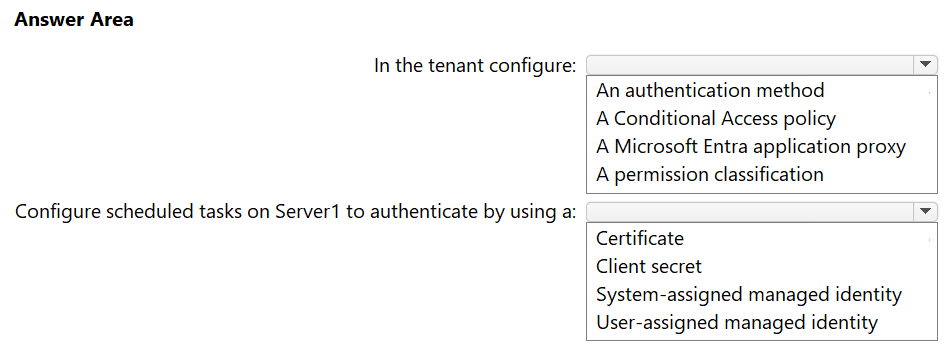
Configure a Conditional Access policy to restrict access to the corporate network and use a Certificate for non-interactive authentication credentials.
Question
You have an on-premises server named Server1 that runs Windows Server.
You have a Microsoft Entra tenant that contains an app registration named App1. App1 has Microsoft Graph application permissions.
You need to configure the environment to support App1. The solution must meet the following requirements:
• App1 must be accessible only from the corporate network.
• The credentials for App1 must NOT be stored as plain text.
• Non-interactive scheduled tasks on Server1 must be able to authenticate to App1.
What should you do? To answer, select the appropriate options in the answer area.
NOTE: Each correct selection is worth one point.
Key Takeaways
On-premises servers cannot use Managed Identities; they must use Certificates for secure non-interactive auth, paired with Conditional Access for network-based access control.
Learn how to secure on-premises servers accessing Microsoft Entra apps by using Conditional Access policies for network restrictions and certificates for non-plaintext authentication.
Common mistake: Using a Client Secret, which violates the no-plaintext requirement, or attempting to use a Managed Identity, which is unsupported for on-premises servers.
Expert Analysis
The scenario requires securing an on-premises server (Server1) that authenticates as a workload identity to a Microsoft Entra app registration (App1) using Microsoft Graph permissions. The constraints are strict: access must be limited to the corporate network, credentials must not be plaintext, and non-interactive authentication is required.
The most attractive but wrong approach is to use a Client Secret or a Managed Identity. A client secret is stored as plaintext in configuration files or scripts, violating the security requirement. Managed Identities (System-assigned or User-assigned) are only available for Azure resources; since Server1 is on-premises Windows Server, this option is technically impossible.
The correct solution involves two distinct configurations:
- Authentication Method: The credential must be a Certificate. Certificates provide strong cryptographic security without storing plaintext secrets. For non-interactive tasks on a machine without a user context, the certificate is installed locally on Server1, allowing the application to authenticate silently.
- Access Control: To restrict access to the corporate network, you must configure a Conditional Access policy. This policy targets the service principal of App1 and uses a location condition to allow sign-ins only from trusted corporate IP ranges, blocking all external access.
This combination ensures secure, non-interactive, and geographically restricted access for the on-premises workload.
Official Reference
- https://learn.microsoft.com/en-us/entra/identity-platform/howto-create-self-signed-certificate
- https://learn.microsoft.com/en-us/entra/identity/conditional-access/
- https://learn.microsoft.com/en-us/entra/identity-platform/workload-identities-fundamentals
These links open the official vendor documentation in a new tab.
Exam Strategy
When seeing 'on-premises' and 'non-interactive', immediately eliminate Managed Identities. If 'no plaintext' is specified, eliminate Client Secrets. The remaining valid credential type is a Certificate. Always pair this with Conditional Access if network restriction is required.
Frequently Asked Questions
Can I use User-Assigned Managed Identity for on-premises servers?
Why not use a Client Secret for non-interactive tasks?
Discussion 4 contributions
Compiled from public community threads and reader submissions, lightly edited for clarity. Handles and vote tallies are shown as recorded, and comments reflect the views of individual contributors.
From public community threads 4
-
Shreempy 👍 31. CAP 2. Certificate. Secret needs to be provided in plain text, SAMI and UAMI are only for Azure resources
-
sheilawu 👍 3reivse->condisional access policy / certificate
-
skirk1564 👍 2The answers are Client Access Policy and a Certificate... the key here is the server is ON PREM... so you can't user a managed Identity
-
Tuyi 👍 1In the tenant configure: A Conditional Access policy. Scheduled tasks on Server1 authenticate by using a: Certificate. Why Conditional Access: App1 uses Graph application permissions, so it authenticates as itself (a workload identity), not as a user. Conditional Access for workload identities can target that service principal with a location condition, blocking every sign-in except those from your corporate network’s named location. That covers “accessible only from the corporate network.” (In practice this needs the Workload Identities Premium license.) Application proxy publishes on-prem web apps to external users. It doesn’t restrict where a service principal can authenticate from. Authentication methods policies apply to users, not apps. Permission classifications label permissions for consent decisions and don’t restrict access. Why certificate: Client secret is a string that ends up in a script or config file, which breaks the “not stored as plain text” requirement. The private key of a certificate sits in the Windows certificate store and can be marked non-exportable. Managed identities (both kinds) only work on Azure resources. Server1 is on-premises. Azure Arc could technically give it one, but nothing in the question mentions Arc, so rule it out.
Reader comments & corrections
No reader corrections yet — spotted an error or have a note? Share it below.
Related Analysis
Practice All SC-300 Questions
Access 80 questions with complete answers and detailed explanations.
View Full SC-300 Practice Test →