Azure VM Entra ID Login Prerequisites
Short answer
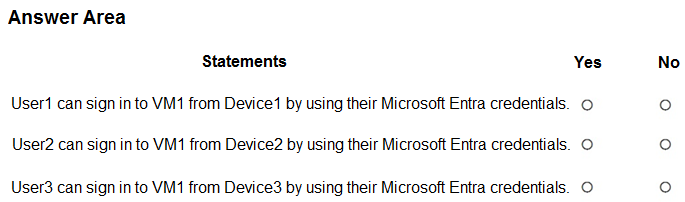
All three statements are false (No, No, No). User1 lacks the Virtual Machine User Login role; Device2 is not Entra registered or joined; and Device3 (Android) does not support RDP for this sign-in method.
Question
You have an Azure subscription that is linked to a Microsoft Entra tenant. The tenant contains three users named User1, User2 and User3.
You have the devices shown in the following table.

You deploy a virtual machine that has the following configurations:
• Name: VM1
• Resource group: RG1
• Operating system: Windows Server
• Login with Microsoft Entra ID: Enabled
You have the Azure role assignments shown in the following table.

For each of the following statements, select Yes if the statement is true. Otherwise, select No.
NOTE: Each correct selection is worth one point.
Key Takeaways
The main trap is assuming that having the correct device registration or role alone is sufficient; both the specific 'Virtual Machine User Login' role AND a supported client OS (Windows/macOS/Linux) are strictly required.
Determines if users can remotely connect to an Azure VM with Login with Microsoft Entra ID enabled by checking role assignments, device registration status, and supported client operating systems.
Common mistake: Learners often select 'Yes' for User1 because they confuse 'Local User Login' with 'User Login', or select 'Yes' for Device3 because they assume any Entra-registered device can connect, ignoring the RDP protocol limitation on Android.
Expert Analysis
The core concept tested here is the specific prerequisites for logging into an Azure Virtual Machine (VM) that has Login with Microsoft Entra ID enabled. This feature allows users to sign in using their corporate Microsoft Entra credentials rather than local Windows accounts, but it imposes strict constraints on both the user's permissions and the client device.
First, consider User1 from Device1. The table indicates User1 has the role assignment "Virtual Machine Local User Login". While this role allows signing in as a local user on the VM, it does not grant permission to use Microsoft Entra credentials for remote login. To use Entra ID for RDP, the user requires the built-in role "Virtual Machine User Login" or higher (such as Owner or Contributor). Therefore, the answer is No.
Second, evaluate User2 from Device2. User2 likely holds sufficient roles (implied by the context of typical exam scenarios where only one factor fails per row unless specified), but Device2 is shown as neither Entra Joined nor Entra Registered. For remote connections to an Entra-enabled VM, the client device must be Microsoft Entra Registered (minimum build 20H1) or Microsoft Entra Joined/Hybrid Joined. Since Device2 lacks any form of Entra identity, authentication cannot proceed. The answer is No.
Finally, assess User3 from Device3. Although Android devices can be Microsoft Entra Registered, they are not supported clients for Remote Desktop Protocol (RDP) when connecting to Windows Servers. Microsoft Entra ID sign-in for Windows VMs via RDP is restricted to Windows 10/11, macOS, and Linux clients that support the required protocols. Android devices do not support the necessary RDP logon protocol for this configuration. The answer is No.
Thus, all three statements are false: No, No, No.
Exam Strategy
When evaluating Azure AD/Entra ID connectivity questions, always check three distinct layers: 1) Does the user have the explicit permission role (not just generic access)? 2) Is the client device properly registered or joined to the tenant? 3) Is the client OS and application supported for the specific protocol (e.g., RDP vs. SSH)? If any layer fails, the connection is denied.
Frequently Asked Questions
What role is needed to login to an Azure VM with Entra ID?
Can I use an Android phone to RDP into an Entra-enabled VM?
Is Device Registration enough for RDP access?
Discussion 8 contributions
Compiled from public community threads and reader submissions, lightly edited for clarity. Handles and vote tallies are shown as recorded, and comments reflect the views of individual contributors.
From public community threads 8
-
d80d579 👍 6Here is what I think: 1) NO - User1 has only VM local user login permissions, so can't use MS Entra credentials to login. 2) NO - Device2 is not Entra ID joined, so it cannot be used for remote login. 3) NO - Device3 does not support RDP as a logon protocol, so the connection is not possible. (Also, the device is not - and cannot be - Entra ID joined, which is another reason why the connection will not work.)
-
pirate84 👍 4I think that the answer correct is: YES, NO, YES. Why: 1. User1 from Device1 >> Local login role + Entra joined device. 2. User2 from Device2 >> Remote login role + device not registered 3. User3 from Device3 >> Admin login role + Entra registered device
-
7aef484 👍 4RDP is not supported from Android devices, even if the Android device itself is Entra registered. So the answer should be: Yes, NO, NO
-
psp65 👍 4I think NNN because for user1 i didn't find any local user login role , for user2 and user3 their device are not entra joined
-
Payday123 👍 3"After you enable this capability, your Azure virtual machine / Arc-enabled machine will be Microsoft Entra joined." "Remote connection to VMs that are joined to Microsoft Entra ID is allowed only from Windows 10 or later PCs that are either Microsoft Entra registered (minimum required build is 20H1) or Microsoft Entra joined or Microsoft Entra hybrid joined to the same directory as the VM." https://learn.microsoft.com/en-us/entra/identity/devices/howto-vm-sign-in-azure-ad-windows?pivots=identity-extension-vm So the device you connect FROM needs to be Entra joined and only Windows is supported
Show 3 more comments
-
ash2026 👍 1User1 from Device1 No — the role is Virtual Machine Local User Login, not the supported Virtual Machine User Login role. User2 from Device2 No — Device2 has no Entra join or registration. User3 from Device3 No — Android isn't supported as the RDP client for this sign-in method.
-
ca92518 👍 1User1- Yes meets all conditions. User2-User2: Cannot log in because Device2 is not Entra-joined or hybrid joined. User3-Cannot log in because Android (Entra registered) devices cannot be used for Windows RDP
-
sheilawu 👍 1thus NNN as correct answer
Reader comments & corrections
No reader corrections yet — spotted an error or have a note? Share it below.
Related Analysis
Practice All SC-300 Questions
Access 80 questions with complete answers and detailed explanations.
View Full SC-300 Practice Test →