Collecting a Defender for Endpoint investigation package via CLI live response only on macOS and Linux devices
Short answer
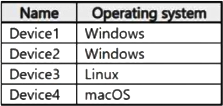
C The CLI 'collect' live-response command is supported on macOS and Linux but not Windows, so only Device3 and Device4 qualify.
Question
Key Takeaways
The Defender for Endpoint live-response advanced command 'collect' (forensics package) is marked N for Windows, Y for macOS, and Y for Linux, which determines which platforms can run it from the CLI.
You start advanced live response sessions and must collect the investigation package by using CLI advanced commands; the Collect command is supported on macOS and Linux but not on Windows, so only the macOS/Linux devices in the table qualify.
Common mistake: Assuming Windows devices support the CLI Collect command — the advanced command table explicitly shows Windows as Not supported, so only the macOS and Linux devices can collect the package this way.
Expert Analysis
Why the Answer Is Correct
The Defender for Endpoint live-response advanced commands table lists the 'collect' command (which collects a forensics/investigation package from a device) as supported on macOS and Linux but not on Windows. In the device table, only Device3 and Device4 run macOS/Linux, so they are the only devices from which you can collect the package via advanced CLI commands.
Why the Other Options Are Wrong
Including Device1 and Device2 (Windows) is incorrect because the 'collect' advanced command is not available on Windows through the CLI. Options that add any Windows device (A, B, D) therefore fail the platform-support constraint.
Community Comment Notes
sapphire, Onimole, Itsmebigal, and 1375514 all cite https://learn.microsoft.com/en-us/defender-endpoint/live-response, confirming the Collect advanced command is Y for macOS and Linux and N for Windows. The community strongly favors C (82 votes).
Official Reference
https://learn.microsoft.com/en-us/defender-endpoint/live-response
This link opens the official vendor documentation in a new tab.
Community Votes
82% of anonymous learners picked answer C. Votes are pick records left by other test-takers — they are not the verified answer.
Discussion 7 contributions
Compiled from public community threads and reader submissions, lightly edited for clarity. Handles and vote tallies are shown as recorded, and comments reflect the views of individual contributors.
From public community threads 7
-
sapphire 👍 3 Answered CCorrect answer is C. You can collect from Linux and MacOS. Source: https://learn.microsoft.com/en-us/defender-endpoint/live-response
-
Itsmebigal 👍 2 Answered CCommand Description Windows and Windows Server macOS Linux collect Collects forensics package from device. N Y Y https://learn.microsoft.com/en-us/defender-endpoint/live-response
-
Onimole 👍 2 Answered CAnswer is device 3 and 4 collect ---> Collects forensics package from device. N (windows ) Y (linux) Y (mac) https://learn.microsoft.com/en-us/defender-endpoint/live-response
-
1375514 👍 2 Answered Chttps://learn.microsoft.com/en-us/defender-endpoint/live-response The Advanced Commands table states that Collect is only available on MacOS and Linux.
-
cypkir 👍 2 Answered DAll of them! Source: https://learn.microsoft.com/en-us/defender-endpoint/live-response
Show 2 more comments
-
chirva 👍 1GPT: Windows Devices: Yes, you can collect a Defender for Endpoint investigation package from Windows devices using advanced live response commands. Linux Devices: No, as of the latest updates, collecting investigation packages using advanced live response commands is not supported on Linux devices. MacOS Devices: Yes, you can collect a Defender for Endpoint investigation package from MacOS devices using advanced live response commands. Therefore, you can collect the investigation package by running advanced live response commands from the CLI on Windows and MacOS devices, but not on Linux devices.
-
Sophonk 👍 1 Answered DNew GPT: Windows: Versions 10 and 11 (specifically, Version 1909 or later, and some earlier versions with specific updates) macOS: Intel-based and ARM-based devices running version 101.43.84 or later Linux: Supported server distributions and kernel versions Windows Server: 2012 R2, 2016, and 2019 (with specific updates)
Reader comments & corrections
No reader corrections yet — spotted an error or have a note? Share it below.
Related Analysis
Practice All SC-200 Questions
Access 80 questions with complete answers and detailed explanations.
View Full SC-200 Practice Test →