Counting incidents created when four independent Sentinel analytics rules all fire for one action
Short answer
D Four independent analytics rules each create their own incident by default, so four incidents are created.
Question
Key Takeaways
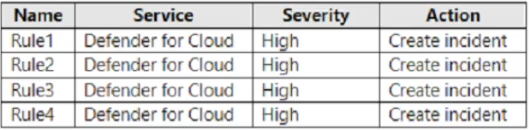
Each analytics rule independently creates alerts, and by default each alert becomes a separate incident unless alert grouping is explicitly configured; four distinct rules firing therefore yield four incidents.
A Sentinel workspace with four separate Microsoft security analytics rules; when User1's action matches all four, each rule generates its own alert and, with default per-rule settings, its own incident, so four incidents are created.
Common mistake: Assuming incident correlation merges them into one — Sentinel groups alerts into a single incident only when a rule's alert grouping is enabled, which is not the default and is not indicated by the scenario.
Expert Analysis
Why the Answer Is Correct
Microsoft Sentinel analytics rules each generate alerts when their query matches, and each alert is created as its own incident unless that specific rule's alert grouping settings are configured to combine alerts. With four independent rules and no grouping indicated, Rule1 through Rule4 each produce one incident, for a total of four.
Why the Other Options Are Wrong
Choosing 1 (A) assumes automatic cross-rule merging, which is not how analytics rules work by default; incident correlation in Defender XDR is separate from Sentinel analytics-rule incident creation. Options 2 (B) and 3 (C) would only apply if specific grouping were configured, which the scenario does not state.
Community Comment Notes
The community favors D (71 votes). Tuitor01 and rkrau explain that each analytics rule generates its own incident unless grouping is enabled. A minority (Franc_Coetzee, HAjouz, sapphire) argues for A based on Defender XDR incident correlation, but that correlation is a different mechanism from Sentinel analytics-rule incident creation.
Official Reference
https://learn.microsoft.com/en-us/azure/sentinel/detect-threats-custom
This link opens the official vendor documentation in a new tab.
Community Votes
71% of anonymous learners picked answer D. Votes are pick records left by other test-takers — they are not the verified answer.
Discussion 9 contributions
Compiled from public community threads and reader submissions, lightly edited for clarity. Handles and vote tallies are shown as recorded, and comments reflect the views of individual contributors.
From public community threads 9
-
Peachy7 👍 3Answer: D https://learn.microsoft.com/en-us/azure/defender-for-cloud/configure-email-notifications
-
Tuitor01 👍 2 Answered D1 analytics rule generates alerts based on the KQL query you use, these alerts are grouped together or not , according to you configuration choice and these alerts can be turned into incidents if you so choose. You can group the incidents into one single incidents too based on multiple factors like, say: all common entities, or one common entity or again, group them all together no matter what the entities are. This is all configurable on a per Analytics Rule basis. So One Analytics Rule generates one incident or alert or multiple incidents or alerts . Here You have four Analytics rules that detect different things where all the conditions for each rules match a particular event. So 1 incident at least per rule would be created following that logic, therefore 4 incidents.
-
Franc_Coetzee 👍 2 Answered AEven though all 4 rules were triggered, they were triggered by a single user. Defender will then group all alerts and incidents under the single user
-
xrxss 👍 1https://learn.microsoft.com/en-us/defender-xdr/alerts-incidents-correlation\ - A for me Incident correlation and merging Microsoft Defender XDR's correlation activities don't stop when incidents are created. Defender XDR continues to detect commonalities and relationships between incidents, and between alerts across incidents. When two or more incidents are determined to be sufficiently alike, Defender XDR merges the incidents into a single incident. How does Defender XDR make that determination? Defender XDR's correlation engine merges incidents when it recognizes common elements between alerts in separate incidents, based on its deep knowledge of the data and the attack behavior. Some of these elements include: Entities—assets like users, devices, mailboxes, and others Artifacts—files, processes, email senders, and others Time frames Sequences of events that point to multistage attacks—for example, a malicious email click event that follows closely on a phishing email detection.
-
rkrau 👍 1 Answered DRule Settings: If the rules (Rule1, Rule2, Rule3, Rule4) are independent of each other (i.e., they don't have the same incident grouping criteria), each rule will create its own incident. However, if the incident grouping feature is enabled and the rules have matching criteria (e.g., same user or same event), they could be grouped into a single incident. Incident Grouping: Incident grouping is a feature that groups alerts from different detection rules into a single incident based on specific matching criteria like the same entity (e.g., user, IP address, or device). If the rules match the same underlying entity (for example, User1), the system might group those alerts into one incident. Without grouping, each rule will generate a separate incident. There is nothing about grouping mentioned, so D
Show 4 more comments
-
HAjouz 👍 1 Answered AThe answer is A. 1. Here's why: Incident Grouping: Microsoft Sentinel has a built-in mechanism to group related alerts into a single incident. This helps reduce alert fatigue and provides a more comprehensive view of security events.
-
sapphire 👍 1 Answered AI go with A, Microsoft Defender groups alerts in Incident when the same user generated this alerts.
-
jacobtriestech 👍 1 Answered Dhttps://learn.microsoft.com/en-us/azure/defender-for-cloud/configure-email-notifications
-
RedZtopics 👍 6 Answered DD for me
Reader comments & corrections
No reader corrections yet — spotted an error or have a note? Share it below.
Related Analysis
Practice All SC-200 Questions
Access 80 questions with complete answers and detailed explanations.
View Full SC-200 Practice Test →