Sentinel custom parser: remove the hardcoded TimeGenerated filter
Short answer
B Remove line 2, the hardcoded TimeGenerated filter, before using Query1 as the body of Parser1 so the calling query controls the time range.
Question
You have a query named Query1 as shown in the following exhibit.
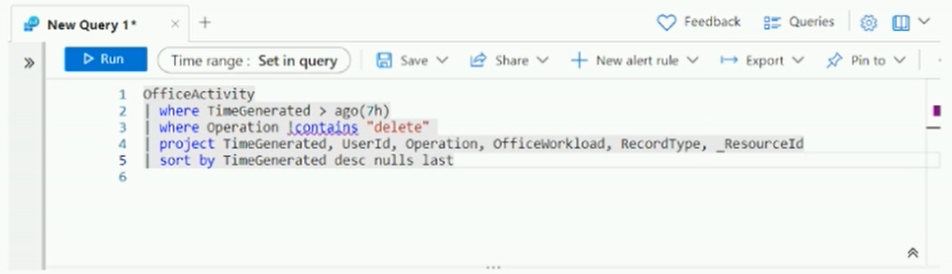
You plan to create a custom parser named Parser1.
You need to use Query1 in Parser1.
What should you do first?
Key Takeaways
It tests that Sentinel parsers are query-time KQL functions and must not embed their own time window; the trap is treating line 5’s sort as the blocker.
This SC-200 question tests how a Microsoft Sentinel custom parser handles time filtering. The correct first step is B: remove the hardcoded TimeGenerated filter on line 2 so Parser1 remains reusable.
Common mistake: The most plausible wrong answer is A, removing line 5’s sort. Sorting is undesirable in a reusable parser, but it does not prevent Query1 from being used in Parser1; the hardcoded TimeGenerated filter on line 2 is what must be removed first.
Expert Analysis
Why line 2 is the required first edit
A Sentinel custom parser such as Parser1 is a saved KQL function that shapes or normalizes incoming records; the query that invokes it is responsible for setting the time range. Line 2 contains a hardcoded relative filter, where TimeGenerated > ago(...). If that line is left in place, Parser1 will always apply its own window at execution time, so any calling query that asks for a different period will either be silently narrowed or return misleading results. Removing line 2 first makes Query1 reusable as parser logic and keeps the time boundary with the caller, which is why option B is correct.
Why option A is tempting but not the first fix
Option A—remove line 5, the sort by—sounds right because a parser should not behave like a final report. Sorting is indeed unnecessary in a reusable parser and can waste resources. However, the discussion’s strongest point is that “parsing happens at query time”; a parser is not supposed to carry a specific time restriction. Sorting does not prevent Query1 from being incorporated into Parser1, while the hardcoded TimeGenerated filter on line 2 defeats the parser’s reusability. That is the single point where A stops being the best answer.
Why the other edits miss the requirement
Option C changes !contains to !has; that is a string-matching choice, not a parser-creation requirement, and it can change which records match. Option D targets another TimeGenerated predicate, but the first structural issue is the relative ago filter on line 2. Correct answer: B.
Official Reference
- https://learn.microsoft.com/en-us/azure/sentinel/normalization-develop-parsers
- https://learn.microsoft.com/en-us/azure/sentinel/normalization-parsers-overview
These links open the official vendor documentation in a new tab.
Exam Strategy
When a question asks about converting a Sentinel query into a parser or saved function, scan for ago(), absolute datetime filters, or any TimeGenerated restriction first. The invoking query supplies the time range, so those predicates are the usual required edit. Separate cosmetic or performance changes such as sorting or contains versus has from structural parser requirements, and choose the edit that restores reusability.
Frequently Asked Questions
Why does a Microsoft Sentinel custom parser need no TimeGenerated filter?
where TimeGenerated > ago(...) would force every caller into that relative window and prevent arbitrary historical searches.Is removing line 5's sort also required before creating Parser1?
Can I use !contains in a Microsoft Sentinel parser?
Community Votes
57% of anonymous learners picked answer B. Votes are pick records left by other test-takers — they are not the verified answer.
Discussion 7 contributions
Compiled from public community threads and reader submissions, lightly edited for clarity. Handles and vote tallies are shown as recorded, and comments reflect the views of individual contributors.
From public community threads 7
-
PhoenixSlasher 👍 12 Answered BB due to Parsing happens at query time, hense Query time parsing meaning we cannot parse a specific time.
-
herta 👍 6 Answered Bi will go for B as well A parser should not filter by time. The query which uses the parser will apply a time range. https://learn.microsoft.com/en-us/azure/sentinel/normalization-develop-parsers
-
ACSC 👍 3 Answered BIn Microsoft Sentinel, parsing and normalizing happen at query time. https://learn.microsoft.com/en-us/azure/sentinel/normalization-parsers-overview
-
4420964 👍 2 Answered AWhen creating a custom parser (a saved function in Sentinel): ✅ It can include filters (where, project, extend, etc.). ✅ It can include parsing logic or field extractions. ❌ It cannot include commands that produce a final presentation such as sort, top, render, take, or limit. ❌ It should not contain time filters (ago()) if you want it to be reusable — but that’s not a syntax error, it’s just bad practice.
-
neogeek87 👍 1 Answered BIn Microsoft Sentinel, custom parsers are created using Kusto Query Language (KQL) functions. A custom parser should not contain a hardcoded time filter because the time range should be controlled by the query that invokes the parser. Line 2: KQL | where TimeGenerated > ago(7h) Removing this line allows Parser1 to process data for any time range specified by the calling query. Why not the other options? A. Remove line 5: Sorting is not the primary issue. C. Replace !contains with !has: Changing the string operator is unnecessary. D. Remove the TimeGenerated predicate in line 4: Line 4 uses project to select columns, not a time filter. Final Answer: B. Remove line 2.
Show 2 more comments
-
HAjouz 👍 1 Answered AThe key issue here is that parsers in Sentinel expect the raw data as input, not the formatted or sorted results of a query.The first thing you need to do is remove line 5, which is the sorting operation. This will ensure that the raw data is passed to the parser. Therefore, the correct answer is A. Remove line 5.
-
barxan1 👍 1 Answered AWe want to turn the query into a parser. Parsers are meant to normalize and shape data, not filter or order it.
Reader comments & corrections
No reader corrections yet — spotted an error or have a note? Share it below.
Related Analysis
Practice All SC-200 Questions
Access 80 questions with complete answers and detailed explanations.
View Full SC-200 Practice Test →