Microsoft Graph activity log KQL for DELETE requests
Short answer
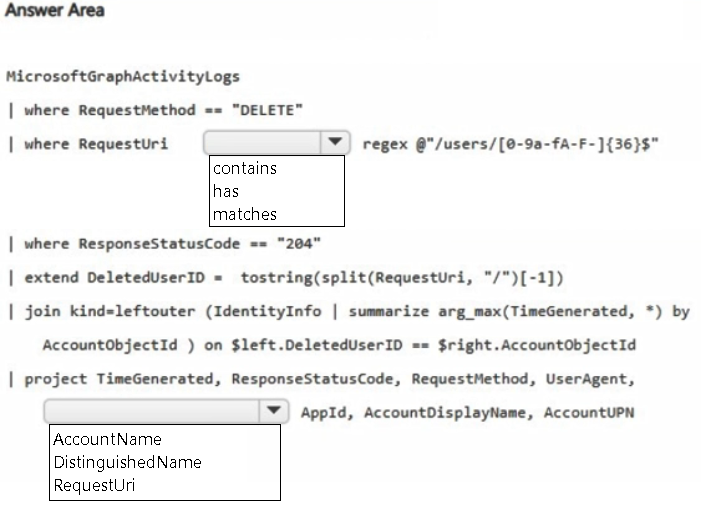
For the two blanks, choose matches so the clause becomes RequestUri matches regex, and choose RequestUri as the column passed to split so the trailing user ID can be extracted and joined to IdentityInfo.
Question
You have a Microsoft 365 subscription that uses Microsoft Defender XDR.
You plan to investigate suspicious activity in the subscription by using Microsoft Graph activity logs.
You need to search for requests to delete resources from the subscription and identify the users that initiated the requests.
How should you complete the KQL query? To answer, select the appropriate options in the answer area.
NOTE: Each correct selection is worth one point.
Key Takeaways
It tests whether you can filter and parse a Graph activity log URI correctly; the main trap is using a loose string operator or splitting the wrong identity column.
This SC-200 hotspot tests a MicrosoftGraphActivityLogs KQL query for DELETE requests. The correct completions are the matches operator on RequestUri and RequestUri as the field split to extract the user identifier for the IdentityInfo join.
Common mistake: A common mistake is to use contains or has on RequestUri, or to split AccountName instead of RequestUri, which prevents extracting the GUID and joining on AccountObjectId.
Expert Analysis
The deciding principle
Microsoft Graph activity logs in Defender XDR advanced hunting are request logs: each row records the HTTP method in RequestMethod, the target path in RequestUri, and the outcome in ResponseStatusCode. The KQL must do two separate jobs: filter to successful DELETE calls and parse the URI so the user object ID can be joined to IdentityInfo. The correct completions are matches (so the clause reads RequestUri matches regex...) and RequestUri (as the input to split).
Why the operator is matches
The filter is not looking for a display name or a free-text fragment. It is looking for a URI shaped like /users/{GUID}, where the GUID is the user object ID. A plain contains or has could match incidental text and would not provide the anchored structure. KQL's matches regex operator is the documented way to enforce that pattern; in the hotspot, the regex keyword is already present, so the blank is the matches operator. The status-code filter ResponseStatusCode == "204" is consistent with a successful Graph DELETE, which returns no content.
Why the split field is RequestUri
The expression tostring(split(..., "/")[-1]) takes the final path segment and names it DeletedUserID. That final segment exists only in RequestUri. Using AccountName or another identity column would not yield the GUID and would break the later join to IdentityInfo on AccountObjectId. Learner discussion of this item converges on matches and RequestUri; an answer that names a display-name column conflicts with the query's own URI parsing. The resulting query filters RequestMethod == "DELETE", applies the anchored regex to RequestUri, keeps 204 responses, extracts the trailing identifier, and resolves it through IdentityInfo.
Exam takeaway Do not choose an operator or column just because it appears elsewhere in the query; choose the one that preserves the URI structure and supplies the join key.
Official Reference
- https://learn.microsoft.com/en-us/azure/data-explorer/kusto/query/matches-regex-operator
- https://learn.microsoft.com/en-us/graph/api/user-delete?view=graph-rest-1.0
These links open the official vendor documentation in a new tab.
Exam Strategy
For hotspot KQL, read the query as a pipeline and identify the data shape at each step: method filter, URI pattern, status filter, extraction, then identity join. When a blank sits next to regex, the operator is almost always matches; when a blank feeds split, choose the column that actually contains the delimiter and target identifier. Test candidate columns mentally against the later join key; if the column would not produce that key, it is wrong. This approach transfers to Graph activity log questions involving resource paths, methods and status codes.
Frequently Asked Questions
Why does the query use matches regex on RequestUri rather than contains?
Which column is split to extract the deleted user ID, and why?
Why filter ResponseStatusCode to 204 in the MicrosoftGraphActivityLogs query?
Discussion 3 contributions
Compiled from public community threads and reader submissions, lightly edited for clarity. Handles and vote tallies are shown as recorded, and comments reflect the views of individual contributors.
From public community threads 3
-
Earthlinghex 👍 4The Correct Answers First Box: matches Second Box: RequestUri
-
nick34567 👍 31. matches 2. AccountName MicrosoftGraphActivityLogs | where RequestMethod == "DELETE" | where RequestUri matches regex @"/users/[0-9a-fA-F-]{36}$" | where ResponseStatusCode == "204" | extend DeletedUserID = tostring(split(RequestUri, "/")[-1]) | join kind=leftouter ( IdentityInfo | summarize arg_max(TimeGenerated, *) by AccountObjectId ) on $left.DeletedUserID == $right.AccountObjectId | project TimeGenerated, ResponseStatusCode, RequestMethod, UserAgent, AccountName, AppId, AccountDisplayName, AccountUPN contains and has doesnt work with regex and requestUri show the entier request not user account, DistinguishedName is an ad attribut
-
ramzicpg 👍 1MicrosoftGraphActivityLogs | where RequestMethod == "DELETE" | where RequestUri matches regex @"/users/[0-9a-fA-F-]{36}$" | where ResponseStatusCode == "204" | extend DeletedUserID = tostring(split(RequestUri, "/")[-1]) | join kind=leftouter ( IdentityInfo | summarize arg_max(TimeGenerated, *) by AccountObjectId ) on $left.DeletedUserID == $right.AccountObjectId | project TimeGenerated, ResponseStatusCode, RequestMethod, UserAgent, AppId, AccountDisplayName, AccountUPN
Reader comments & corrections
No reader corrections yet — spotted an error or have a note? Share it below.
Related Analysis
Practice All SC-200 Questions
Access 80 questions with complete answers and detailed explanations.
View Full SC-200 Practice Test →