How do you enable Sentinel UEBA and collect on-premises AD DS events?
DRAG DROP
Your network contains an on-premises Active Directory Domain Services (AD DS) domain that syncs with an Azure AD tenant.
You have a Microsoft Sentinel workspace named Sentinel1.
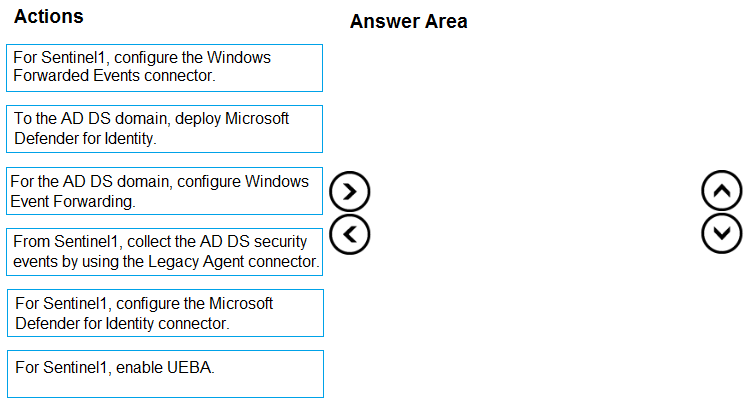
You need to enable User and Entity Behavior Analytics (UEBA) for Sentinel1 and collect security events from the AD DS domain.
Which three actions should you perform in sequence? To answer, move the appropriate actions from the list of actions to the answer area and arrange them in the correct order.
Community Insight
Tests the dependency chain between the Defender for Identity sensor, its Sentinel data connector, and the UEBA toggle — the trap is reaching for Windows Event Forwarding plus the Windows Forwarded Events connector, which populates event logs but never syncs AD user entities.
Enabling UEBA in Microsoft Sentinel for an on-premises Active Directory domain requires Microsoft Defender for Identity as the identity data source, not just Windows Event Forwarding. This page establishes the correct three-step sequence: deploy the MDI sensor into the AD DS domain, connect Defender for Identity to Sentinel1, then turn on entity behavior analytics.
Assuming that configuring Windows Event Forwarding on the domain controllers and wiring the 'Windows Forwarded Events' connector is enough — that path delivers raw security events but supplies none of the Active Directory user, group and identity entities UEBA needs, and it also skips enabling UEBA itself.
Community Discussion (8 comments)
Comments & Corrections
No comments yet — spotted an error or have a note? Share it below.
Expert Analysis
Why the Answer Is Correct
The question has two requirements: turn on User and Entity Behavior Analytics for Sentinel1 and collect security events from the on-premises AD DS domain. Microsoft's documented method for syncing on-premises Active Directory identities into Sentinel UEBA is the Microsoft Defender for Identity data connector, which is fed by an MDI sensor installed on a domain controller. So the first action is to deploy Microsoft Defender for Identity to the AD DS domain (install the sensor on a DC), because until the sensor exists there is nothing for a connector to pull from. The second action is to configure the Microsoft Defender for Identity data connector for Sentinel1, which brings the identity entities and the AD-related security events into the workspace. The third action is to enable UEBA for Sentinel1, which activates the entity pages, behavior analytics and enrichments on top of the already-ingested identity data. That sensor → connector → enable-UEBA ordering is exactly what the community confirms, with danb67 stating "No point doing the connector before the sensor. Answer is correct."Why Other Candidate Answers Are Wrong
Windows Event Forwarding plus the Windows Forwarded Events connector (the sequence Anarckii proposed, arguing "the question says nothing about defender") does satisfy the 'collect security events' half of the requirement, but it delivers log records only — it does not sync on-premises AD user accounts, groups and directory entities, which is the specific thing UEBA consumes. Placing the connector step before the sensor deployment, as Phil_79 wondered ("Shouldn't you deploy MDI before connecting it to Sentinel?"), creates a connector with no data source, so the ordering is inverted. Omitting the 'enable UEBA' action entirely, or enabling UEBA before any identity data exists, satisfies only one of the two stated requirements and leaves the workspace with empty entity pages. The remaining variants simply reorder the three required actions around the sensor prerequisite.Community Comment Notes
mali1969 gives the clearest walkthrough: configure the Defender for Identity connector for Sentinel1, deploy Microsoft Defender for Identity to the AD DS domain, and install the MDI sensor on the domain controller to let UEBA collect on-premises security events. danb67, claiming to have deployed this repeatedly, insists on sensor before connector. user636 points at Microsoft's own 'How to enable user and entity behavior analytics' documentation and quotes the step about syncing user entities from on-premises Active Directory. ApexPredator84 confirms the scenario appeared in the exam on 21/12/2023, so expect the exact sensor-then-connector-then-UEBA phrasing rather than a WEF alternative.Official Reference
Exam Strategy
Whenever a Sentinel question mentions UEBA plus on-premises AD DS, the answer set is always the MDI sensor on a domain controller, then the Defender for Identity connector, then the UEBA toggle. Treat the sensor as a hard prerequisite and never substitute Windows Event Forwarding for identity entity sync.
Frequently Asked Questions
Why can't Windows Event Forwarding and the Windows Forwarded Events connector enable UEBA for AD DS?
WEF only ships security event logs; it does not sync Active Directory users, groups or other directory entities. UEBA needs identity entities, which come from the Defender for Identity connector.
Must the Defender for Identity sensor be installed before configuring the connector in Sentinel1?
Yes. The connector authenticates to your Defender for Identity instance and pulls its data, so the sensor must already be running on a domain controller and reporting identity data.
Related Analysis
Practice All SC-200 Questions
Access 80 questions with complete answers and detailed explanations.
View Full SC-200 Practice Test →