How do you check if AzureActivity exists in each Sentinel workspace?
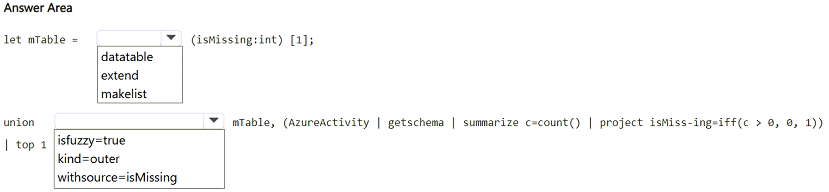
HOTSPOT
You have multiple Azure subscriptions that contain multiple Microsoft Sentinel workspaces.
You are creating a Microsoft Sentinel workbook that will include references to the AzureActivity table.
You need to create a KQL query that will perform the following actions:
• Check whether the AzureActivity table exists in each workspace.
• If the table exists, return a single row that has the isMissing column set to 0.
• If the table does NOT exist, return a single row that has the isMissing column set to 1.
How should you complete the query? To answer, select the appropriate options in the answer area.
NOTE: Each correct selection is worth one point.
Community Insight
The exam tests whether you know that a plain union fails when AzureActivity is missing from one workspace, so you need union isfuzzy=true plus a datatable seed row that supplies isMissing = 1.
This hotspot asks you to complete a cross-workspace KQL query for a Microsoft Sentinel workbook that must report whether the AzureActivity table exists in every workspace, returning isMissing = 0 when present and isMissing = 1 when absent. The page confirms the correct union/datatable construction and explains why a fuzzy union plus a fallback row is the only combination that always returns exactly one row per workspace.
Picking datatable as the first selection and isfuzzy=true as the second, which inverts the query structure; the fuzzy modifier belongs on the union operator, and datatable is only the fallback row that guarantees a result when the real table is absent.
Community Discussion (1 comments)
Comments & Corrections
No comments yet — spotted an error or have a note? Share it below.
Expert Analysis
Why the Answer Is Correct
The query must survive a workspace that has no AzureActivity table, and only theunion isfuzzy=true form suppresses the unresolved-table failure while still running the healthy branches. The datatable(isMissing:int)[1] branch seeds a single fallback row with isMissing = 1, so the union always produces at least one row even when every AzureActivity reference returns nothing. The real branch uses workspace("<name>").AzureActivity | take 1 | extend isMissing = 0, so when the table exists its row wins and the workbook reports 0. Combining the two branches (for example with summarize/take 1 over the union) collapses the output to exactly one row per workspace carrying the correct isMissing value. This matches the requirement of one row with 0 for present and one row with 1 for missing, and it scales to the multiple subscriptions and workspaces described in the scenario.Why Other Candidate Answers Are Wrong
A plainunion (without isfuzzy=true) resolves every table reference before execution, so a single workspace lacking AzureActivity aborts the whole workbook query instead of returning isMissing = 1. A datatable-only branch has no way to detect the real table, and an AzureActivity-only branch silently returns zero rows when the table is absent, which violates the single-row requirement. Wrapping the logic in iff(count > 0, 0, 1) without a seed row fails for the same reason: an empty input produces no row at all, not a row with isMissing = 1. Placing isfuzzy=true as if it were a table expression rather than a modifier of the union operator is simply invalid KQL syntax.Community Comment Notes
Leonit recorded the attempt "option1: datatable option2: isfuzzy=true" and marked it incorrect, which highlights that the position of each selection inside the query matters more than the vocabulary itself. In other words, learners who recognize both keywords can still fail by assigningdatatable to the operator slot and isfuzzy=true to the table slot. Reading the skeleton as "operator first, fallback row second" resolves the ambiguity and keeps the isMissing semantics intact. Official Reference
Exam Strategy
Before touching the dropdowns, mentally label each blank as either the union operator or a table expression; only union isfuzzy=true can be an operator, and datatable can only be a table. Then verify the query still returns a row when the right-hand table returns zero results.
Frequently Asked Questions
How do I return a row when AzureActivity does not exist in one of my Sentinel workspaces?
Use union isfuzzy=true together with a datatable(isMissing:int)[1] seed row so the query never fails and always emits exactly one row with isMissing set to 0 or 1.
Why does a plain union break a multi-workspace Sentinel workbook query?
A plain union resolves every table reference up front, so if AzureActivity is absent in one workspace the whole query errors instead of reporting isMissing = 1.
Related Analysis
Practice All SC-200 Questions
Access 80 questions with complete answers and detailed explanations.
View Full SC-200 Practice Test →