Where to Create a Conditional Access App Control Custom Policy and Enable It
HOTSPOT
You have a Microsoft 365 E5 subscription that has a Conditional Access policy named Policy1.
You need to perform the following actions:
• Create a Conditional Access App Control custom policy named Custom1.
• Configure Policy1 to use Custom1.
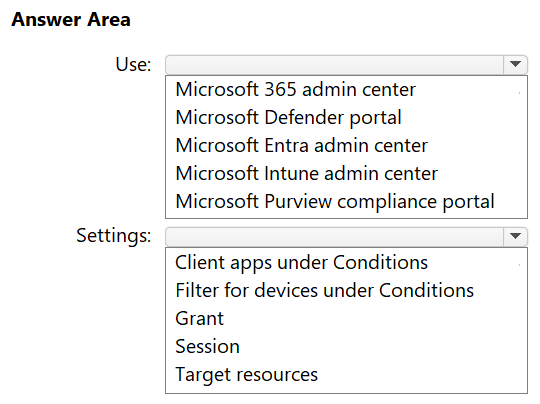
What should you use co create Custom1, and in which settings of Policy1 should you enable Conditional Access App Control? To answer, select the appropriate options in the answer area.
NOTE: Each correct selection is worth one point.
Community Insight
The test is separating the two consoles involved in Conditional Access App Control: the policy object is authored in Defender for Cloud Apps, but the hook that activates it is the Session control inside the Entra Conditional Access policy.
Creating the Custom1 Conditional Access App Control policy requires the Microsoft Defender portal, where Defender for Cloud Apps session policies live, while Policy1 only references it from the Session access controls. This page confirms both hotspot selections and explains why the Entra admin center cannot create the custom policy itself.
Learners try to build Custom1 inside the Entra admin center's Conditional Access blade, because that is where Policy1 is edited; that blade only offers the 'Use Conditional Access App Control' toggle and a link out, it does not author session policies.
Community Discussion (9 comments)
Comments & Corrections
No comments yet — spotted an error or have a note? Share it below.
Expert Analysis
Why the Answer Is Correct
Conditional Access App Control is a Defender for Cloud Apps capability, so the custom session policy named Custom1 must be created in the Microsoft Defender portal under Cloud apps > Policies > Policy management. The Entra Conditional Access policy Policy1 never stores the session policy definition; it only contains a Session access control that hands the session to Defender for Cloud Apps and names the custom policy to apply. Selecting Session as the settings location is therefore correct because the 'Use Conditional Access App Control' control, including the custom policy picker and the 'Configure custom policy' hyperlink, lives under Access controls > Session. The two selections together describe the real workflow: author the policy in Defender, reference it from the session control in Entra.Why Other Candidate Answers Are Wrong
Choosing the Entra admin center (or Microsoft Entra ID > Security > Conditional Access) as the creation location fails because the Conditional Access UI cannot define session policy actions, filters, or content-inspection behavior; it merely delegates. Selecting 'Grant' is wrong because grant controls block or require MFA/compliant device rather than routing a session through a Cloud App Security proxy. Selecting 'Client apps' or 'Conditions' is wrong because those tabs scope when a policy applies, not how a session is controlled after sign-in. Any option implying the policy is stored in Sentinel or Defender for Endpoint misplaces the feature entirely, since App Control is a Defender for Cloud Apps and Entra integration.Community Comment Notes
As milkfish explained, you build Policy1 in Entra Conditional Access and then click "Session" under Access controls, where the option to use Conditional Access App Control lets you specify Custom1. Optimizor_IT reinforces that the custom policies are created in Microsoft Defender for Cloud Apps and cannot be authored in the Entra admin center, so the policy is made in Defender and then linked from Sessions. Krayzr supplied the Microsoft Learn session-policy article as supporting evidence, and OneplusOne quoted the in-product note that custom policies must be configured in the Cloud App Security portal. Several commenters converged on the same pair of answers, Defender portal plus Session, which matches the product documentation rather than the vote count alone.Official Reference
Exam Strategy
For any Conditional Access App Control hotspot, first ask which console the artifact lives in: session policies belong to Defender for Cloud Apps, while the reference to them belongs to the Session control of the Conditional Access policy. Remember that 'Grant' and 'Session' are two different access-control groups in the same blade, so do not let the similar wording pull you into the grant controls.
Frequently Asked Questions
Can I create the Custom1 Conditional Access App Control policy directly in the Entra admin center?
No. Entra Conditional Access only hosts the Session control and a 'Configure custom policy' link; the session policy itself must be authored in the Microsoft Defender portal under Cloud apps > Policies.
Which Policy1 setting references the Custom1 session policy?
The Session access controls. Enable 'Use Conditional Access App Control' there and pick Custom1 as the custom policy to apply to the session.
Related Analysis
Practice All SC-200 Questions
Access 80 questions with complete answers and detailed explanations.
View Full SC-200 Practice Test →