How do you join two Sentinel auxiliary tables for six months of data?
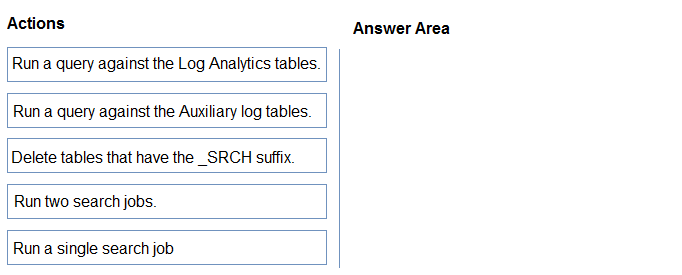
DRAG DROP
You have a Microsoft Sentinel workspace named Workspace1 that has a retention period of 12 years. Workspace1 contains two custom auxiliary tables named Table1 and Table2.
You need to correlate the data between Table1 and Table2 from the past six months by using a JOIN operation. The solution must minimize administrative effort and costs.
Which three actions should you perform in sequence? To answer, move the appropriate actions from the list of actions to the answer area and arrange them in the correct order.
Community Insight
This item tests the query limitation of auxiliary/Basic tables and the search-job workaround; the trap is trying to JOIN Table1 and Table2 directly in one KQL query.
Microsoft Sentinel auxiliary tables restrict queries to a single table, so a JOIN between Table1 and Table2 requires two search jobs to create _SRCH Analytics tables, followed by the JOIN and cleanup.
A common wrong approach is writing a single JOIN query across the two auxiliary tables, which fails because Basic/Auxiliary table queries are restricted to one table.
Community Discussion (2 comments)
Comments & Corrections
No comments yet — spotted an error or have a note? Share it below.
Expert Analysis
Why the Answer Is Correct
Microsoft Sentinel auxiliary (and Basic) tables are optimized for low-cost, high-volume logs, but their queries are limited to a single table; JOIN, find, search, and externaldata are not supported directly. Because Workspace1 stores Table1 and Table2 as custom auxiliary tables, the only low-effort path is to run a search job for each table to materialize the last six months into new Analytics tables with the _SRCH suffix. After both search jobs finish, a normal KQL JOIN can be run against the resulting Log Analytics tables, and the temporary _SRCH tables should then be deleted to avoid unnecessary storage and retention charges. The 12-year retention period does not remove the auxiliary-table query limitation, so retention alone is not a reason to change table plans.Why Other Candidate Answers Are Wrong
A single query that joins Table1 and Table2 directly is invalid because the auxiliary table restriction blocks cross-table operators. Permanently promoting both tables to Analytics would enable joins but increases ingestion and retention cost and administrative overhead, which violates the minimize-cost and effort requirement. Using the search operator or externaldata as a substitute does not bypass the restriction for auxiliary tables and adds complexity. Leaving the _SRCH tables in place after correlation may seem harmless, but those tables consume workspace storage and can add cost, so cleanup is part of the correct sequence.Community Comment Notes
Frippy's sequence — "Run two search jobs", query the Log Analytics tables, then delete the _SRCH tables — matches the documented workaround. Staim reinforces the key rule with "Basic or Auxiliary table queries are limited to a single table", and explains that the _SRCH tables become the Analytics-side inputs for the JOIN. The community discussion also points to Azure Monitor documentation on basic logs, supporting the idea that this is a platform limitation rather than a KQL syntax issue. No commenter suggested a direct JOIN or permanent table promotion as a cost-effective solution.Official Reference
Exam Strategy
When a Sentinel item mentions auxiliary/basic tables and JOIN, immediately eliminate any single-query JOIN option. Look for a search-job step for each table, an Analytics JOIN, and cleanup of _SRCH tables.
Frequently Asked Questions
Why can't I JOIN Table1 and Table2 directly in Workspace1?
Auxiliary tables in Microsoft Sentinel only support single-table queries, so JOIN and similar cross-table operators fail until search jobs stage the data into Analytics tables.
Should I delete the _SRCH tables after joining Table1 and Table2?
Yes. The _SRCH tables are temporary search-job outputs; deleting them after the JOIN minimizes storage and retention costs, which the question requires.
Related Analysis
Practice All SC-200 Questions
Access 80 questions with complete answers and detailed explanations.
View Full SC-200 Practice Test →