Testing Microsoft Entra Smart Lockout Parameters
Short answer
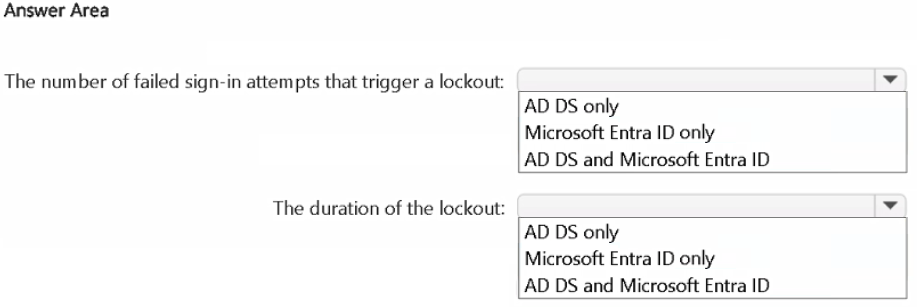
For both 'Number of failed sign-in attempts that trigger a lockout' and 'Duration of the lockout', the correct selection is Microsoft Entra ID only.
Question
Your network contains an Active Directory Domain Services (AD DS) domain named Domain1.
You have a Microsoft Entra tenant.
Domain1 syncs with the tenant by using Microsoft Entra Connect.
You need to evaluate Microsoft Entra smart lockout by testing the following account lockout considerations:
• The number of failed sign-in attempts that trigger a lockout
• The duration of the lockout
What should you use to test each consideration? To answer, select the appropriate options in the answer area.
NOTE: Each correct selection is worth one point.
Key Takeaways
The trap is confusing the coordinated AD DS policy with the actual Smart Lockout configuration; Smart Lockout is an Entra ID-only feature.
This guide explains that Microsoft Entra Smart Lockout settings, including failure thresholds and lockout durations, are configured and tested exclusively in Microsoft Entra ID, even in hybrid environments.
Common mistake: Selecting AD DS for one or both options because the environment uses Entra Connect, leading learners to believe the lockout logic resides on-premises.
Expert Analysis
The question asks how to test the parameters of Microsoft Entra Smart Lockout within a hybrid identity environment using Microsoft Entra Connect. It is crucial to distinguish between the legacy on-premises account lockout policy and the modern cloud-based Smart Lockout feature.
Smart Lockout is a Microsoft Entra ID (cloud) feature designed to protect user accounts from brute-force attacks by analyzing sign-in risk across all connected services. The key mechanism involves coordinating with on-premises Active Directory Domain Services (AD DS) to prevent false positives—such as locking out a user in AD because of failed attempts in the cloud—but the configuration and testing of Smart Lockout itself occur exclusively in the cloud.
According to Microsoft documentation, administrators manage Smart Lockout values, including the number of failed sign-in attempts that trigger a lockout and the duration of the lockout, directly within the Microsoft Entra ID portal or via PowerShell commands targeting the Entra tenant. While AD DS has its own local account lockout policies, these are not the settings being tested for Smart Lockout. Testing against AD DS would only verify the traditional on-premises lockout behavior, which does not reflect the intelligent, risk-based logic of Smart Lockout.
Therefore, both considerations—the threshold for failure and the lockout duration—are properties of the Microsoft Entra ID Smart Lockout policy. To evaluate them correctly, you must use Microsoft Entra ID only for both selections.
Official Reference
https://learn.microsoft.com/en-us/entra/identity/authentication/howto-password-smart-lockout
This link opens the official vendor documentation in a new tab.
Exam Strategy
When encountering questions about 'Smart' or 'Cloud-native' security features (like Smart Lockout, Conditional Access, or Identity Protection), always look for the cloud identity provider (Entra ID/Azure AD) as the source of truth, regardless of hybrid connectors. Do not assume on-premises systems control cloud-specific intelligent behaviors.
Frequently Asked Questions
Does AD DS participate in Smart Lockout?
How do I configure Smart Lockout duration?
Discussion 10 contributions
Compiled from public community threads and reader submissions, lightly edited for clarity. Handles and vote tallies are shown as recorded, and comments reflect the views of individual contributors.
From public community threads 10
-
jim85 👍 4a) should be Entra ID only, the attempts happen there, as per https://learn.microsoft.com/en-us/entra/identity/authentication/howto-password-smart-lockout
-
Hameet 👍 3• Number of failed sign-in attempts that trigger a lockout → Microsoft Entra ID only • Duration of the lockout → Microsoft Entra ID only
-
jim85 👍 3sorry, typo, b) should be Entra ID only, a) is ok
-
rvln7 👍 2dont know what type of auth it is, but judging by the question it seems that AD DS’s account lockout policy is effectively sidelined because auth attempts never hit a domain controller, they’re handled in the cloud. I think its Entra ID only for both...
-
424ede1 👍 2It's about Smart Lockout. Both are available on Entra ID only https://learn.microsoft.com/en-us/entra/identity/authentication/howto-password-smart-lockout#manage-microsoft-entra-smart-lockout-values
Show 5 more comments
-
Greens 👍 1Correct: Answer: Number of failed sign-in attempts that trigger a lockout: AD DS and Microsoft Entra ID Duration of the lockout: AD DS and Microsoft Entra ID Why: With hybrid identity (password hash sync or pass-through authentication through Entra Connect), Microsoft says the smart lockout settings have to be coordinated with the AD DS account lockout policy. A test only tells you something if you look at both directories: Threshold: the Entra ID smart lockout threshold must be lower than the AD DS lockout threshold. Then Entra ID locks attackers out in the cloud before they can lock the on-premises AD DS account. Microsoft’s example is 5 in Entra ID and 10 in AD DS. Duration: the Entra ID lockout duration must be longer than the AD DS “Reset account lockout counter after” value. Microsoft’s example is 120 seconds in Entra ID and 1 minute in AD DS.
-
3bb422b 👍 1The answer should be Microsoft Entra ID only for both, as Smart Lockout is a cloud-based feature. The goal of Smart Lockout is to prevent the on-premises account from being locked out due to repeated failed sign-in attempts in the cloud. https://learn.microsoft.com/en-us/entra/identity/authentication/howto-password-smart-lockout?utm_source=chatgpt.com
-
RoboCock 👍 1doesn't make sense to "test" against adds, smart lockout is entra feature. also auth is not mentioned, hybrid integration of smart lockout requires PTA or ADFS.
-
6c9ce39 👍 1The number of failed sign-in attempts that trigger a lockout: Microsoft Entra ID only The duration of the lockout: Microsoft Entra ID only
-
manognavenkat 👍 1I agree too https://learn.microsoft.com/en-us/entra/identity/monitoring-health/howto-troubleshoot-sign-in-errors
Reader comments & corrections
No reader corrections yet — spotted an error or have a note? Share it below.
Related Analysis
Practice All SC-100 Questions
Access 110 questions with complete answers and detailed explanations.
View Full SC-100 Practice Test →