MCRA Job Role Security Level Configuration
HOTSPOT
You are planning the security levels for a security access strategy.
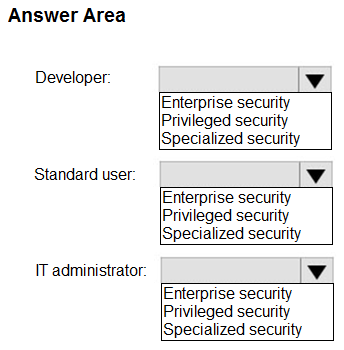
You need to identify which job roles to configure at which security levels. The solution must meet security best practices of the Microsoft Cybersecurity Reference Architectures (MCRA).
Which security level should you configure for each job role? To answer, select the appropriate options in the answer area.
NOTE: Each correct selection is worth one point.
Community Insight
The exam requires knowledge of the specific MCRA PowerPoint deck slide that maps Developer and Admin roles to Privileged or Specialized account types, a detail often updated in recent exam versions.
This question tests the mapping of job roles to security levels within the Microsoft Cybersecurity Reference Architecture (MCRA). The correct configuration aligns with MCRA best practices for privileged and specialized access.
Candidates often confuse 'Privileged' and 'Specialized' accounts or assume all administrators require the highest privilege level, failing to distinguish between standard admin duties and highly sensitive privileged operations as defined by MCRA.
Community Discussion (9 comments)
Comments & Corrections
No comments yet — spotted an error or have a note? Share it below.
Expert Analysis
Why the Answer Is Correct
The solution is derived directly from the Microsoft Cybersecurity Reference Architectures (MCRA) documentation. According to the MCRA framework, job roles are segmented into specific security levels to enforce least privilege. Typically, general developers are mapped to Specialized Accounts, while system administrators are mapped to Privileged Accounts, reflecting the higher risk associated with administrative tasks.Why Other Candidate Answers Are Wrong
Incorrect selections usually stem from applying generic ITIL or traditional AD concepts rather than the specific MCRA taxonomy. Assigning developers to Privileged Accounts violates the principle of separation of duties and increases the attack surface unnecessarily. Conversely, placing admins in Specialized Accounts may fail to provide necessary audit trails for high-risk actions required by the architecture.Community Comment Notes
Community consensus strongly points to specific slides in the official MCRA PowerPoint deck. As noted by user Jacquesvz, referencing page 59 (or later pages like 84/100 in updated versions) provides the exact mapping. User dsatizabal highlights a common confusion where both devs and admins appear on specialized accounts in older versions, emphasizing the need for the latest exam materials. Another commenter, God2029, attributes the ease of the question to insider threat logic, which underpins the MCRA design.Official Reference
Exam Strategy
Memorize the role-to-account mappings from the latest MCRA PowerPoint deck, paying attention to page numbers that change with exam updates. Focus on distinguishing between 'Privileged' (high trust, broad access) and 'Specialized' (limited scope, task-specific) account requirements for Developers vs. Administrators.
Frequently Asked Questions
Where can I find the MCRA role mapping?
The mapping is detailed in the Microsoft Cybersecurity Reference Architectures (MCRA) PowerPoint deck, typically on slides ranging from 59 to 100 depending on the version.
Why are developers not privileged accounts?
Developers do not require broad administrative control over production environments; assigning them to specialized accounts enforces the principle of least privilege and reduces insider threat risk.
Related Analysis
Practice All SC-100 Questions
Access 110 questions with complete answers and detailed explanations.
View Full SC-100 Practice Test →