What tool should run next after an Nmap scan to explore a host?
Short answer
A OpenVAS
Question
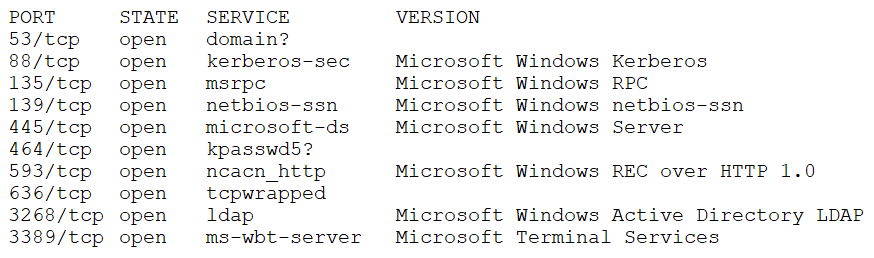
Key Takeaways
This question tests the tester's ability to match the appropriate tool to the penetration testing phase: Nmap discovers open ports, OpenVAS scans those services for vulnerabilities, and BloodHound is a post-exploitation tool that cannot run without existing AD data.
After performing an Nmap scan, the next recommended step is to run OpenVAS to identify known vulnerabilities in the discovered services. Community consensus strongly favors OpenVAS over BloodHound, DirBuster, or Nikto because OpenVAS aligns directly with the post-scan vulnerability discovery phase.
Common mistake: Choosing BloodHound is the most common mistake. BloodHound is a popular Active Directory enumeration tool, but it requires credentials and existing AD data; it is a post-exploitation tool, not a next step after a simple Nmap scan.
Expert Analysis
Why the Answer Is Correct
OpenVAS is a vulnerability scanner that can take the results of an Nmap scan and probe the discovered open ports and services for known vulnerabilities. It is a natural next step in the penetration testing methodology after initial discovery and enumeration. The community vote is unanimous: 100% selected A, and comments emphasize that OpenVAS fits the scenario of exploring a host further after scanning.
Why the Other Options Are Wrong
BloodHound is incorrect because, as commenters note, it cannot pull AD information by itself; it only visualizes AD data that is provided to it. BloodHound is considered post-exploitation and is typically run only after gaining initial access to an AD environment. DirBuster and Nikto are web-focused tools; while they could be used if the Nmap scan showed web services, there is no indication that the target is a web server, making them too specific and less generally applicable than OpenVAS.
Community Comment Notes
Commenters correctly point out that BloodHound is not the next step because it requires credentials and is for post-exploitation. One commenter notes that BloodHound "cannot pull the information by itself," while another explains that it is used to enumerate AD paths for privilege escalation after gaining access. These insights reinforce that OpenVAS, a comprehensive vulnerability scanner, is the best choice for exploring a host right after Nmap.
Official Reference
- https://nmap.org/book/man.html
- https://www.greenbone.net/en/community/
- https://www.kali.org/tools/openvas/
These links open the official vendor documentation in a new tab.
Exam Strategy
When asked "what to run next," first identify the current phase. Nmap is discovery; the next phase is vulnerability scanning, so choose tools like OpenVAS. Eliminate post-exploitation tools (BloodHound) and web-specific tools (DirBuster, Nikto) unless the scan output specifically indicates web services.
Community Votes
100% of anonymous learners picked answer A. Votes are pick records left by other test-takers — they are not the verified answer.
Discussion 4 contributions
Compiled from public community threads and reader submissions, lightly edited for clarity. Handles and vote tallies are shown as recorded, and comments reflect the views of individual contributors.
From public community threads 4
-
ZoeAnneTaylor 👍 5 Answered ABloodhound cannot be run next. Bloodhound can only visualize AD information that is provided to it; it cannot pull the information by itself.
-
Nikamy 👍 4 Answered AThis question is easy. Is A. BloodHound. I have my exam tomorrow :D
-
BlackSkullz 👍 2 Answered ABloodHound is considered a "post exploitation" tool, meaning you would typically run it once you have access to the internal network or an AD host in order to enumerate the AD environment and identify paths for privilege escalation. Since this is only a scan, the penetration tester would need to find a vulnerability to exploit before he/she can execute BloodHound
-
Learner213 👍 1 Answered AApparently, the answer is A. But, why would you run OpenVAS after scanning, and finding vulnerabilities? Either exploit them or remediate them.
Reader comments & corrections
No reader corrections yet — spotted an error or have a note? Share it below.