How to Optimize Vertex AI Pipeline Caching for Cost Reduction?
Short answer
A Change the components’ YAML filenames to export.yaml, preprocess,yaml, f "train-
Question
 -
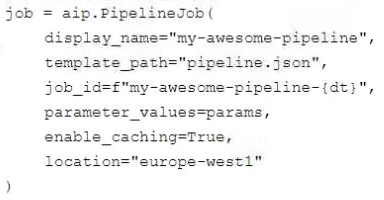
- 
Key Takeaways
Assesses knowledge of Kubeflow caching mechanics, where dynamic filenames invalidate cache keys and force expensive re-execution.
This scenario evaluates optimizing Vertex AI Pipelines by leveraging Kubeflow’s automatic caching to eliminate redundant compute expenses. Industry consensus confirms that static component naming is required to trigger successful cache hits.
Common mistake: Test-takers frequently select option B or C, incorrectly assuming v1 caching syntax applies to v2 APIs or that manual storage refactoring replaces native caching.
Expert Analysis
Why the Answer Is Correct
Kubeflow Pipelines automatically cache outputs based on component names and input hashes. When YAML filenames contain dynamic timestamps, the cache key changes on every run, forcing redundant execution of costly steps. Standardizing the filenames allows the cache to activate seamlessly, reusing previous results and significantly lowering development costs.
Why the Other Options Are Wrong
Option B references kubeflow.v1.caching, which is incompatible with the KubeFlow v2 API explicitly mentioned in the scenario. Option C suggests restructuring the pipeline architecture unnecessarily, as caching can be enabled natively without moving steps. Option D introduces another timestamp, exacerbating the caching failure rather than resolving it.
Community Comment Notes
Multiple voters highlighted that dynamic naming breaks caching logic, aligning with platform behavior (Comments 1, 4, 7). Users also correctly noted that v1 caching modules do not apply to v2 pipelines, effectively dismissing option B (Comments 3, 9). Several candidates initially favored manual cloud storage paths but recognized that native caching is the intended exam solution.
Exam Strategy
Always identify dynamic variables in pipeline configurations, as they routinely disable deterministic caching and inflate resource usage. Favor built-in optimization features over manual architectural changes unless explicitly required.
Community Votes
52% of anonymous learners picked answer A. Votes are pick records left by other test-takers — they are not the verified answer.
Discussion 12 contributions
Compiled from public community threads and reader submissions, lightly edited for clarity. Handles and vote tallies are shown as recorded, and comments reflect the views of individual contributors.
From public community threads 12
Show 7 more comments
-
Foxy2021 👍 1I select B. A: Changing the YAML filenames does not affect caching behavior or cost reduction. The pipeline's efficiency and cost effectiveness are primarily governed by how it handles inputs and outputs rather than the filenames of the components. C: Moving the first step to a separate pipeline may help with organization but doesn’t directly address the cost incurred by repeated data exports and preprocessing. Also, simply providing a cached path does not guarantee that the preprocessing step itself won’t be executed multiple times. D: Changing the name of the pipeline to include a timestamp or other identifier does not influence caching or resource usage. It merely alters the identification of the pipeline runs without any impact on the efficiency of the operations being performed.
-
Sivaram06 👍 1 Answered BAdding caching to your pipeline by setting the parameter {"kubeflow.v1.caching": True} is the most efficient and effective approach to reduce model development costs, particularly for steps like data export and preprocessing, which are often time-consuming and costly to repeat during multiple iterations. This will help you avoid unnecessary re-computation and save on resource usage.
-
b1a8fae 👍 1 Answered CI considered B but a search of "kubeflow.v1.caching" on Google only produces 1 result, which is this very question on this very website. Thus, I rule it out as non-existent (please share a resource if there is any that proves it exists) and opt for C.
-
Foxy2021 👍 1I select C: By leveraging a Dataproc cluster, you can maintain compatibility with your existing PySpark jobs, minimize management overhead, and create a scalable proof of concept quickly and efficiently.
-
f084277 👍 1 Answered AA. The dynamic filename is causing kubeflow to be unable to cache the export and preprocess steps, causing the problems mentioned in the question.
-
Yan_X 👍 1 Answered CC Caching should be enabled for all steps, e.g., export, preprocessing and training.
-
gscharly 👍 1 Answered Asee guilhermebutzke
Reader comments & corrections
No reader corrections yet — spotted an error or have a note? Share it below.
Related Analysis
Practice All PMLE Questions
Access 65 questions with complete answers and detailed explanations.
View Full PMLE Practice Test →
-dt), suggesting that by removing this timestamp, the pipeline steps might not rerun as expected. Option C could be an approach, but it would require more effort to implement (since Kubeflow handles it automatically). Additionally, the beginning of the option only mentions moving the first step, which is the export, and doesn't say anything about preprocessing (which could be one of the more expensive steps). So, considering all of these factors, I think A is the best choice."