Model-Driven App: Calculated Fields and Form Notifications
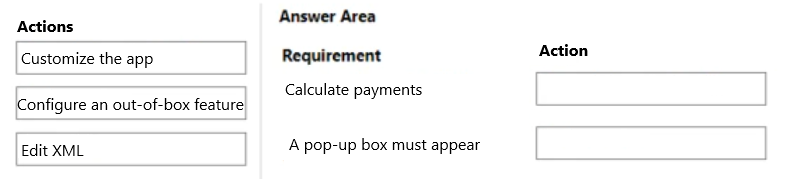
DRAG DROP
You are modifying a model-driven app for a bicycle company.
The app modifications must meet the following requirements:
• The order form must include a column that calculates payments based on how many years the customer wants to finance a bicycle.
• A pop-up box must remind the employee to validate the information entered before saving.
You must use out-of-the-box features before customizing the application.
What should you do?
Community Insight
The core trap is misclassifying standard form behaviors; calculating values via a 'Calculated Column' is an OOB data feature, whereas enforcing validation with a modal pop-up requires customizing the app interface (e.g., via JavaScript).
This question tests the distinction between out-of-the-box Dataverse features and application customizations in Power Apps. It establishes that calculated columns are native OOB capabilities, while form-level user interactions like pop-ups typically require client-side scripting or specific UI customizations.
Learners often incorrectly assume that all form validations or notifications are out-of-the-box features because Business Rules exist. They fail to recognize that a true 'pop-up box' (modal) is not a standard OOB element for simple validation, necessitating code customization.
Community Discussion (8 comments)
Comments & Corrections
No comments yet — spotted an error or have a note? Share it below.
Expert Analysis
Why the Answer Is Correct
To meet the requirements using the specified approach hierarchy: First, calculate payments based on financing years using a Calculated Column in Dataverse. This is a native, out-of-the-box (OOB) feature that performs server-side calculations without code. Second, to display a pop-up box reminding employees to validate information before saving, you must Customize the App. Standard OOB Business Rules show inline warnings, not modal pop-ups. Achieving a true pop-up requires client-side scripting (JavaScript) attached to the OnSave event, which falls under customization.Why Other Candidate Answers Are Wrong
Some candidates suggest using Plugins for the calculation. While Plugins can calculate values, they are asynchronous and complex for simple field logic; Calculated Columns are the designated OOB tool for this. Others might suggest using Business Rules for the pop-up. Business Rules are OOB but only support inline field visibility/requirement changes, not modal dialogs. Therefore, any solution claiming the pop-up is OOB is incorrect.Community Comment Notes
Community consensus correctly identifies Calculated Columns as the OOB solution for the payment logic. Users note that while Business Rules are OOB, they do not produce true modals, leading to the conclusion that the pop-up requirement forces a customization path. One commenter referenced PCF components, but standard form scripting is the more direct answer for a simple reminder pop-up. The agreement is strong that Calculation = OOB and Pop-up = Customize.Official Reference
Exam Strategy
Always prioritize OOB features first. If a requirement asks for a 'calculation' involving existing fields, think Calculated Column or Rollup Field. If it asks for a 'pop-up' or complex UI interaction on save, immediately classify it as Customization requiring JavaScript or PCF, as these are not default OOB behaviors.
Frequently Asked Questions
Are Business Rules considered out-of-the-box?
Yes, Business Rules are OOB features for managing field visibility and requirements, but they cannot create modal pop-up boxes.
Can I use a Plugin for the payment calculation?
You can, but it is not an OOB feature. Use a Calculated Column first as it is native and simpler for static formulas.
Related Analysis
Practice All PL-400 Questions
Access 85 questions with complete answers and detailed explanations.
View Full PL-400 Practice Test →