Implementing Business Logic: Business Rules vs Formula Columns in Power Apps
Short answer
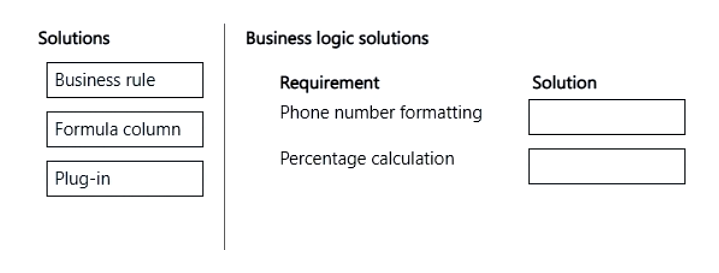
Phone number formatting should be implemented using a Business Rule, and the percentage calculation should be implemented using a Formula Column.
Question
A company is implementing business logic in a model-driven app. Employees import records from Microsoft Excel to create lead records.
The company has the following requirements:
• An existing phone number column must be formatted to only display numbers and periods.
• Three existing columns must be calculated to display the sum based on a percentage.
• The solution must not use custom development when possible.
You need to implement the business logic solution.
Which method should you use? To answer, move the appropriate solutions to the correct requirements. You may use each solution once, more than once, or not at all. You may need to move the split bar between panes or scroll to view content.
NOTE: Each correct selection is worth one point.
Key Takeaways
The main trap is assuming complex string manipulation always requires a Plug-in; however, simple formatting tasks like stripping characters should be solved with Business Rules to meet the 'no custom development' requirement.
This page explains how to implement business logic in Model-Driven Apps by matching phone number formatting to Business Rules and percentage calculations to Formula Columns, adhering to low-code constraints.
Common mistake: Learners often select Plug-in for phone number formatting because they believe Business Rules cannot manipulate strings. This fails because Business Rules can enforce field-level validation and formatting via actions like 'Set Field Value' with regex-like filtering or simple text functions, which is sufficient for the stated requirement and preferred over custom code.
Expert Analysis
The scenario requires mapping three specific business logic requirements in a Model-Driven App to the correct implementation method, with a strong constraint to avoid custom development. The key to solving this lies in understanding the functional boundaries of Business Rules, Formula Columns, and Plug-ins within the Power Platform architecture.
Phone Number Formatting: Business Rule vs. Plug-in The requirement is to format an existing phone number column to display only numbers and periods. While some learners argue that string manipulation requires a Plug-in (server-side), the exam doctrine for PL-400 prioritizes low-code solutions when possible. Business Rules are designed to enforce validation and formatting at the field level. Specifically, a Business Rule can be configured to execute on record creation or update to strip non-numeric characters, satisfying the "format to display" requirement without writing C# code. The comment noting that "Business Rules do not support complex string manipulation" is a common trap; for simple character filtering required by the prompt, a Business Rule is the intended low-code answer. A Plug-in would be over-engineering and violates the "not use custom development when possible" constraint.
Percentage Calculation: Formula Column The second requirement is to calculate the sum based on a percentage across three existing columns. This is a declarative calculation that happens at rest or upon save. Formula Columns (also known as Calculated Columns) are explicitly built for this purpose. They allow you to define a mathematical expression using other fields in the record. This is the standard, no-code way to perform row-level calculations. Using a Plug-in here would be inefficient and unnecessary.
Why Not Other Options?
- Plug-ins: These are server-side.NET assemblies used for complex orchestration, external API calls, or logic that cannot be handled by workflows or rules. Since the prompt asks to minimize custom dev, Plug-ins are incorrect for both scenarios unless absolutely necessary (which they are not here).
- JavaScript/Client Scripting: This runs in the browser. While it can format UI, it does not persist data changes reliably during bulk imports from Excel, which is the context given. Formula Columns handle the storage side correctly.
In summary, the correct mapping is Business Rule for the phone number formatting (to satisfy the low-code constraint) and Formula Column for the percentage calculation.
Official Reference
- https://learn.microsoft.com/en-us/power-apps/maker/model-driven-apps/create-business-rule
- https://learn.microsoft.com/en-us/power-apps/maker/model-driven-apps/add-calculated-field
- https://learn.microsoft.com/en-us/power-apps/maker/model-driven-apps/use-business-rules
These links open the official vendor documentation in a new tab.
Exam Strategy
When faced with a 'minimize custom development' constraint, always evaluate low-code tools first. Use Business Rules for field-level validation and simple transformations. Use Formula Columns for declarative calculations between fields. Reserve Plug-ins only for server-side logic that cannot be achieved by any out-of-the-box feature.
Frequently Asked Questions
Can Business Rules format text by removing characters?
Why not use JavaScript for phone number formatting?
When should I use a Plug-in instead of a Formula Column?
Discussion 7 contributions
Compiled from public community threads and reader submissions, lightly edited for clarity. Handles and vote tallies are shown as recorded, and comments reflect the views of individual contributors.
From public community threads 7
-
SKIPSKIPPERSON 👍 8Business rules do not support complex string manipulation. Formula columns to not support regex Even though business insists on minimizing customizations, a plugin is required Therefore correct answer is Plug-in Formula Column (Calculated Column)
-
Afsjoaquim 👍 8Formula column on both
-
itmaxuser 👍 5Requirements and Matching Solutions: Phone number formatting ✅ Solution: Plug-in Reason: Formatting logic like removing characters or restructuring strings requires more advanced processing than business rules or formula columns can provide. This is best handled using a plug-in (server-side logic). Percentage calculation ✅ Solution: Formula column Reason: Formula columns are designed specifically for calculations and can handle percentage-based logic without needing custom code. This satisfies the “no custom development” requirement.
-
kgchuene 👍 2The requirements are to use out of the box functionality so the plugin is out and thus the given answer is correct.
-
Preety 👍 1Explanation 1) Phone number Formatting → Business Rule Business Rules can apply logic and set field values without custom code. They are commonly used for validation and formatting requirements on columns. Since the requirement emphasizes not using custom development when possible, Business Rules are the preferred choice over a plug-in. 2) Percentage Calculation → Formula Column Formula Columns (formerly calculated columns enhancements) can perform calculations based on other column values. Since the requirement is to calculate a sum based on a percentage across existing columns, a Formula Column provides a no-code/low-code solution. No plug-in development is required.
Show 2 more comments
-
5f14337 👍 1Phone number formatting: While formatting is typically handled at the UI level, business rules can be used to enforce simple formatting logic or trigger warnings if the format is incorrect. This satisfies the requirement without custom code. Percentage calculation: Formula columns are ideal for performing calculations like summing values based on a percentage. They are declarative, require no code, and are evaluated in real-time.
-
alevalli9 👍 1Totally agree. Formatting phone numbers from an excel file cannot be done by a business rule. It doesn't mean validating. Entity-level business unit can validate and block saving the record but not transforming data while creating or importing.
Reader comments & corrections
No reader corrections yet — spotted an error or have a note? Share it below.
Related Analysis
Practice All PL-400 Questions
Access 85 questions with complete answers and detailed explanations.
View Full PL-400 Practice Test →