Designing Planning Hub Data Model Using Standard Tables and Column Security
Short answer
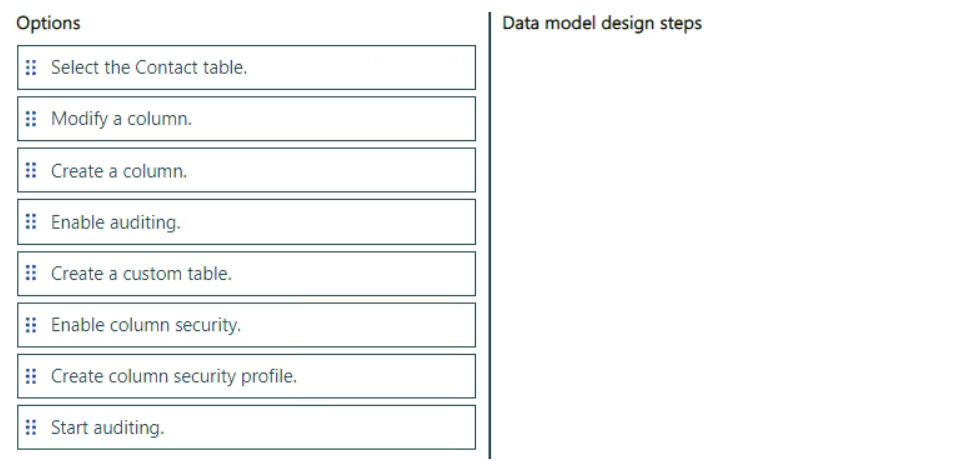
Select the Contact table, Create a column, Enable column security, Create column security profile
Question
Case study
This is a case study. Case studies are not timed separately. You can use as much exam time as you would like to complete each case. However, there may be additional case studies and sections on this exam. You must manage your time to ensure that you are able to complete all questions included on this exam in the time provided.
To answer the questions included in a case study, you will need to reference information that is provided in the case study. Case studies might contain exhibits and other resources that provide more information about the scenario that is described in the case study. Each question is independent of the other questions in this case study.
At the end of this case study, a review screen will appear. This screen allows you to review your answers and to make changes before you move to the next section of the exam. After you begin a new section, you cannot return to this section.
To start the case study
To display the first question in this case study, click the Next button. Use the buttons in the left pane to explore the content of the case study before you answer the questions. Clicking these buttons displays information such as business requirements, existing environment, and problem statements. If the case study has an All Information tab, note that the information displayed is identical to the information displayed on the subsequent tabs. When you are ready to answer a question, click the Question button to return to the question.
Background
City Power & Light is an energy and utilities company that has offices in Europe. The company subsidizes home improvements for domestic customers, to improve energy efficiency and to meet environmental commitments. The company also distributes and generates electricity for domestic and commercial customers. The company has 2,000 employees in multiple offices and in work-from-home locations.
City Power & Light uses a team of schedulers, assessors, field engineers, and customer support agents for home improvements in a program named Get Energy Fit.
Current Environment
Get Energy Fit Program
City Power & Light uses the following to manage the Get Energy Fit program:
• The company uses a Microsoft Excel spreadsheet named Planning Hub on Microsoft SharePoint Online to store information about customer appointments, customer details, and customer eligibility in the program.
• The company records sensitive customer information that includes the document identification numbers and the customer's financial information.
• The company uses an assessor to verify customer eligibility in the program and to perform a suitability assessment. The assessor completes the suitability assessment by using a paper and clipboard at the customer property and enters the data to the Planning Hub after the assessment is completed. The assessor also uploads photographs to an on-premises document library. The assessor completes the eligibility assessment by using an application written in React.
• Schedulers use Microsoft Outlook to schedule engineers and assessors for home improvement appointments. About 200 appointments are scheduled daily.
• Employees for the company submit funding claims on behalf of the customer by uploading evidence and compliance checks information to an application named the Claim Submission Portal.
Technical Environment
• Schedulers use Windows 11 desktop and laptop computers with the latest version of Microsoft Edge.
• Assessors use iOS and Android tablet devices.
• The Claim Submission Portal uses REST-based APIs for all operations and a dedicated testing environment. Authentication to the API is provided by using the following example header key and value pair:
o Authentication: 2C8D41431415E429C7FC7A74D8315
• The company uses Microsoft Azure for hosting multiple applications.
Requirements
Overview
City Power & Light plans to implement Microsoft Power Platform to improve the customer experience and increase delivery for the Get Energy Fit program.
Business Requirements
• Only team leaders and senior managers should have access to read personally identifiable information (PII).
• All development changes must be tested in a separate environment.
• The company requires out-of-the-box solutions, when possible.
• Sensitive credentials, such as user passwords and API secrets, must be stored securely.
• The Claim Submission Portal must allow citizen developers to create automated solutions.
• Customer and appointment information must be accessible to all applications.
Planning Hub Application
The company is planning to replace the Planning Hub spreadsheet with a new application. The new application has the following requirements:
• The application must support a component design that provides rapid changes requested by the schedulers.
• The data model for the application must capture the following information:
o Information about customers such as name, address, and other PII.
o The data and time for an assessor's or engineer's appointment. Schedulers must be able to view all appointments without filters.
o Records the details of the home improvements installed for the customer.
o Contains all the information and evidence for submission to the Claim Submission Portal.
• After an assessor uploads the funding application and all evidence after a home improvement has been complete, the company requires that the status of the application is set to Submit and should run the following:
o Retrieve the details about the customer and the improvement installed.
o Send an approval to a senior manager to review and approve in Microsoft Teams.
o Upload the information to the API endpoint.
o If the upload fails to complete, it should retry after a delay of 30 seconds up to three times. If an error occurs after three times, the application should send an email notification to the application support team.
o Must record the status on the funding application.
Suitability Assessment Tool
The company plans to implement a new application named the Suitability Assessment Tool for the assessors. The new application has the following requirements:
• Must integrate with Microsoft Power Platform.
• Assessors must be able to complete the eligibility assessment by using the Suitability Assessment Tool. The assessors must be able to upload photographs to the on-premises file share.
• Must be developed by using modular components that can be used by other applications.
• Must be optimized for use on tablet devices.
• All changes to the application must be completed in the Suitability Assessment Tool solution.
Reporting
The company has the following requirements for a reporting solution:
• The data source for the reporting solution must support incremental refreshes.
• The solution must report accurate data if an error occurs.
Issues
• A recent audit identified that all users can access the PII in the Planning Hub spreadsheet.
• After a developer deploys a change to the production environment, a user reports information is loaded incorrectly to the test system when processing a funding application.
• After deploying a change to the new eligibility assessment tool in the development environment, you observe that the changes do not appear in the development environment.
• After removing a column from the Planning Hub application and deploying the changes to the production environment, you observe that the column is still present.
• You deploy the customizations for the data model. Users report that the email address of the user who created the appointment is missing and that searches on the description information do not return any results.
You need to design the Planning Hub data model.
Which four actions should you perform in sequence? To answer, move the appropriate actions from the list of actions to the answer area and arrange them in the correct order.
Key Takeaways
The main trap is ignoring the 'use out-of-the-box solutions when possible' requirement, leading candidates to incorrectly choose creating a custom table instead of leveraging the standard Contact table.
To meet the requirement of using out-of-the-box solutions for storing customer PII, you should select the standard Contact table rather than creating a custom one. Secure the data by enabling column security and assigning access via a column security profile.
Common mistake: Candidates often select 'Create a custom table' because they want full control over the schema. However, this violates the explicit business requirement to prioritize OOTB components for standard data like customer names and addresses.
Expert Analysis
The scenario requires designing a Dataverse data model for the 'Planning Hub' to replace an Excel spreadsheet. The critical constraint is that the solution must use out-of-the-box solutions when possible.
The first step in any Power Platform data design is determining whether to reuse existing standard tables or create new ones. The requirements explicitly ask to store customer information such as name, address, and PII. In Microsoft Dataverse, the Contact table is the standard out-of-the-box entity designed specifically to store this type of personal information. Creating a custom table for basic contact details would violate the requirement to use OOTB solutions where feasible.
Once the correct entity (Contact) is selected, the next steps involve configuring security for the sensitive data. The audit identified that all users could access PII, so column-level security must be implemented. This requires two sequential actions: first, enable column security on the specific sensitive columns within the Contact table; second, create a column security profile to define which roles (team leaders and senior managers) have read access to those protected fields. This ensures compliance with the business requirement that only authorized personnel can view PII.
Therefore, the logical sequence begins with selecting the appropriate standard table, adding necessary fields if not present, enabling the security feature on those fields, and finally defining the profile that grants access.
Exam Strategy
Always scan the business requirements for constraints like 'use out-of-the-box solutions' or 'minimize customization'. When designing data models, check if standard entities (like Account, Contact, Incident) can fulfill the data storage needs before jumping to create custom tables. For PII security, remember that enabling column security is a per-column setting, while the profile defines the permissions.
Frequently Asked Questions
Why not create a custom table for customer data?
What is the difference between column security and row security?
Discussion 6 contributions
Compiled from public community threads and reader submissions, lightly edited for clarity. Handles and vote tallies are shown as recorded, and comments reflect the views of individual contributors.
From public community threads 6
-
TheRealTrompie99 👍 3ain't we supposed to create a custom Table, does Contact Table support all the data model requirements?
-
tatacsi 👍 2Select the Contact table. Create a column. Enable column security. Create column security profile. 1. Select the Contact table The customer information (including PII) belongs in the standard Contact table, as the requirements say the solution should use out-of-the-box solutions when possible. 2. Create a column Create the new PII column(s), for example Document ID or Financial Information. 3. Enable column security Each sensitive column must have Column Security enabled. Without this, everyone with table access can see the data. 4. Create column security profile A Column Security Profile grants read/update/create permissions on secured columns to specific users or teams (team leaders and senior managers).
-
itmaxuser 👍 11-Create a custom table This is the first step to building the structure for capturing customer information, appointments, home improvements, and funding applications. You need to create a custom table that aligns with the business needs and data requirements. 2-Create a column After creating the custom table, you will need to create individual columns to store specific pieces of data, such as customer name, appointment date, and funding application details. 3-Enable column security To protect sensitive data, such as personally identifiable information (PII), you should configure column-level security to ensure that only authorized users (team leaders and senior managers) have access to certain columns. 4-Create column security profile After setting up the columns, you’ll then create a column security profile. This is the step where you define which columns should be protected, particularly the ones that contain sensitive information like PII.
-
5f14337 👍 1Create a custom table → Start by creating a new table to replace the Planning Hub spreadsheet and store structured data. Create a column → Add necessary fields such as customer name, address, appointment details, etc. Enable column security → Protect sensitive data like personally identifiable information (PII) by enabling column-level security. Create column security profile → Define who can access secured columns (e.g., only team leaders and senior managers).
-
alevalli9 👍 1"Information about customers such as name, address, and other PII". Why should we create a custom table for that information? I'd use the existing out-of-the-box contact table.
Show 1 more comment
-
Krabi 👍 1I agree
Reader comments & corrections
No reader corrections yet — spotted an error or have a note? Share it below.
Related Analysis
Practice All PL-400 Questions
Access 85 questions with complete answers and detailed explanations.
View Full PL-400 Practice Test →