How to filter nested BigQuery data cost-effectively?
Short answer
A Create a view with a filter to drop rows with fewer than 8 vCPU, and use the UNNEST operator.
Question
Key Takeaways
This question tests the ability to handle nested and repeated fields using UNNEST, while the trap is over-engineering the solution with materialized views or ETL tools for a simple filter.
To filter nested vCPU data in BigQuery for reporting, use a standard view with the UNNEST operator. The community agrees this is the most cost-effective method compared to materialized views or Dataflow pipelines.
Common mistake: Choosing a materialized view (Option B) is a common mistake because, while it improves performance, it incurs storage costs that are unnecessary for regular reporting requirements.
Expert Analysis
Why the Answer Is Correct
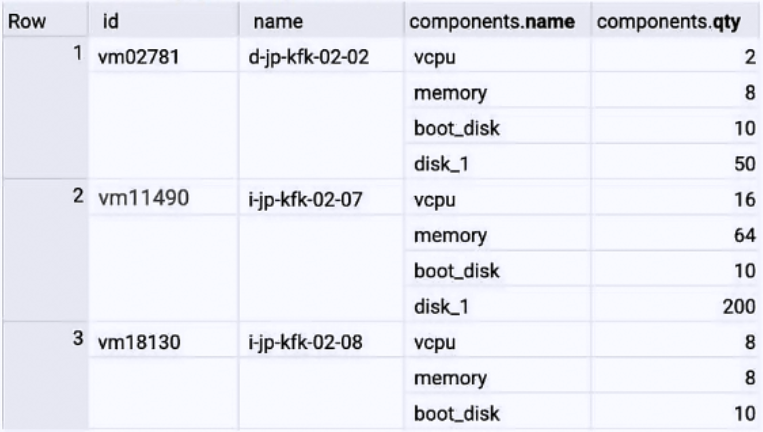
Option A is correct because the data schema contains nested fields (specifically vCPU inside components), requiring the UNNEST operator to flatten the array for filtering. A standard view is the most cost-effective solution as it incurs no storage fees; users only pay for the query processing when the report runs. This fits the "regular reporting" use case perfectly without the overhead of managing infrastructure or paying for pre-computed storage.
Why the Other Options Are Wrong
Option B is incorrect because materialized views store data physically, incurring storage costs which contradicts the "most cost-effective" requirement for a simple filter. Option C is incorrect because while a view is appropriate, the WITH clause alone does not handle the nested data structure; UNNEST is technically required to access the specific field. Option D is incorrect because using Dataflow to write to a new table introduces unnecessary infrastructure complexity, maintenance, and storage costs for a task that can be solved with a simple SQL view.
Community Comment Notes
Commenters correctly identified that the vCPU data resides in a nested field, making UNNEST a strict necessity (Comments 1, 6). There was some confusion regarding materialized views, but the community clarified that the access frequency for "regular reporting" does not justify the storage costs of a materialized view, making a standard view the superior choice (Comment 3).
Official Reference
- https://cloud.google.com/bigquery/docs/nested-repeated
- https://cloud.google.com/bigquery/docs/materialized-views-intro
These links open the official vendor documentation in a new tab.
Exam Strategy
Always look for keywords indicating data structure, such as "nested" or "repeated," which immediately point to the UNNEST operator. Additionally, prioritize standard SQL logic and views over ETL pipelines or materialized views unless the question explicitly demands high performance or real-time results.
Community Votes
100% of anonymous learners picked answer A. Votes are pick records left by other test-takers — they are not the verified answer.
Discussion 6 contributions
Compiled from public community threads and reader submissions, lightly edited for clarity. Handles and vote tallies are shown as recorded, and comments reflect the views of individual contributors.
From public community threads 6
-
raaad 👍 6 Answered A- The table structure shows that the vCPU data is stored in a nested field within the components column. - Using the UNNEST operator to flatten the nested field and apply the filter.
-
Matt_108 👍 4 Answered AOption A - The regular reporting doesn't justify a materialized view, since the frequency of access is not so high; a simple view would do the trick. Moreover, the vcpu data is in a nested field and requires Unnest.
-
Krauser59 👍 4 Answered AA seems to be the correct answer because of the table structure and the UNNEST operator. However, i don’t understand why wouldn’t we chose a materialized view
-
scaenruy 👍 2 Answered AA. Create a view with a filter to drop rows with fewer than 8 vCPU, and use the UNNEST operator.
-
JyoGCP 👍 1 Answered AOption A - UNNEST
Show 1 more comment
-
hanoverquay 👍 1 Answered Aoption A
Reader comments & corrections
No reader corrections yet — spotted an error or have a note? Share it below.