Network+ N10-009 Simulation: WAN 2, Router A, and Top Workstation
Short answer
Choose WAN 2 as the preferred WAN for VoIP, Router A as the device with the connectivity issue, and 10.1.90.53 as the workstation generating the most traffic.
Question
After a recent power outage, users are reporting performance issues accessing the application servers. Wireless users are also reporting intermittent Internet issues.
INSTRUCTIONS
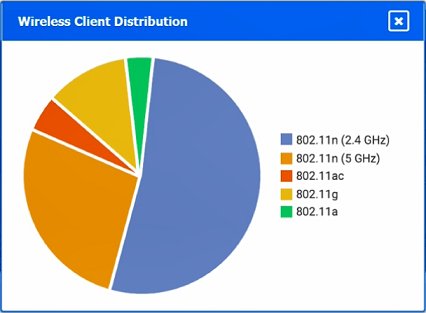
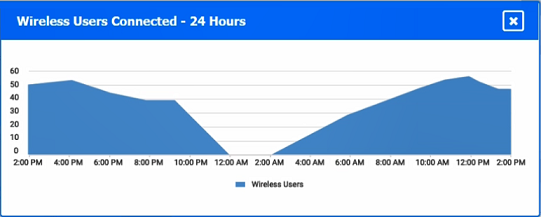
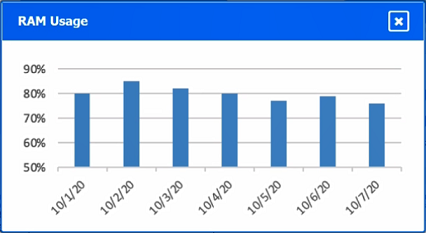
Click on each tab at the top of the screen. Select a widget to view information, then use the drop-down menus to answer the associated questions.
If at any time you would like to bring back the initial state of the simulation, please click the Reset All button.

Key Takeaways
The simulation tests separating infrastructure addresses from workstation endpoints and using health indicators—uptime, ping replies, and traffic counters—rather than simply picking the biggest number.
This N10-009 simulation tests reading WAN, router, and traffic widgets to select WAN 2 for VoIP, Router A as the failed device, and 10.1.90.53 as the top workstation by traffic.
Common mistake: Choosing 206.208.133.9 because it carries the largest traffic total; that address belongs to Router B, not to a workstation.
Expert Analysis
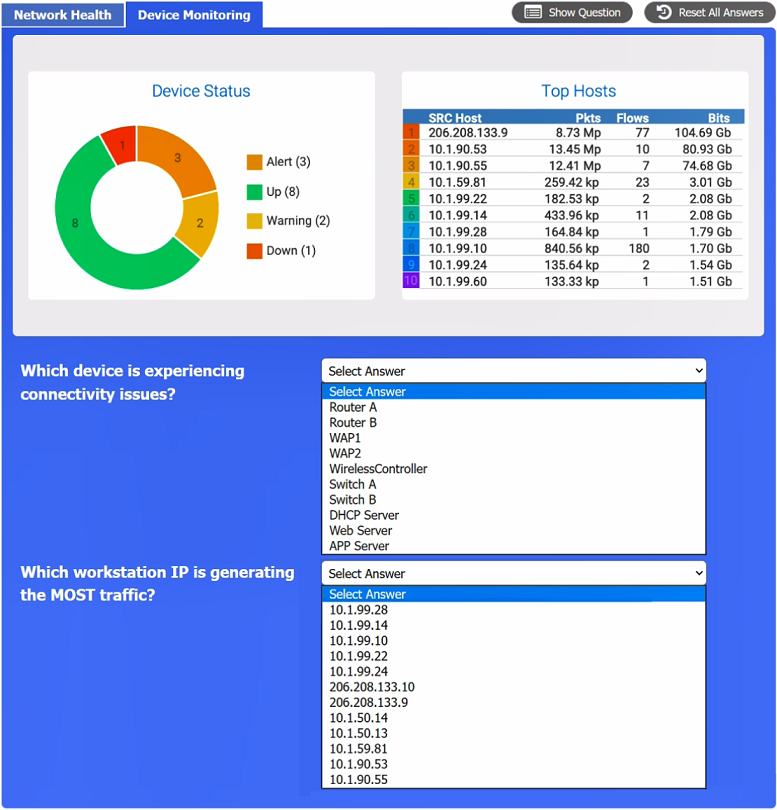
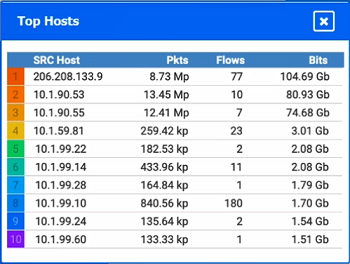
The tempting wrong answer: 206.208.133.9 The widget with the largest traffic number is the trap. It is easy to scan the traffic table, see 206.208.133.9 at 104.69 GB, and select it as the busiest workstation. That choice satisfies the surface-level phrase 'most traffic' but fails the actual subject: the question asks which workstation IP is generating the most traffic. In the exhibit, 206.208.133.9 is Router B's public/WAN address, so it is infrastructure, not an endpoint workstation. The highest internal workstation address is 10.1.90.53, which is reported at 80.93 GB. That is the correct third answer.
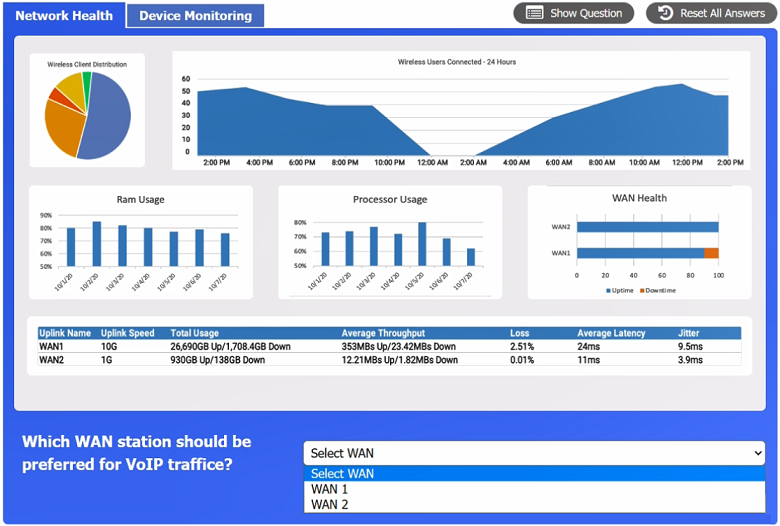
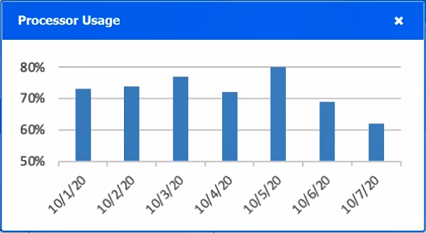
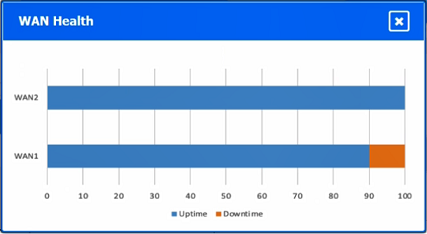
WAN choice: WAN 2 For the VoIP question, WAN 2 is preferred because its widget shows the better combination of average throughput and less downtime. Voice traffic is sensitive to a stable path; a link that drops or has poor average delivery is a bad choice even if other counters look attractive. The post-outage symptom makes uptime and consistent throughput the deciding factors.
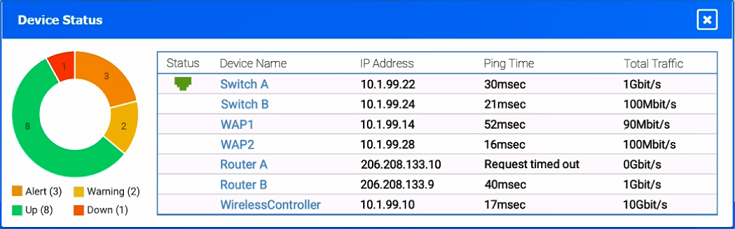
Connectivity failure: Router A Router A is the device with the connectivity issue. Its ping result shows 'request timed out' and its total traffic is 0 Gbit/s. A router that cannot answer ping and is passing no measurable traffic is not merely busy; it is disconnected or failed. This matches the user reports of poor application access after the power event.
Answer set Select WAN 2 for VoIP preference, Router A for the device experiencing the connectivity issue, and 10.1.90.53 for the workstation generating the most traffic. The key discipline is to read what kind of device/IP each widget is showing before ranking the numbers.
Official Reference
https://www.comptia.org/certifications/network
This link opens the official vendor documentation in a new tab.
Exam Strategy
In simulation PBQs, read each drop-down question literally before trusting the largest number in a widget. Separate infrastructure addresses such as router/WAN public IPs from endpoint addresses, then cross-check with ping status and zero-traffic counters. For VoIP, compare health indicators like average throughput, downtime, latency, and jitter rather than headline speed alone. Use Reset All only after you have noted which tabs and columns you have already reviewed, because the decisive health or traffic field is often hidden in another tab.
Frequently Asked Questions
Why is WAN 2 preferred for VoIP traffic over the other WAN link?
Why is 206.208.133.9 not the top workstation?
What indicates Router A has a connectivity issue?
Discussion 5 contributions
Compiled from public community threads and reader submissions, lightly edited for clarity. Handles and vote tallies are shown as recorded, and comments reflect the views of individual contributors.
From public community threads 5
-
Abx_01 👍 181. Which WAN station should be preferred for VoIP traffic? WAN2 2. Which device is experiencing connectivity issue? Router A (Ping test result) 3. Which workstation IP is generating most traffic? 10.1.90.53 (206.208.133.9 is a router not workstation)
-
ojones888 👍 9The first answer is WAN 2. WAN 2 has better average throughput and less downtime which makes it better for VoIP traffic. The second answer is Router A. Under ping time it says "request timed out" and total traffic is 0gbit/s. This means there is a connectivity issue. The Third Answer is 206.208.133.9. This IP has 104.69gb of traffic making it the workstation with the most traffic.
-
rf18 👍 1I passed today, and I think there were only 2 or 3 questions that I wasn't familiar with, so thanks to a public community thread. I watched Professor Messer's videos first and then started studying all the practice questions. Some of the questions are a real pain, but my advice is to focus on reading the questions carefully. Most of the time, there is a clue in the wording that points you toward the answer.
-
rf18 👍 1out of all comptias exams this is the lowest number of SIMULATION questions all came from here only one i wasnt able to complete so anyway i wish everyone that come here to study the best and you can do it dont focus on the confusing questions too much you might get one of them or none . so good luck
-
Provost 👍 1Provided answers are correct except for the 3rd.206.208.133.9 is router B.The question is asking which workstation generates the most traffic.Correct answer is 10.1.90.53,it is generating 80.93 GB.
Reader comments & corrections
No reader corrections yet — spotted an error or have a note? Share it below.
Related Analysis
Practice All N10-009 Questions
Access 100 questions with complete answers and detailed explanations.
View Full N10-009 Practice Test →